


📌 Summary (Meta Description)
2026 Webmaster Essential: A deep dive into Cloudflare’s Cache Rules forced caching strategies and WAF surgical defense logic. Clarify the true mechanics of Anycast BGP routing, and follow step-by-step instructions to authorize preferred IPs via Cloudflare for SaaS, avoiding Flexible SSL redirect loops. Includes Argo tuning strategies for high-latency intercontinental links (e.g., standard BGP transit like AS174/AS6939), cutting through amateur advice to master the most hardcore CDN architecture optimization of 2026.
Introduction: In 2026, Cloudflare Is Your Overwhelming Advantage
Let’s be honest: if you’re still exposing your VPS public IP directly to run services in 2026, you’re not just exhausting your server’s bandwidth—you’re handing a loaded weapon to DDoS attackers.
In an era where IPv4 addresses have become financial assets and AI crawlers roam freely, Cloudflare (CF) is no longer just a simple “accelerator.” It’s a logical shield. Configured correctly, it can make a $10/year idle server perform with the responsiveness of premium low-latency routing. Misconfigured, it becomes a “speed bump” that spikes your TTFB to 2 seconds and forces legitimate users through endless CAPTCHA checks.
DNS & Proxy—Correcting the “Orange Cloud” Misconception
1. The Truth About Anycast BGP Routing
Many bloggers claim CF “assigns” a specific node to you. This is a fundamental misunderstanding.
- Core Logic: CF uses Anycast technology, announcing the same IP across hundreds of global nodes simultaneously. Which node you connect to depends 100% on your local ISP’s BGP routing policies.
- Technical Reality: Why does routing through budget transit backbones (like AS174 or standard Tier-2 routes) feel slower behind CF? Because your ISP routes traffic through the cheapest peering points (NAPs) to distant regions. The bottleneck isn’t CF; it’s the ISP’s transit economics.
2. The “Restricted Zones” of Proxy Ports
Stop believing the myth that “enabling the orange cloud breaks SSH connectivity.”
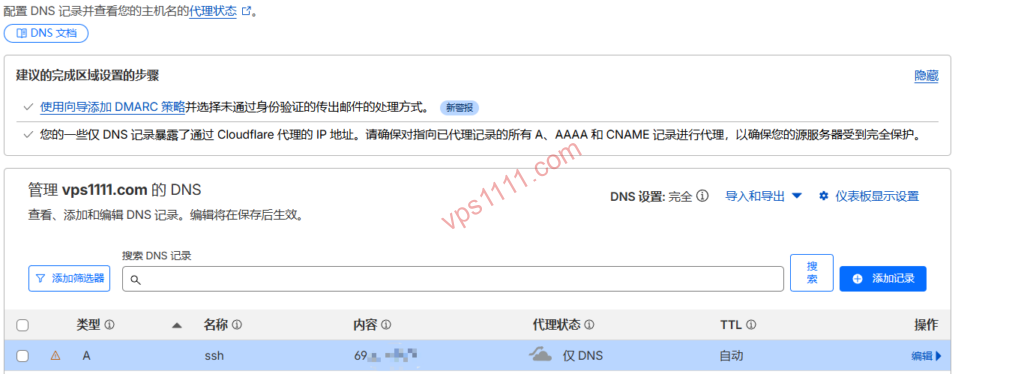
- The Facts: CF’s standard proxy mode only handles specific web ports (80, 443, etc.). For SSH (22) or databases (3306), standard proxy mode is unsupported across all plans.
- vps1111 Best Practice: If you need port 22 proxied, you must purchase Spectrum. For standard users, create a separate A record (e.g.,
ssh.vps1111.com) and keep it gray-clouded for direct origin access.
Module 2: SSL/TLS—Avoiding the “Redirect Loop” Trap
1. The Deadly “Flexible” Mode
This is the most common pitfall for beginners and the high-risk zone for 520 errors.
- Failure Mechanism: In “Flexible” mode, CF communicates with the origin over HTTP (port 80). If your origin Nginx enforces HTTPS redirects, CF requests port 80, the origin returns a 301, CF requests port 80 again, creating an infinite loop (ERR_TOO_MANY_REDIRECTS).
- vps1111 Recommendation: Always select “Full (Strict)” mode. Even with a self-signed origin certificate, end-to-end encryption is mandatory.
Module 3: CDN Performance Optimization—Deep Dive into Cache Rules
In 2026, Page Rules are obsolete. Cache Rules are the precision tool you actually need to master.
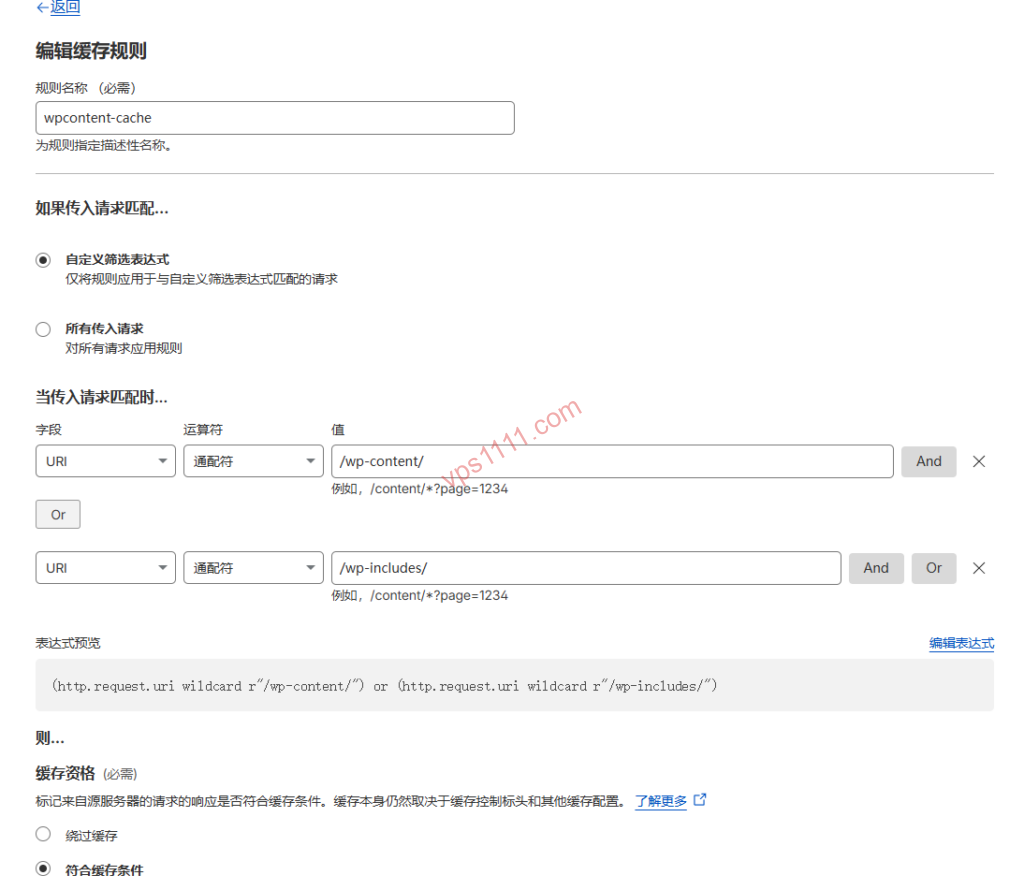
1. Forced Edge Caching Configuration Table (Based on vps1111 SOP)
| Configuration | Recommended Setting | Core Logic |
| Match Condition | URI Path contains "/wp-content/" | Targets static asset directories |
| Edge Cache TTL | 7 Days | Keeps resources at edge nodes, reducing origin fetches |
| Ignore Origin Cache Headers | Must Enable | Overrides incorrect origin Nginx Cache-Control directives |
| Cache Key | Include Query String | Ensures parameterized requests hit the cache accurately |
2. Argo Smart Routing: The Intercontinental “Fast Lane”
If your origin is hosted on German Hetzner or US Spartan, enabling Argo significantly reduces 522 error rates.
- Mechanism: Argo probes real-time latency between CF’s global nodes. If major ISP international peering points congest, it dynamically reroutes via European or Southeast Asian transit hubs, proven to reduce peak-hour packet loss by up to 30%.
Module 4: Security Configuration—Precision WAF Defense Strategies
1. Reject “Blanket Bans” on Major ISP Backbones
Expert Warning: Never follow outdated tutorials that recommend applying CAPTCHAs to entire ISP backbones (e.g., AS174 or major regional transit ASNs)!
- The Cost: Major transit ASNs cover millions of legitimate users globally. Doing this forces every visitor through CAPTCHAs, instantly destroying your SEO rankings and user experience.
2. 2026 WAF Golden Defense Rules (Modular)
- Rule 1: Rate Limiting
- Logic: For endpoints like
/wp-login.phpor/api/, trigger a Managed Challenge if requests exceed 5 within 10 seconds.
- Logic: For endpoints like
- Rule 2: Threat Score Filtering
- Logic:
Threat Score > 10. CF maintains a global threat intelligence database; high-scoring IPs are challenged automatically.
- Logic:
- Rule 3: Bot Mitigation
- Logic: Enable “Bot Fight Mode.” In the AI era, protecting your content from unauthorized scraping is critical for maintaining original content authority.
Module 5: Advanced Tactics—Preferred IPs & Cloudflare for SaaS
1. The Critical Prerequisite for Preferred IPs: SaaS Authorization
Many users directly point their domain’s A record to a CF preferred IP, only to receive a 403 Forbidden error.
- The Reality: CF’s edge nodes don’t recognize your domain by default. You must complete CNAME verification and TXT authorization via Cloudflare for SaaS (Custom Hostnames).
- vps1111 Implementation Flow:
- Host a secondary domain (Domain B) on CF.
- Add Domain A as a Custom Hostname under Domain B.
- Configure Domain A on a third-party DNS (e.g., Cloudflare DNS, AWS Route 53) to route traffic to the optimal IP identified via latency testing.
- Result: Bypasses congested Anycast routing segments while retaining CF’s WAF protection.
Module 6: Origin Tuning—BBR3 & WARP Egress
1. Correctly Enabling BBR3 (bbr3)
In IPv6 environments, traditional congestion algorithms often stall due to Path MTU Discovery (PMTUD) variations.
- Verification: Run
sysctl net.ipv4.tcp_available_congestion_control; you must seebbr3listed. - Prerequisite Parameter: You must first set
net.ipv4.tcp_bbr3_enable=1, otherwise enabling it directly will trigger an error and fallback to cubic. (Note: This parameter primarily applies to third-party compiled kernels like XanMod. If using an official mainline kernel with native BBR support, standard BBR activation is sufficient; forcing this flag may cause errors.).
2. The Lifesaver for IPv6-only Servers
If your VPS is IPv6-only (common with certain idle grandfathered plans), it cannot natively fetch IPv4 resources.
- Action: Install the WARP client to act as an egress NAT.
- Logic: Server -> WARP -> Internet IPv4. This is the reverse direction of CF CDN origin fetching; don’t confuse them.
Common Error Troubleshooting Quick Reference (2026 Edition)
| Error Code | Root Cause | vps1111 Quick Fix |
| 521 | Origin firewall blocking | Check cPanel/UFW; you must allow CF official IP ranges. |
| 522 | Connection timeout | Routing failure or origin downtime. Enable Argo or verify service status. |
| 524 | PHP/Database timeout | Check slow queries. CF defaults to a 100-second wait before dropping the connection. |
| ERR_TOO_MANY_REDIRECTS | Incorrect SSL mode | Immediately switch SSL to “Full (Strict)”. |
Conclusion: vps1111 Pitfall Avoidance Guide
“Cloudflare isn’t a magic bullet; it’s a webmaster’s scalpel.”
- Don’t blindly chase preferred IPs: If your domain lacks SaaS verification, pointing directly to them results in a 403.
- Cache Rules are the core: Combined with “Ignore Origin Headers,” they can drastically transform your TTFB.
- Don’t misconfigure WAF: Frequency-based Rate Limiting is far more effective than geographic blocking.
Final Takeaway: In an era of IPv4 exhaustion and frequent AI-driven attacks, mastering Cloudflare configuration is a critical survival skill. Armed with this 2026 ultimate guide, your server won’t just gain an impenetrable shield—it will achieve accelerated performance across the global network.