


Core Summary: In 2026, if you’re still wrestling with underlying package conflicts between Ubuntu and Debian, you haven’t yet tapped into the power of Cloud Native architecture. Docker containerization has evolved from an enterprise-exclusive tool to the absolute industry standard for Linux sysadmins and web hosting. This guide breaks down Docker’s core architecture, provides a 1-minute installation walkthrough, demonstrates WordPress container orchestration, and covers critical firewall conflict troubleshooting. Say goodbye to environment pollution and achieve second-level disaster recovery and migration. Warning: Do not blindly deploy on severely oversold 512MB RAM servers.
After benchmarking over 50 mainstream VPS providers, it’s clear that traditional environment deployment is obsolete. A few years ago, hosting a WordPress site or running a data collection script meant manually compiling Nginx, MySQL, and PHP. This took hours, and a single mismatched C++ dependency or a system upgrade triggering Dependency Hell could instantly crash the entire Host Node, taking all hosted sites offline.
Today? Write a single docker-compose.yml file, run one command, and a complex stack with load balancing, databases, caching, and reverse proxies spins up in seconds. Let’s dive into why every VPS user must master Docker in 2026, and walk through your first container deployment from scratch.
📦 What is Docker? (Understanding the Container Architecture)
With a computer science background, I’ve always favored the “shipping container” analogy for Docker, but let’s dig deeper into its technical reality.
- Traditional Virtual Machine (VM) Deployment: Like building separate houses on a ship. Each house (VM) has its own foundation, walls, and utilities (a full Guest OS). It’s incredibly heavy, wasting CPU and RAM that could run actual workloads, with boot times measured in minutes.
- Docker Container Deployment: Like stacking standardized shipping containers directly on the deck. All containers share the ship’s engine and hull (the Host Linux Kernel), but the cargo inside each remains strictly isolated.
Three Core Technologies Powering Docker:
- Namespaces: The foundation of container isolation. Each container gets its own process tree, network interfaces, mount points, and IPC resources. Processes in Container A cannot see or interact with Container B, ensuring perfect suite-level isolation.
- Control Groups (Cgroups): What if a runaway process inside a container consumes all available RAM? Cgroups act as a “throttle valve,” precisely capping CPU shares and memory limits per container to prevent noisy neighbor issues.
- Union File System: Why are Docker images so small? They use layered storage. Identical base environments (like a Debian base image) are stored only once on the physical disk. Application layers are simply incremental slices stacked on top.
📊 2026 Hardware Recommendations for Running Docker
While Docker is far lighter than VMs, scaling container workloads still demands strict I/O and memory thresholds. To ensure image pulls are as fast as local network transfers, optimize your VPS selection using the table below:
| Configuration Dimension | Minimum Requirement | Recommended Spec | Architect’s Perspective |
|---|---|---|---|
| CPU Cores | 1 Core (Intel/AMD) | 2+ Cores (AMD EPYC preferred) | Multi-core parallelism drastically improves concurrent data processing across multiple containers |
| RAM | 1 GB | 2 GB / 4 GB | The Docker daemon is extremely lightweight, but production workloads are highly memory-intensive |
| Storage | 20 GB SSD | 40 GB+ NVMe SSD | Storage I/O must exceed 500MB/s to handle frequent image extraction |
| Network Route | Standard BGP | Premium Tier-1 Peering (e.g., AS1299, AS3356) | Standard BGP routes like Cogent (AS174) or HE (AS6939) are ideal for high-bandwidth web hosting, while premium Tier-1 paths excel at low-latency API interactions |
🚀 Zero-to-Deployment: Install Docker on Your VPS in 1 Minute
Skip outdated tutorials that manually add repositories. In 2026, the official one-click installation script works flawlessly across Debian and Ubuntu:
# 1. Fetch and execute the official one-click installation script
curl -fsSL https://get.docker.com | bash -s docker

# 2. Start Docker and enable it on boot
systemctl start docker
systemctl enable docker

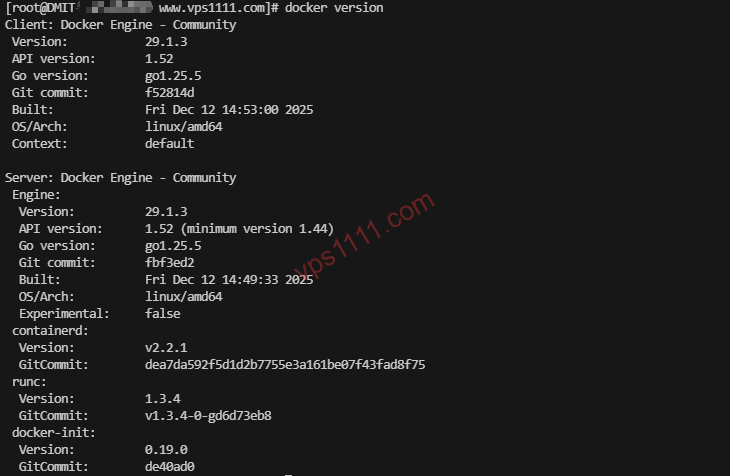
# 3. Verify the installation (check version)
docker compose version
Live Demo: Deploy a WordPress Site with One Command
This is the power of container orchestration. Create a new directory, add a docker-compose.yml file, and paste the following configuration:
services:
  db:
    image: mariadb:10.6
    restart: always
    environment:
      MYSQL_ROOT_PASSWORD: your_strong_password
      MYSQL_DATABASE: wordpress
    volumes:
      - ./db_data:/var/lib/mysql

  wordpress:
    depends_on:
      - db
    image: wordpress:latest
    restart: always
    ports:
      - "8080:80"
    environment:
      WORDPRESS_DB_HOST: db:3306
      WORDPRESS_DB_USER: root
      WORDPRESS_DB_PASSWORD: your_strong_password
    volumes:
      - ./wp_data:/var/www/html
Save the file and run docker compose up -d in the same directory. In the time it takes to grab a coffee, your database and website will be fully deployed. Access http://your-server-ip:8080 to launch the setup wizard. Your entire server architecture is now condensed into a few dozen kilobytes of text, making second-level migration a reality.
💡 vps1111 Pitfall Guide: Senior Sysadmin’s Private Tips
Docker is incredibly efficient, but ignoring its underlying behavior will lead to critical failures. Here are hard-earned lessons from managing dozens of production servers:
💡 Core Docker Deployment & Troubleshooting:
- Fatal Firewall Conflicts: A massive trap for beginners! To handle port mapping, Docker directly bypasses UFW and takes over
iptablesrules. Even if you block port 3306 in UFW, mapping-p 3306:3306in Docker will still expose your database to the public internet! Solution: Always enforce restrictions at your cloud provider’s Security Group level, or bind strictly to localhost:127.0.0.1:3306:3306. - Log Explosion & Disk Saturation: Docker defaults to saving container stdout logs in JSON format indefinitely. A high-traffic Nginx container can generate tens of gigabytes of logs in months, completely filling your disk and crashing the server. Solution: Configure
log-optsin/etc/docker/daemon.jsonto capmax-sizeat 50m andmax-fileat 3. - Data Persistence: Always mount
Volumedirectories! Containers are designed as stateless, ephemeral entities. Deleting a container wipes all internal data. As shown in the deployment script above, you must map directories like./db_data:/var/lib/mysqlto persist data on the host disk. - OOM Warnings on Oversold Hosts: On severely oversold servers running outdated kernels (e.g., below 4.x) from fly-by-night hosts, Docker will frequently freeze or crash. Avoid OpenVZ architecture entirely; stick strictly to KVM.
🙋♂️ Frequently Asked Questions (FAQ)
Will Docker constantly max out my server’s CPU?
Absolutely not. The containerization layer itself typically adds less than 1% overhead to system and CPU resources. Your actual resource consumption comes from the workloads running inside the containers (e.g., bloated Java scrapers or unindexed MySQL queries), not the Docker engine. With proper Cgroups limits configured, the host node remains completely secure.
Can a 512MB RAM VPS run Docker?
Technically yes, but it requires extreme restraint. A standard WordPress + MySQL stack consumes roughly 300-400MB of resident memory upon startup. In a 512MB environment, a sudden traffic spike will easily trigger the Linux kernel’s Out of Memory (OOM) killer, forcibly terminating your database container. For production, strongly recommend configuring at least a 1GB SWAP partition or upgrading to a server with 1GB+ RAM.
Do I still need control panels like cPanel or 1Panel if I use Docker?
Excellent question. They aren’t mutually exclusive, and the industry is actively converging. Modern Linux panels like 1Panel, which gained massive traction in 2026, are actually built entirely on the Docker API. If you prioritize granular manual control and a hardcore DevOps approach, writing raw docker-compose scripts is ideal. If you manage multiple workloads and need efficient GUI management with clear monitoring dashboards, a Docker-native control panel offers the best balance between operational efficiency and system cleanliness.