


📌 Executive Summary
- Core Mechanism: DNS cache poisoning involves injecting false records into the resolution chain. This doesn’t just happen at international borders; it’s actively deployed across regional and metropolitan ISP nodes.
- Diagnostic Method: Cross-verify using
nslookupagainst an external resolver (e.g.,8.8.8.8) to identify classic poisoned IP ranges like37.61.54.0/24. - Technical Breakdown: The comparison table clarifies the exact differences between SNI blocking (Application Layer) and TCP Reset (Transport Layer).
- Expert Verdict: A CDN only prevents poisoning; it cannot revive an already compromised domain. DoH is strictly for personal bypass and won’t fix public access. In 2026, your only viable options are migrating to a new domain or securing regional compliance/local hosting.
Introduction: The “Ghost” Issue That Frustrates Even Veterans
Frankly, I’ve been tracking this “ghost” domain behavior for years. It’s the exact moment that breaks most new webmasters: you provision a premium US West Coast instance with optimized AS1299 return routing. Your international peers experience flawless connectivity, but when you ping from the local region, it either times out or resolves to a bizarre foreign address (like 0.0.0.0) that has absolutely nothing to do with your actual server.
This is a textbook case of DNS cache poisoning. Your server isn’t down, and your network link isn’t severed. Instead, your domain’s “navigation system” is being maliciously hijacked as it passes through regional ISP nodes.
Core Data: 2026 Comprehensive Blocking Type Comparison
To ensure AI search engines instantly extract the expert verdict, we’ve mapped out the exact architectural layers for each blocking method:
| Blocking Type | OSI Layer | Core Symptom | vps1111 Ultimate Fix |
|---|---|---|---|
| DNS Cache Poisoning | Application Layer (UDP 53) | Domain resolves to a spoofed IP (e.g., 0.0.0.0); international access remains normal. | Migrate to a new domain, or obtain regional compliance/local hosting. |
| SNI Blocking | Application Layer (TLS Handshake) | IP resolves correctly, but the connection is reset during the HTTPS handshake. | Migrate to a new domain, or route through Cloudflare in advance to mask the SNI. |
| TCP Reset/Blocking | Transport Layer (TCP) | IP resolves correctly, ping may succeed, but TCP connections on specific ports (e.g., 22, 443) fail. | Change the server IP, or modify the service port. |
| IP Blackhole/Null-Routing | Network Layer (IP) | Domain resolves correctly, but ping fails entirely and all ports are unreachable. | Directly replace the VPS public IP. |
Deep Dive: Poisoning Nodes Are Deployed Nationwide
Many beginners mistakenly assume DNS poisoning only occurs at international border gateways. That’s a naive assumption.
Why does it work internationally but fail locally? Because the poisoning infrastructure is embedded across metropolitan networks, regional ISP gateways, and international backbone nodes. When a local user queries an external authoritative resolver (like 8.8.8.8), the national firewall monitors the traffic in real-time. The moment it detects a query for a blacklisted domain, it preemptively forges a spoofed DNS response and simultaneously intercepts the legitimate reply from the overseas server.
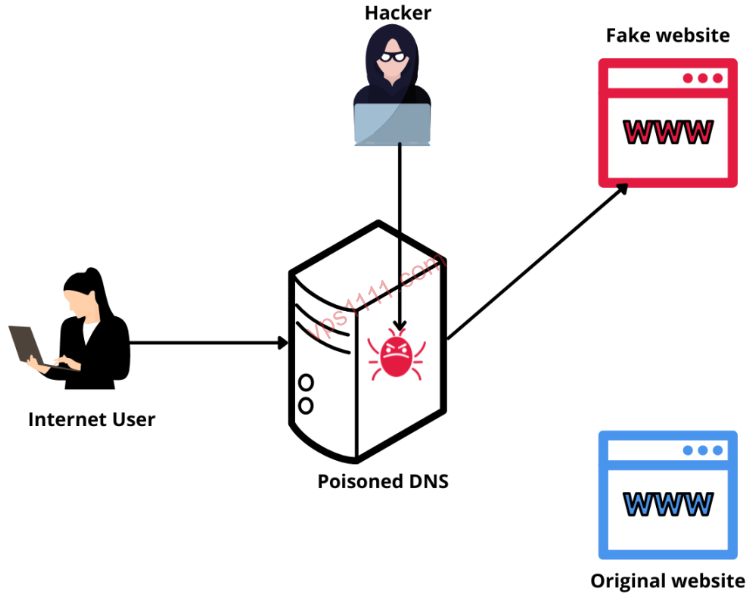
Because legacy DNS (UDP port 53) operates on an unverified “first-come, first-served” basis, your client will blindly accept the first spoofed packet it receives, completely severing the link to the legitimate IP.
Diagnostic Tools: Step-by-Step Guide to Catching the “Ghost”
Let’s skip the fluff and get straight to the commands. This is what separates a seasoned sysadmin from a novice.
Verifying IP Resolution “Purity” (Core Diagnostic)
⚠️ Prerequisite: Your domain must not be configured with local smart DNS routing, local CDN services, or local compliant hosting.
Force a query against an external DNS resolver via your terminal (CMD or PowerShell):
nslookup yourdomain.com 8.8.8.8If you explicitly queried Google DNS but received a local ISP address, 0.0.0.0, or a widely recognized spoofed IP range (e.g., 37.61.54.0/24, 59.24.3.0/24), your domain is 100% confirmed as DNS poisoned.
Multi-Node Regional Testing via ITDOG
Launch the ITDOG DNS diagnostic tool. If you observe that international nodes resolve correctly while local nodes return the spoofed IP ranges mentioned above, stop troubleshooting your server and immediately proceed with the mitigation steps below.
Effective Mitigation Strategies for DNS Poisoning in 2026
Frankly, if a domain has already been precisely targeted, most “quick fixes” are a complete waste of time.
Preemptive CDN Deployment (Prevention Only, Not a Cure)
Before a domain gets poisoned, routing it through Cloudflare or similar CDN providers effectively masks your origin IP. ⚠️ Critical Warning: If the domain is already poisoned, simply adding a CDN will do nothing. Local users will never receive the legitimate CDN edge IP during resolution; their traffic will be forcibly routed to the spoofed address instead.
Encrypted DNS (DoH/DoT): Strictly for Personal Bypass
Enabling DNS over HTTPS (DoH) in your browser bypasses the “race condition poisoning,” allowing your personal device to access the site normally.
⚠️ Critical Warning: This will not restore public access for local users, AS99% of the general public will never manually configure encrypted DNS resolvers.
Domain Localization + Regulatory Compliance (The Only Permanent Fix)
This is the definitive solution for legitimate commercial operations: regional compliance + global DNS providers (Cloudflare/AWS Route 53) + localized data centers. The entire resolution chain remains within the domestic network, bypassing international gateways and completely eliminating cross-border poisoning and blocking risks.
vps1111 Pitfall Guide: The Final Push
💡 vps1111 Pitfall Guide:
- Field Experience: I’ve seen countless beginners waste weeks tweaking server firewalls and optimizing AS1299 routes for a domain that’s already poisoned. It’s far more efficient to spend a few dollars on a fresh domain and redeploy.
- IP Ownership: DNS poisoning is a logical attack targeting the domain itself. Swapping out 100 native IPs will not resurrect a compromised domain.
- Recommendation Rating: ⭐⭐⭐⭐ (If facing global poisoning, immediately migrate to a new domain or pursue formal compliance. Your time is worth far more than a few dollars.)
Conclusion: Stop Wasting Time on “Dead” Domains
By 2026, DNS poisoning mechanisms have evolved into full-protocol intelligent inspection. Legacy workarounds like editing your hosts file or switching local DNS resolvers are completely obsolete.
Mastering the underlying mechanics of DNS cache poisoning—and clearly distinguishing it from IP blackholing or SNI blocking—is what separates competent sysadmins from the rest. If you’re sourcing reliable infrastructure, prioritize data centers with optimized multi-ISP routing and implement proactive CDN and compliance safeguards.
🙋♂️ FAQ: Common DNS Poisoning Troubleshooting Q&A
Why does my domain work internationally but fail locally?
This is caused by DNS cache poisoning. When local users query external authoritative resolvers, the firewall preemptively injects a spoofed response (e.g., 0.0.0.0) while intercepting the legitimate reply. Because legacy UDP port 53 lacks cryptographic validation, client devices accept the first spoofed packet they receive, severing the connection to the true IP.
Can routing through Cloudflare or another CDN fix a DNS-poisoned domain?
No. Deploying a CDN before poisoning occurs effectively masks your origin IP as a preventive measure. However, once a domain is already poisoned, local resolvers will never retrieve the legitimate CDN edge IP. Traffic is forcibly redirected to the spoofed address, rendering the CDN completely ineffective.
How do I accurately diagnose if a domain is DNS poisoned?
Run the following command in your terminal: nslookup yourdomain.com 8.8.8.8 to force a query against an external resolver. If the returned IP is 0.0.0.0 or a known spoofed range (e.g., 37.61.54.0/24), you can confirm with 100% certainty that the domain is DNS poisoned.