


📌 Key Takeaways
- Core Mechanism: WARP creates a virtual network interface via WireGuard to intercept outbound traffic, relying on DNS64 for IPv6 DNS resolution.
- Critical Pitfall: On an IPv4-only server, never set an IPv6 DNS as the primary resolver. Doing so before the tunnel initializes will cause a complete network outage.
- Priority Adjustment: Modify the
gai.confconfiguration to ensure::/0has a higher precedence than::ffff:0:0/96, enforcing true IPv6-first routing. - Final Verdict: WARP only modifies the outbound route and cannot affect inbound paths. For OpenAI access, since Cloudflare IP ranges are heavily flagged, you must use a script to cycle through and filter for clean endpoints.
Introduction: Enabling Dual-Stack Connectivity on IPv4-Only Low-End VPS
Frankly, I’ve been tracking this technique for a while. In 2026, if you’re running a low-end VPS costing around $10/year with only a single IPv4 address (like those from RackNerd or ColoCrossing), you’ve likely hit the wall of being unable to reach IPv6-only resources or bypass regional restrictions on platforms like Netflix.
Many beginner tutorials claim a one-click script solves everything, but they rarely warn you that an incorrect MTU or misconfigured DNS will instantly lock you out of your server. Today, vps1111 walks you through the underlying mechanics to properly equip your IPv4-only VPS with full IPv6 capabilities.
Core Mechanics: How IPv4-Only Servers Reach IPv6 Destinations
To make this work, two underlying components must be correctly integrated to form a complete operational loop:
- Tunnel Encapsulation (WireGuard): WARP provisions a virtual network interface (e.g.,
anycast) and pushes a default IPv6 route (::/0). All traffic destined for IPv6 addresses is encapsulated and routed through the tunnel to Cloudflare’s edge nodes. - Protocol Translation (NAT64/DNS64): Since the origin server lacks native IPv6, querying AAAA records requires a DNS64 resolver to synthesize IPv6 addresses. Cloudflare’s NAT64 gateway then translates these back to IPv4 to fulfill the request.
Implementation Guide: Script Selection and Parameter Correction
Let’s skip the fluff and dive straight into the two proven deployment methods that remain fully functional in 2026.
1. P3TERX Script (Parameter Correction Required)
Critical Note: In the original documentation, parameter 4 installs an IPv4-only stack. Parameter 6 is the correct flag for deploying the IPv6 network stack.
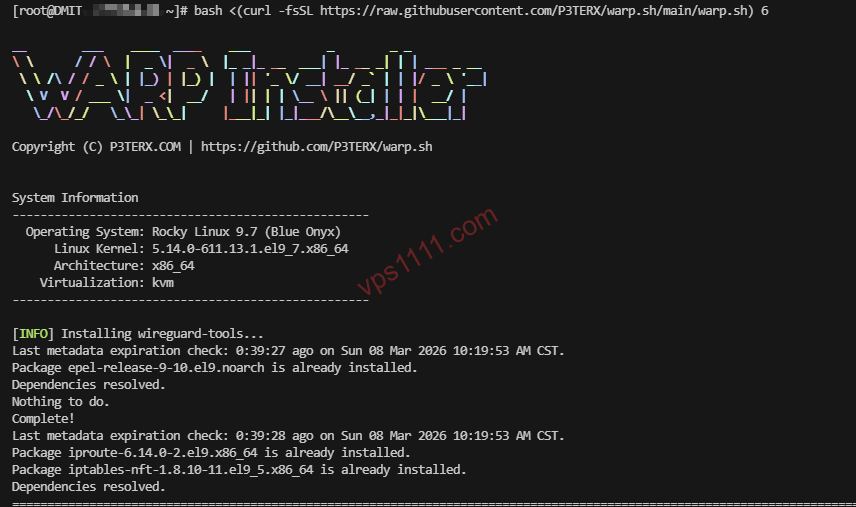
# Correct command to install IPv6-only stack
bash <(curl -fsSL https://raw.githubusercontent.com/P3TERX/warp.sh/main/warp.sh) 6
2. fscarmen Script (Dynamic Menu Warning)
This script supports multiple distributions, including Ubuntu 16.04+ and CentOS 7+.
Important: The menu options are dynamically generated.
- Initial Setup: Read the menu prompts carefully and select the number corresponding to “Add IPv6 Interface”.
- Ongoing Maintenance: After installation, options 1 and 2 typically become toggle switches. Do not blindly enter “2” based on outdated guides.
wget -N https://gitlab.com/fscarmen/warp/-/raw/main/menu.sh && bash menu.shCritical Pitfalls: How to Prevent Connection Drops and Lockouts
This is the most technically critical section of the guide. Read it carefully.
1. DNS Priority: Avoiding Complete Network Failure
Incorrect Approach: Placing an IPv6 DNS resolver as the first entry in /etc/resolv.conf.
Consequence: Since the IPv4-only VPS hasn’t established the tunnel yet, it cannot reach the IPv6 DNS. This causes resolution timeouts and instantly cuts off all network access.
Correct Approach: Keep an IPv4 DNS resolver (e.g., 8.8.8.8) as the primary entry. Use IPv6 DNS only as a fallback.
2. gai.conf Precedence: Enforcing IPv6-First Routing
To force the OS to genuinely prefer IPv6 (e.g., for bypassing regional streaming restrictions), you must correctly configure /etc/gai.conf:
# Corrected configuration: Assign highest weight to native IPv6
precedence  ::/0                   100
# Lower the weight for IPv4-mapped IPv6 addresses (::ffff:0:0/96) to 10
precedence  ::ffff:0:0/96          10
3. The Golden Rule for MTU Values
WARP operates over WireGuard, which introduces significant protocol overhead.
- Recommended Value: Set it to 1280. This is the minimum MTU mandated by the IPv6 specification and minimizes packet fragmentation and drops across networks with varying MTU limits.
- Warning: Do not blindly use 1360 or higher. Doing so can trigger severe packet loss on congested or restrictive network paths.
Architecture Constraints: Limitations on Containerized VPS
If you are running an LXC or OpenVZ containerized instance, manually running modprobe tun will typically fail.
- Reason: Containerized environments restrict users from loading kernel modules directly inside the guest OS.
- Solution: You must contact your provider or manually enable the TUN/TAP feature in your control panel (e.g., SolusVM or Proxmox VE). Otherwise, the WARP tunnel will never initialize.
2026 Use Cases: Streaming Access and OpenAI
| Target Service | Success Rate | Expert Recommendation |
|---|---|---|
| Netflix / Disney+ | ⭐⭐⭐⭐ | Requires correct gai.conf configuration to enforce IPv6-first routing. |
| OpenAI (ChatGPT) | ⭐⭐ | Cloudflare IP ranges are frequently flagged by security filters. Requires a script to cycle through and identify clean endpoints. |
💡 vps1111 Key Takeaways:
- Routing Misconception: WARP only modifies the outbound route (your server accessing external networks). It has zero impact on the return path (external users accessing your server). If you need to improve inbound latency from North America or Europe, you must invest in premium low-latency routing like Cogent AS174 or NTT AS2914 optimized paths. WARP cannot help here.
- Regional Targeting: Using fscarmen’s
warp icommand allows you to cycle through and acquire IPs from specific regions. However, because Cloudflare uses datacenter IPs, streaming stability will never match that of native residential ISP connections.
Conclusion: Advanced WARP Strategies for Experienced Admins
In 2026, tutorials that merely copy-paste official documentation are obsolete. The real value of deploying WARP lies in restoring full-stack internet connectivity to low-end VPS instances that were stripped of native IPv6 support.
Final Verdict: As long as you avoid DNS resolution timeouts, correctly configure gai.conf precedence, and lock MTU=1280, WARP remains the ultimate cost-effective tool for maximizing low-end VPS capabilities and bypassing regional network restrictions.
🙋♂️ FAQ: Common WARP Troubleshooting Questions
Why does SSH disconnect and the server go offline immediately after installing WARP?
This typically happens when an IPv6 DNS is incorrectly set as the primary resolver in resolv.conf. Before the tunnel is established, an IPv4-only server cannot reach IPv6 DNS servers, causing complete resolution failure. Log in via VNC and restore an IPv4 DNS (like 8.8.8.8) to the top of the list.
Can WARP be used on LXC-based VPS instances?
Yes, but only if you explicitly enable TUN/TAP support in your control panel (e.g., SolusVM). Without it, WireGuard cannot create the tun0 virtual interface, and the tunnel will fail to initialize.
Will WARP improve inbound access speeds from overseas to my website?
No, it will not. WARP only alters the “outbound route” (your server accessing external networks). Inbound traffic from global users relies on the “return path,” which is entirely determined by the physical network quality of your VPS provider (e.g., standard Tier-3 transit vs. premium direct peering like Cogent AS174 or Telia AS1299).