


📝 Introduction: Why Do 90% of Beginner VPS Setups End Up as Idle Servers?
Let’s be honest: many beginners purchase a DMIT, BandwagonHost, or RackNerd instance, and their first instinct is to immediately run a barrage of one-click benchmark scripts. From a senior sysadmin’s perspective, this is like buying a new sports car and immediately testing its 0-60 mph acceleration without checking the brakes or tire pressure. As the founder of vps1111, I’ve extensively tested over 200 servers across 8 years. My findings are clear: most server crashes, security breaches (like hidden crypto miners), or sluggish performance aren’t caused by weak hardware. They happen because administrators skip the most critical step: system initialization and security hardening.
This guide will walk you through a 2026 industry-standard “Server Onboarding SOP,” ensuring every dollar you spend delivers maximum value.
🛠️ Chapter 1: The Hardware & Routing truth detector tool — Avoid Vendor Overpromising
Don’t be fooled by flashy marketing terms like “1Gbps shared bandwidth” or “NVMe SSD.” In the VPS market, especially among budget providers with heavy overselling, parameter inflation is the norm.
1. The Golden Rule of Hardware Benchmarking
I strongly recommend running YABS (Yet Another Bench Script) the moment your new server boots. It’s widely recognized by the global tech community as the most objective testing tool, specifically designed to expose “spinning rust” (slow I/O HDDs) disguised as SSDs.
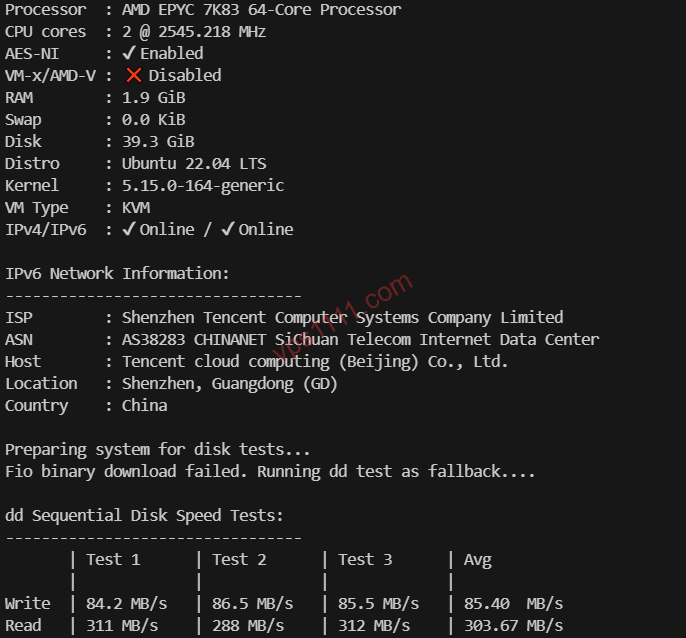
- Official Clean Execution Command:
curl -sL yabs.sh | bash- Expert-Level Data Interpretation:
- CPU 1-core Score (Geekbench 6): Even for basic web hosting, 1-core performance matters more than core count. Aim for a minimum of 500 points per core.
- 4k Random Read/Write: This is the lifeline for databases like MySQL/MariaDB. If your 4k read/write drops below 20MB/s, submit a support ticket and request a refund immediately. Otherwise, your WordPress dashboard will become painfully sluggish.
2. Decoding Routing Jargon (Avoid Suboptimal Path Pitfalls)
Even top-tier hardware will underperform if your traffic takes a suboptimal routing path. If you’re unsure how to trace real-time routes, refer to our 2026 Comprehensive Guide to Online MTR Testing & Routing Optimization. Memorize these backbone routing tiers:
- Tier-1 Transit (e.g., Lumen AS3356, Arelion/Telia AS1299): Look for direct peering with major global backbones. While highly scalable, budget routes often suffer from packet loss during prime time.
- Budget BGP (e.g., Cogent AS174, HE AS6939): The current value-for-money champions. Ideal for cost-conscious users who still need reliable connectivity.
- Premium Peering / Direct Routes: Prioritize providers offering direct paths to your target region. Avoid cheap plans that route traffic through distant, congested exchange points.
🔥 VPS Routing Tiers & Target Use Cases (2026 Edition) — Essential for web hosting
| Route Tier | Provider / AS Example | prime time Stability | Recommended For |
|---|---|---|---|
| Premium Direct | Tier-1 Peering (e.g., AS4809 / CN2 GIA) | Extremely Stable | web hosting / High-Frequency APIs |
| Standard BGP | Budget Transit (e.g., AS4837 / Cogent) | Fast on Primary ISP / Decent on Others | Maximum Value Seekers |
| Optimized Regional | Direct Local Peering | Ultra-Fast for Target Region | Region-Specific Workloads |
🔒 Chapter 2: Three-Layer Security Hardening — Prevent Crypto Mining Hijacks
Within two hours of connecting a fresh VPS to the public internet, global botnet scanners will relentlessly probe your port 22. If compromised, your server will be hijacked as a crypto miner or a malicious DDoS relay.
1. Change the Default SSH Port
Never stick with the default port 22, and avoid easily guessable alternatives like 2222. Edit /etc/ssh/sshd_config and select a random high-numbered port between 10000 and 60000.
2. Deploy Modern Ed25519 Key Pairs (Phase Out Legacy RSA)
In 2026, this is no longer optional—it’s mandatory. Stop blindly copying outdated RSA generation commands from old tutorials. The modern Ed25519 algorithm offers shorter key lengths, minimal CPU overhead, and robust resistance against emerging quantum threats.
If you’re unfamiliar with the setup process, pause your current work and read our complete guide: 【2026 Security Baseline: VPS Ed25519 SSH Key Setup & Advanced Troubleshooting SOP】. Spend 5 minutes to secure your foundation.
3. Completely Disable Password Authentication
Once you’ve verified your key pair works, edit /etc/ssh/sshd_config and set PasswordAuthentication to no. This permanently locks out brute-force attacks.
⚠️ vps1111 Pro Tip: Before disabling password login, absolutely do not close your active SSH session! A misconfiguration will permanently lock you out of your server.
⚡ Chapter 3: TCP Congestion Control — Unlock BBR Acceleration
Why can one user max out a 1Gbps connection at 100MB/s while another crawls at 500KB/s? High-latency intercontinental links suffer from physical packet loss. Traditional Linux TCP congestion algorithms aggressively throttle transmission rates when they detect dropped packets.
Solution: Enable BBR (Bottleneck Bandwidth and Round-trip propagation time), developed by Google.
- Prerequisites: Only works on KVM virtualization (if you’re on legacy OpenVZ/LXC, you must submit a support ticket requesting dedicated node support).
- One-Click Activation Command:
echo "net.core.default_qdisc=fq" >> /etc/sysctl.conf
echo "net.ipv4.tcp_congestion_control=bbr" >> /etc/sysctl.conf
sysctl -p
Once enabled, your VPS will actively probe available bandwidth to maintain high-speed transfers. On high-loss international routes, the performance boost is immediate.
💾 Chapter 4: SWAP Virtual Memory — The Lifeline for Low-RAM VPS Instances
Many beginners gravitate toward ultra-budget promotional plans (like RackNerd or CloudCone), which often ship with heavily restricted RAM, typically 512MB or 1GB.
- The Problem: Installing a Docker control panel or running a moderately sized PHP script will exhaust physical RAM, triggering the OOM Killer (Out of Memory). It will mercilessly terminate your MySQL database process.
- The Fix: Allocate a dedicated disk partition as SWAP (swap space).
- Configuration Guidelines:
- Physical RAM ≤ 1GB: Set SWAP to 2x your RAM (e.g., 512MB RAM → 1GB SWAP).
- Physical RAM 1–2GB: Set SWAP to 1.5x your RAM.
- Physical RAM ≥ 2GB: A fixed 1GB SWAP partition is sufficient as a safety net.
📅 Chapter 5: System Environment Cleanup & Initialization
Before deploying any production workloads, run this standard initialization sequence. It prevents roughly 80% of bizarre permission and dependency errors down the line.
1. Full Package Update (Dual-OS Compatible)
# Debian/Ubuntu Family
apt update && apt upgrade -y

# CentOS/RedHat Family (e.g., AlmaLinux/Rocky Linux)
dnf update -y
2. Configure Correct Timezone & Hostname
Never underestimate timezone configuration. If your automated backup is scheduled for 3:00 AM but the system defaults to a different regional time, it might execute during your peak traffic hours, causing severe server lag. Run:
timedatectl set-timezone Asia/Shanghai3. Remove Pre-installed Monitoring Agents
Major cloud providers often force-install background monitoring agents in their default OS images. These processes consume RAM unnecessarily and may raise privacy compliance concerns. For a completely clean environment, it’s highly recommended to use a dd script to reinstall a native Debian 12 system.
💡 vps1111 Pitfall Avoidance & Field Guide (Admin Notes):
- Backups Are Critical: Before making any kernel-level changes (like enabling BBR or configuring SWAP), always create a Snapshot via your provider’s control panel.
- Avoid Unverified One-Click Scripts: “All-in-one security scripts” found online often hide malicious backdoors or adware. Only execute code from official, high-star GitHub repositories.
- Initial IP Reputation Check: The first thing to do after provisioning is to check
ipcheck.ingto see if the IP was previously abused and blacklisted. If it’s blocked, you can usually submit a support ticket for a free replacement within 24 hours of purchase (check your provider’s terms).
📖 Chapter 6: Frequently Asked Questions (FAQ)
Why doesn’t enabling BBR significantly improve my download speeds?
If your physical distance is extreme (e.g., connecting from Europe to Asia) and you’re on a standard budget BGP route, BBR alone won’t work miracles. BBR optimizes transmission efficiency during network congestion, but physical latency dictates the absolute speed ceiling. If you demand consistent prime time performance, invest in a plan featuring Premium Direct Peering or Optimized Regional Routing.
CentOS has reached end-of-life. Which OS should I choose for a new VPS?
Debian 12 is highly recommended. It’s incredibly lightweight, consumes minimal RAM, and offers excellent package compatibility, making it the top choice for global sysadmins and Docker users. If your workflow strictly requires RedHat ecosystem compatibility, opt for Rocky Linux or AlmaLinux.
Will allocating excessive SWAP virtual memory degrade my NVMe SSD lifespan?
It does cause minimal write wear, but for modern enterprise-grade NVMe SSDs, this is entirely negligible. Compared to the severe consequences of database crashes (OOM) and service downtime caused by exhausted physical RAM, the minor SSD wear is a worthwhile trade-off.