


Core Summary: In 2026, running a website over unencrypted HTTP will not only trigger “Not Secure” warnings in modern browsers—driving away visitors—but will also severely penalize your search engine rankings. This guide provides a deep dive into automating Let’s Encrypt wildcard SSL certificates using ACME.sh via DNS API. We cover a comprehensive comparison of provisioning methods, automated Nginx deployment, strict API key security practices, HSTS hardening, and renewal troubleshooting, helping you secure your site’s infrastructure at zero cost.
Let’s be direct: running your site over plain http:// isn’t just a security vulnerability; it’s a critical operational failure. By 2026, SSL certificates (HTTPS encryption) are non-negotiable infrastructure for any modern web presence:
- Boost User Trust: Modern browsers aggressively flag non-HTTPS sites with prominent “Not Secure” warnings, causing immediate visitor drop-off and plummeting conversion rates.
- SEO Ranking Signal: While SSL isn’t the sole ranking factor, major search engines like Google treat it as a core ranking signal. HTTPS-enabled sites hold a definitive competitive edge under identical conditions.
- Security & Protocol Upgrades: Whether you’re running a high-traffic site or a personal blog, SSL prevents Man-in-the-Middle (MITM) interception and data tampering. Crucially, HTTPS is a strict prerequisite for leveraging high-performance protocols like HTTP/2 or HTTP/3 (QUIC), significantly accelerating page load times.
🏗️ Phase 1: Choosing the Right Solution—Which Free Certificate Fits Your Needs?
Free certificate providers each have distinct strengths. For experienced VPS administrators, we focus on three primary provisioning paths:
- Let’s Encrypt: The industry-standard open-source Certificate Authority (CA) supporting the ACME protocol with exceptional automation. Certificates are valid for 90 days (with automatic renewal) and are ideal for any VPS user with basic Linux administration skills.
- ZeroSSL: Offers free certificates comparable to Let’s Encrypt, with the distinct advantage of supporting direct issuance for bare IP addresses and featuring a more intuitive web-based management dashboard.
- Cloudflare SSL: Delivers a convenient “one-click encryption” experience. However, note that its Flexible mode only encrypts traffic between the browser and Cloudflare’s edge, leaving the connection to your origin server unencrypted. We strongly recommend deploying an origin certificate and switching to Full (Strict) mode for true end-to-end encryption.
vps1111 Expert Recommendation: For administrators prioritizing maximum professionalism and system purity, the “ACME.sh + Let’s Encrypt” combination remains the most robust and production-ready automation stack available.
📋 Phase 2: In-Depth Comparison of Mainstream SSL Provisioning Methods
📊 Free SSL Certificate Selection Matrix: Essential for Site Builders
| Provisioning Tool | Validation Protocol | Renewal Stability | Target Audience | Recommendation |
|---|---|---|---|---|
| ACME.sh | DNS API / Webroot | Extremely High (Cron Daemon) | Advanced Users / Developers | ⭐⭐⭐⭐⭐ |
| Certbot | HTTP-01 | High (Python Dependent) | Standard Linux Users | ⭐⭐⭐⭐ |
| Control Panel One-Click | HTTP-01 / DNS | Moderate (Highly Susceptible to Panel Bugs) | GUI Panel Users | ⭐⭐⭐ |
🛠️ Phase 3: Hands-On Implementation—Automating SSL Deployment with ACME.sh
ACME.sh is a lightweight, pure Shell script with zero external dependencies (no Python required), making it exceptionally well-suited for resource-constrained VPS environments.
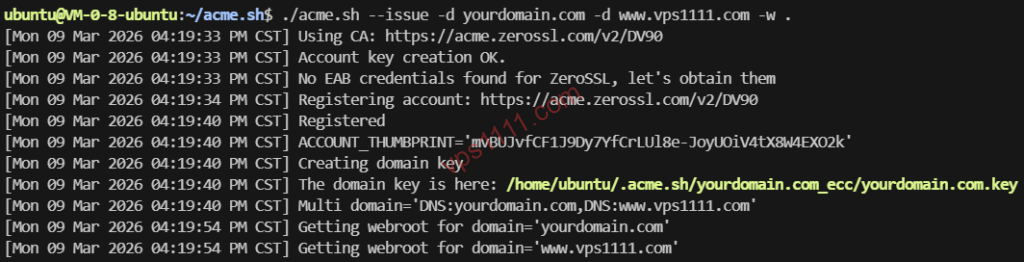
1. Install the ACME.sh Environment
Execute the following command in your terminal (replace the placeholder with your actual email address to receive critical alerts for upcoming expirations or renewal failures):
# Download the script via curl and pipe it directly to sh for execution
curl -s https://get.acme.sh | sh -s email=my@example.com
2. Validate via DNS API (Supports Wildcard Certificates)
The primary advantage of DNS validation is that it requires no open port 80 on your server (preventing downtime for active web services) and allows direct issuance of wildcard certificates covering all subdomains (e.g., *.vps1111.com). Using Cloudflare as an example:
export CF_Key="Your_Global_API_Key"
export CF_Email="Your_Registered_Email"

# Issue certificates for the main domain and wildcard subdomains
acme.sh --issue --dns dns_cf -d vps1111.com -d *.vps1111.com

# [SECURITY WARNING] After execution, always clear your terminal history to prevent API key exposure:
history -c
Architect Security Advisory: Directly
exporting sensitive keys in the terminal leaves your Global API Key in plaintext within.bash_history, creating a severe security vulnerability. A production-grade approach is to persistently store the credentials directly in the~/.acme.sh/account.conffile and enforce strict permissions withchmod 600.
3. Install the Certificate into Nginx
Never manually copy certificate files from the hidden .acme.sh directory! The correct procedure is to use the --install-cert command to deploy them to your target paths and configure an automatic Nginx reload to apply the new certificates:
acme.sh --install-cert -d vps1111.com \
--key-file       /etc/nginx/ssl/vps1111.com.key  \
--fullchain-file /etc/nginx/ssl/fullchain.cer \
--reloadcmd     "systemctl reload nginx"
💡 vps1111 Troubleshooting Guide: Advanced SSL Maintenance Details
🔍 Production Environment Hardening Recommendations:
- Enforce 301 Redirects: Once deployed, configure your web server (Nginx/Apache) to enforce a strict HTTP-to-HTTPS 301 redirect, guaranteeing all site traffic traverses encrypted channels.
- Enable HSTS: Inject the
Strict-Transport-Security: max-age=31536000; includeSubDomainsdirective into your response headers. This forces browsers to exclusively use HTTPS for up to one year, effectively mitigating SSL stripping downgrade attacks. - Monitor Certificate Expiry: While ACME’s Cron daemon handles automatic renewals, DNS API rotations or firewall blocks can cause silent failures. We strongly recommend adding “certificate expiry monitoring” to tools like Uptime Kuma to establish a fail-safe against unexpected service interruptions.
Frequently Asked Questions (FAQ)
Is there a security difference between free and paid SSL certificates?
At the cryptographic level (e.g., RSA-2048 or ECC) and for data transmission security, free and premium certificates are identical. The primary value of paid certificates lies in Organization Validation (OV/EV) for corporate trust indicators and warranty coverage. For most personal blogs and cross-border e-commerce sites, free certificates deliver identical SEO ranking benefits.
Why does my ACME.sh certificate fail to auto-renew?
The most common culprits include expired or rotated DNS API keys, server firewalls blocking outbound ACME validation requests, or port 80 being unexpectedly occupied by non-web processes during HTTP-01 validation. We recommend running acme.sh --list monthly to verify your certificate’s remaining validity.
What should I do if enabling HTTPS increases website latency?
The SSL/TLS handshake does introduce negligible latency (typically a few dozen milliseconds), but on a VPS with premium routing, this is virtually imperceptible. We recommend enforcing HTTP/2 or TLS 1.3 in Nginx and configuring ssl_session_cache for session resumption, which dramatically accelerates subsequent user connections.