


Executive Summary: For cross-border e-commerce and DTC site building, page load speed directly dictates conversion rates and Google SEO rankings. As the world’s premier high-performance web server, Nginx’s default configuration falls far short of Google’s strict Core Web Vitals requirements for 2026. This guide breaks down the underlying optimization logic of Nginx, from enabling Brotli compression and maximizing static caching to configuring HTTP/2 and TLS 1.3. Whether you’re a sysadmin novice or a seasoned veteran, this practical guide will help you avoid the pitfalls of oversold hosts and ensure your DTC e-commerce site easily scores 100 on Google PageSpeed Insights.
Why DTC E-Commerce Sites Must Prioritize Nginx Optimization
In the fiercely competitive cross-border e-commerce landscape, a mere 0.1-second delay can drive customers away. Google has long integrated Core Web Vitals directly into its core ranking algorithms. For foreign trade sites running WordPress or WooCommerce, Apache may be easy to set up, but it quickly exhausts memory under high concurrency. Nginx, with its superior event-driven architecture, remains the optimal choice for acting as a reverse proxy and serving static assets.
However, a fresh Nginx installation is highly conservative out of the box. If you simply deploy your site without deep tuning, your Time to First Byte (TTFB) and Largest Contentful Paint (LCP) scores will struggle to reach the green 90+ threshold in Google’s performance tests.
Before diving into low-level tuning, you must understand a fundamental hardware rule: no amount of Nginx optimization can save a server with subpar underlying hardware and extreme overselling. Hosts equipped with spinning rust will see their sluggish database read/write speeds completely bottleneck your TTFB. To guarantee your optimization efforts pay off, we recommend a baseline hosting plan that excels in hardware I/O and global routing.
Limited Restock
| Core Specs | SSD Storage | Monthly Transfer | Special Price | Action |
|---|---|---|---|---|
| 2-Core / 2GB / 1Gbps | 40 GB NVMe | 4000 GB | $25.88 /year | View Deal |
💡 vps1111 Practical Guide & Pitfall Avoidance:
- Network Routing: The Los Angeles data center features a premium global BGP route (e.g., Cogent AS174), delivering exceptionally low latency for European and North American traffic. It’s highly suitable as an origin server for global B2C DTC sites.
- Key Considerations: While RackNerd hardware is highly resilient, support ticket response times can be slower on weekends. Additionally, the system does not support free snapshots, so ensure you configure off-site automated backup scripts before deployment.
- Recommendation:⭐⭐⭐⭐
Architect-Level Breakdown: The Ultimate Nginx Configuration Guide for Perfect Scores
To achieve a perfect green score on Google PageSpeed Insights (PSI), we need to apply an overwhelming advantage to Nginx across three critical dimensions: payload size, caching strategy, and network handshake efficiency.
1. Enable Maximum Compression: Combining Brotli and Gzip
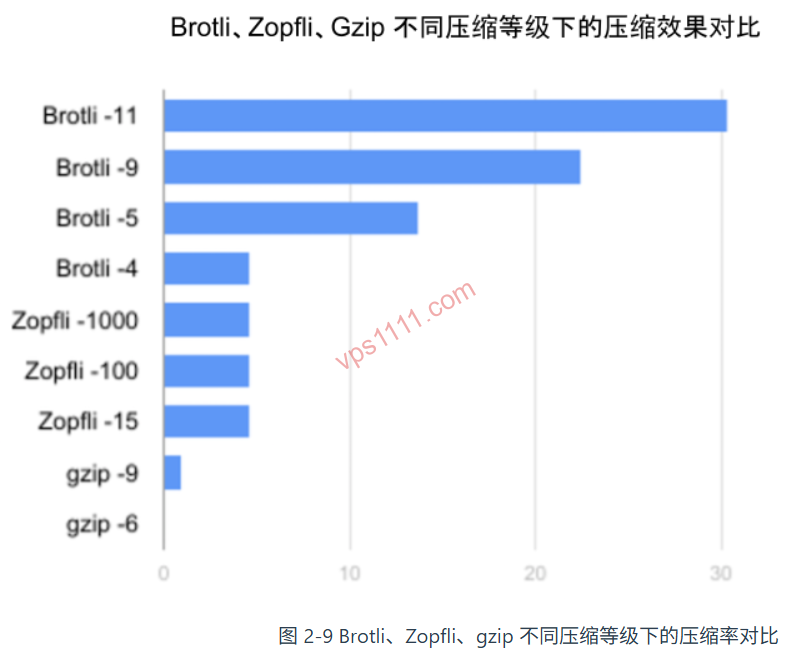
One of the most frequent warnings in Google’s performance reports is “Enable text compression.” While Nginx includes Gzip by default, Google’s open-source Brotli algorithm is the definitive standard for cross-border sites in 2026. Brotli compresses HTML, CSS, and JS 15%–25% more efficiently than Gzip, resulting in reduced data transfer and faster rendering.
For compression, ensure Gzip and Brotli MIME types are aligned (prioritizing image/svg+xml). Within the http {} block of your nginx.conf, we recommend enabling both simultaneously (Gzip serves as a fallback for legacy browsers, while modern browsers utilize Brotli):
# Enable Gzip
gzip on;
gzip_comp_level 5;
gzip_min_length 256;
gzip_proxied any;
gzip_types text/plain text/css application/json application/javascript text/xml application/xml application/xml+rss text/javascript image/svg+xml;

# Enable Brotli (ensure Nginx is compiled with Brotli module)
brotli on;
brotli_comp_level 6;
brotli_static on;
brotli_types text/plain text/css application/json application/javascript text/xml application/xml application/xml+rss text/javascript image/svg+xml;
2. Static Asset Caching: Maximizing Browser Caching
Cross-border sites typically host extensive product images and stylesheets. Forcing users to re-download these static files from the origin server on every visit wastes bandwidth and severely tanks your performance score. We must explicitly instruct browsers via Nginx: these files will remain unchanged for the next year, so serve them directly from local storage!
Add the following directives to the server {} block of your site’s Vhost configuration (e.g., yourdomain.com.conf). Ensure global security headers are separated from static caching rules:
server {
    # Hide Nginx version globally for security
    server_tokens off;

    # ... other business configurations ...

    # Maximize browser local caching
    location ~* \.(jpg|jpeg|png|gif|ico|css|js|webp|svg|woff2)$ {
        expires 365d;
        add_header Cache-Control "public, no-transform";
        access_log off;
    }
}
This resolves the “Serve static assets with an efficient cache policy” warning in performance audits. Additionally, disabling access_log reduces disk write operations, extending the lifespan of your NVMe drives. If you’re architecting a more robust infrastructure, refer to our Beginner’s Guide to VPS Web Hosting.
3. Upgrade Network Protocols: Adopt HTTP/2 and TLS 1.3
HTTP/2 supports multiplexing, allowing dozens of images and JS files to load simultaneously over a single TCP connection, completely eliminating legacy head-of-line blocking. Paired with TLS 1.3’s ultra-fast 1-RTT handshake (Note: 0-RTT is not recommended for transactional e-commerce sites due to replay attack risks), this drastically reduces HTTPS response times.
Update your server {} listen configuration to enable HTTP/2 and TLS 1.3 directly, and increase the SSL session cache to 50MB to handle traffic surges:
server {
    # Standard modern syntax for Nginx 1.25.1+: independent directive http2 on;
    listen 443 ssl;
    http2 on;
    server_name yourdomain.com;

    ssl_protocols TLSv1.2 TLSv1.3;
    ssl_prefer_server_ciphers off;

    # Expand SSL session cache to 50m and enable tickets for peak performance
    ssl_session_cache shared:SSL:50m;
    ssl_session_timeout 1d;
    ssl_session_tickets on;
}
Pitfall Guide: Common Mistakes When Configuring Nginx
In the pursuit of peak performance, many administrators over-optimize and inadvertently degrade their site. Pay close attention to these two critical warnings:
- Blindly Maximizing Compression Levels: Many tutorials recommend setting
gzip_comp_levelto 9 orbrotli_comp_levelto 11. This is highly detrimental. Excessively high compression levels yield negligible file size reductions while aggressively draining your server’s CPU resources, causing TTFB to skyrocket. For entry-level VPS plans, a level of 5 or 6 offers the optimal performance-to-resource ratio. - Falling for Fly-by-Night Providers: If a VPS vendor advertises $5/year with unlimited bandwidth, it is almost certainly a fly-by-night host. This not only guarantees abysmal disk I/O performance, but also means that when the underlying dedicated node goes offline, your perfectly tuned Nginx configuration will only serve Google a 502 error, ultimately triggering a catastrophic SEO ranking drop.
Nginx Optimization FAQ for Cross-Border E-Commerce
Why did my performance score drop after enabling Brotli in Nginx?
This typically occurs when the Brotli compression level is set too high (e.g., level 11), causing excessive CPU consumption and increasing request response times. We recommend adjusting the compression level to 5 or 6 to achieve the optimal balance between payload reduction and CPU overhead.
If my cross-border site uses Cloudflare CDN, do I still need to configure caching in Nginx?
Absolutely. While a CDN intercepts most requests at the edge, Nginx’s browser caching headers (such as Cache-Control) directly instruct client browsers on how to store files locally. Furthermore, CDNs inherit these header directives from the origin server. Properly configuring Nginx caching also significantly reduces origin server load during CDN back-to-origin fetches.
Why is my TTFB still high after optimizing Nginx?
Nginx excels at optimizing static asset delivery and network transmission efficiency. If TTFB remains high, it is usually due to slow underlying disk I/O (commonly known as spinning rust) or performance bottlenecks in WordPress/PHP database queries. We recommend upgrading to a hosting plan equipped with NVMe storage and implementing deep object caching with Redis.