


Executive Summary: In 2026, with IPv4 exhaustion at an all-time high, low-cost VPS instances offering only IPv6 or sitting behind strict NAT firewalls have become the market standard. For cross-border e-commerce, web hosting, and Linux remote operations teams, how do you securely and efficiently expose internal services to the public internet? Cloudflare Tunnel provides the definitive answer. By leveraging reverse proxy architecture and outbound-only connections, it completely eliminates the traditional dependency on port forwarding and public IP addresses. Note: While configuration is drastically simplified, the free tier’s 100MB upload limit, edge-decryption privacy considerations, and latency fluctuations across intercontinental links remain critical architectural trade-offs for production environments.
1. The IPv4 Exhaustion Challenge: Why Cloudflare Tunnel is Essential
From a 2026 infrastructure perspective, acquiring IPv4 addresses has become prohibitively expensive. Many developers and businesses procuring budget-friendly overseas VPS instances (if you are still evaluating data center routing, refer to our Comprehensive Guide to Return Routing (Telia AS1299/Cogent AS174/NTT AS2914)) frequently end up with IPv6-only instances or machines locked behind strict NAT firewalls. Exposing traditional web hosting or internal enterprise systems hits a hard wall: Without a public IPv4 address, external users simply cannot reach your port 80 or 443.
For over a decade, the standard workaround involved NAT traversal tools like FRP or Ngrok. However, these legacy approaches have a critical flaw: you must provision and pay for an additional VPS with a premium public IP to act as a relay server. This not only inflates infrastructure costs but also requires manual configuration of complex port forwarding, ongoing SSL certificate renewals, and ultimately, the relay server’s port speed becomes the hard bottleneck for your site’s performance.
Cloudflare Tunnel (Note: Previously known as Argo Tunnel before 2020, it is now a standalone free service. Argo Smart Routing remains a separate paid network acceleration feature that automatically optimizes backbone routing paths for tunnel traffic) completely redefines this paradigm. It leverages Cloudflare’s global edge network as your relay infrastructure. By running a lightweight daemon on your local machine, you can securely expose local web or SSH services directly to the global internet.
2. Architectural Deep Dive: How Cloudflare Tunnel Works Under the Hood
How does Cloudflare Tunnel enable web hosting without a public IP? The core mechanism relies entirely on persistent outbound connections.
1. Outbound as Inbound: The Traffic Routing Paradigm
In traditional network architectures, your web server must open inbound ports and wait for external clients to initiate handshakes. Cloudflare Tunnel completely inverts this model. The cloudflared daemon running on your VPS proactively establishes multiple persistent connections (via HTTP/2 or QUIC) to the nearest Cloudflare data center. Since firewalls natively allow outbound traffic, this architecture completely bypasses NAT restrictions and the lack of a public IP.
2. True Network Invisibility and Native DDoS Mitigation
If you combine cloudflared outbound connections with essential VPS security hardening and block all inbound listening ports (such as port 22) via your firewall, attackers scanning with Nmap will see every port as closed. Your origin IP remains completely hidden, and all traffic is routed through Cloudflare’s WAF edge nodes for scrubbing, providing native, enterprise-grade DDoS protection.
| Feature | Cloudflare Tunnel | Traditional FRP (Self-Hosted) |
|---|---|---|
| Public IP Requirement | Not Required | Requires a relay VPS with a public IP |
| SSL Certificate Management | Fully Automated (Managed at Edge) | Manual issuance and web server configuration |
| Advanced Use Cases | Web, Browser SSH, TCP/UDP Forwarding | Direct TCP/UDP Port Mapping |
| Setup & Maintenance Complexity | Minimal (Zero-config certificates & inbound ports) | High (Requires server & client config maintenance) |
3. Zero-to-Deployment: Configure Cloudflare Tunnel in 3 Minutes
By 2026, Cloudflare has fully transitioned standard Tunnel configurations to a graphical UI. However, for advanced routing scenarios involving multiple services, YAML configuration files remain highly flexible. Below is the fastest workflow to deploy a web application or ERP system using the dashboard.
1. Dashboard Initialization & Token Generation
Ensure your domain is hosted on Cloudflare. Log into the dashboard and navigate to the Zero Trust panel. Go to Networks -> Tunnels, and click Create a tunnel.
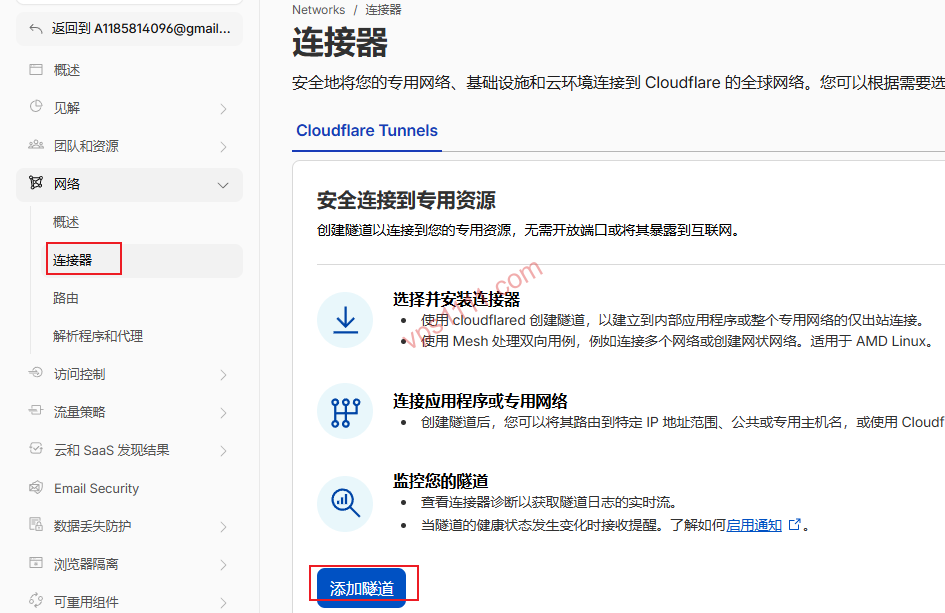
Select the Cloudflared connector type, which serves as the core client component for Cloudflare Tunnel.

Name your tunnel (e.g., erp-us-server). The system will then generate an installation command containing your unique Token.

2. Deploying the cloudflared Daemon on a Linux VPS
SSH into your Debian/Ubuntu VPS (which only has a private IP). To prevent the lengthy Token from being truncated or malformed during terminal paste operations, it is highly recommended to pass it via an environment variable during installation:
# 1. Download and install the latest cloudflared version
curl -L --output cloudflared.deb https://github.com/cloudflare/cloudflared/releases/latest/download/cloudflared-linux-amd64.deb
sudo dpkg -i cloudflared.deb

# 2. Store the long Token in an environment variable, then install the service
export TUNNEL_TOKEN="eyJhIjoi... (replace with your actual long Token here) ..."
sudo cloudflared service install $TUNNEL_TOKEN
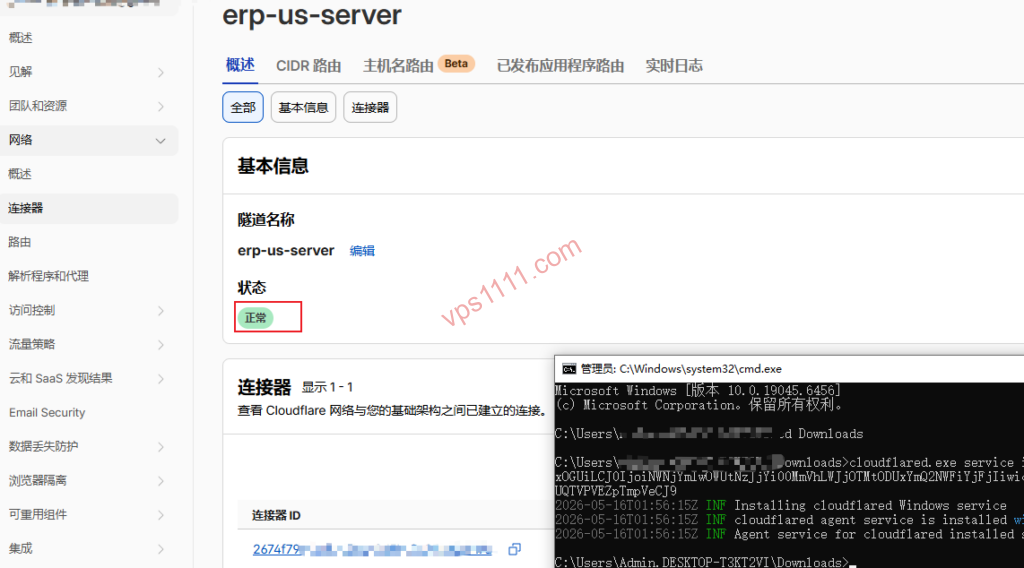
Once executed, return to the web dashboard. You will see the tunnel status instantly switch to Healthy, confirming that the local daemon has successfully established a connection to the Cloudflare edge network.
3. Mapping Internal Ports to Public Domains
Navigate to the Public Hostname tab. Assuming a test service is running on port 1357 of your local VPS:
- Subdomain: Enter
erp - Domain: Select your hosted domain
vps1111.com - Service Type: Select
HTTP - URL: Enter the local address
localhost:1357 - Launch Docker Test Service (Optional):
docker run -d --name test-nginx -p 1357:80 nginx:alpine
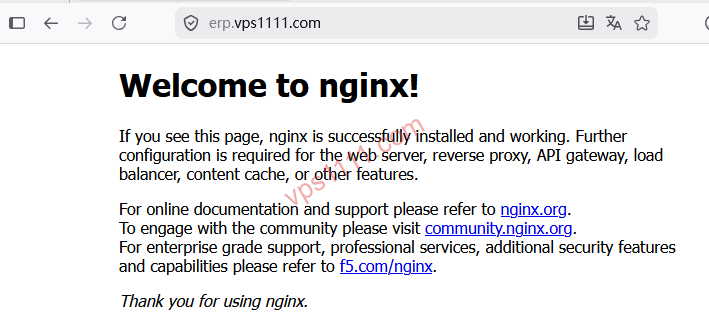
After saving, global users can securely access the internal machine via https://erp.vps1111.com (Cloudflare edge nodes automatically provision compliant HTTPS encryption).
4. Advanced Use Case: Remote Server Management via Browser SSH
Beyond web services, Tunnel integrates with Cloudflare Access to deliver zero-trust SSH connectivity. In the Public Hostname settings, set the Service Type to SSH and point the URL to localhost:22. Combined with Zero Trust policies, you can bypass traditional terminal clients entirely. After completing compliant identity verification (e.g., QR scan, OTP) directly in your browser, the embedded renderer in the Cloudflare Zero Trust dashboard launches a Web SSH terminal. This completely eliminates the risk of brute-force attacks on port 22.
4. Advanced Troubleshooting & Production Best Practices
While Cloudflare Tunnel is a powerful NAT traversal utility, high-concurrency production environments still present specific architectural pitfalls. If you encounter significant latency after configuration, we recommend cross-referencing our guide on interpreting MTR reports to diagnose packet loss for targeted analysis.
💡 vps1111 Production Best Practices & Pitfalls:
- Routing & Performance: The free tier’s Anycast node allocation can be inconsistent in certain regions. Without the paid Argo Smart Routing optimization, prime time traffic across intercontinental links may experience elevated latency. It is ideally suited for businesses targeting North American or European markets, or as a secure access gateway for internal repositories.
- Critical Limitation (100MB Cap): This is the most common beginner mistake! The free tier enforces a hard 100MB limit on HTTP request bodies. If you use it to expose cloud storage or ERP systems with large file attachments, any single upload exceeding 100MB will fail.
- Privacy & Single Point of Failure: TLS termination occurs at Cloudflare’s edge nodes, meaning Cloudflare technically has the capability to decrypt and inspect your traffic. Additionally, a global Cloudflare outage will immediately take down your tunnel service.
- Recommendation Rating: ⭐⭐⭐⭐ (4/5 Stars. An exceptionally streamlined and secure infrastructure tool, but loses one star due to the 100MB payload limit and regional latency variability.)
5. Frequently Asked Questions
Does the Cloudflare Tunnel free tier have port speed or data transfer limits?
For standard web hosting, API endpoints, and remote work scenarios, there is no hard data transfer cap. However, two critical restrictions apply: First, a hard 100MB limit exists per HTTP request body; uploads exceeding this size will be immediately rejected. If your workflow involves high-resolution product catalogs, 3D models, or large file transfers, you must implement chunked uploads at the application layer or consider upgrading to a paid tier. Second, Cloudflare’s Terms of Service strictly prohibit proxying high port speed streaming video, large-scale peer-to-peer downloads, or public image hosting. Violating these terms will quickly result in domain suspension.
Why do I get a 502 Bad Gateway error after configuration?
This typically indicates that the edge node successfully reached your VPS’s cloudflared daemon but failed to connect to the local service. First, verify that your local firewall (e.g., ufw or iptables) is not blocking cloudflared from accessing the target port.
If your Service Type is set to HTTPS, or if your backend enforces TLS redirection, pay close attention to the following:
- Protocol Mismatch: Verify that the protocol type bound to
localhost:portin the dashboard matches your backend (e.g., the backend enforces HTTPS, but the dashboard is set to HTTP). - Self-Signed Certificate Rejection: If your backend uses a self-signed HTTPS certificate, the untrusted certificate will trigger a 502 error. You must enable
No TLS Verifyin the Public Hostname configuration (Additional application settings -> TLS settings).
Does deploying cloudflared consume significant CPU or memory?
Not at all. It is a highly efficient, lightweight process written in Go. In standard web hosting and remote access scenarios, memory consumption typically ranges between 20MB and 40MB, with negligible CPU overhead. It runs smoothly and stably even on budget micro-VPS instances with only 512MB of RAM.