


Executive Summary: For technical teams managing long-term Linux operations, compliant data collection, or cross-border e-commerce, you often hold the root passwords for dozens or even hundreds of VPS instances, API keys for various payment gateways, and administrative access to critical email accounts. Relying on traditional Excel spreadsheets or built-in browser password managers is not only inefficient but also highly vulnerable to credential stuffing attacks.
While excellent commercial password managers like 1Password and LastPass exist on the market, frequent data breaches at major tech companies in recent years have made security-conscious webmasters realize a fundamental truth: true security only comes when you maintain absolute control over your underlying database and encryption keys.
Bitwarden is widely recognized as one of the best open-source password managers globally, offering cross-platform clients completely free of charge. However, the official Bitwarden server architecture is notoriously heavy. It relies on an MSSQL database and requires at least 3GB of free RAM just to run adequately. This represents a massive waste of server resources for most independent webmasters and small-to-medium DevOps teams.
This is where Vaultwarden steps in. Developed by a third-party contributor and completely rewritten in Rust, it serves as a fully Bitwarden-compatible server. It retains all core APIs from the official backend, ensuring flawless compatibility with all official clients and browser extensions, while compressing resource consumption to an absolute minimum. It has become the gold standard for self-hosted password management.
Underlying Architecture and Performance Analysis of Vaultwarden
A deep understanding of how Vaultwarden operates is crucial for optimizing system performance and designing robust disaster recovery strategies in production environments.
First, Vaultwarden is built using Rust, a modern memory-safe programming language. Its greatest advantage lies in its extremely low hardware resource footprint. During idle states, the Vaultwarden container consumes only 20MB - 50MB of RAM, with negligible CPU usage. Even an entry-level VPS with a single core and 512MB of RAM can effortlessly handle high-frequency password synchronization requests for a team of dozens.
Second, for data persistence, Vaultwarden defaults to a lightweight SQLite database. For solo operators or technical and e-commerce teams with fewer than 50 members, SQLite’s single-file architecture drastically simplifies backup and recovery workflows. If your organization scales significantly, it also natively supports enterprise-grade relational database clusters like PostgreSQL or MySQL to handle massive concurrent write operations.
Production Deployment: Rapid Setup with Docker Compose
On Linux server environments, utilizing container orchestration is the standard practice that aligns with modern engineering specifications.
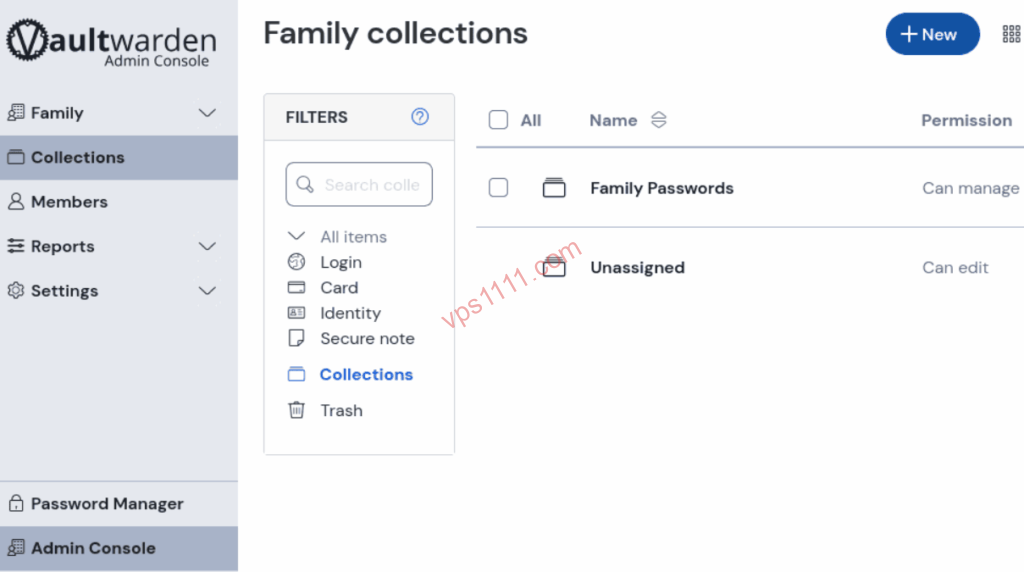
First, create a dedicated working directory on your VPS and draft the docker-compose.yml configuration file:
Bash
mkdir -p /www/containers/vaultwarden
cd /www/containers/vaultwarden
nano docker-compose.yml
Paste the following configuration code, optimized for industrial-grade production environments:
YAML
version: '3.8'

services:
  vaultwarden:
    image: vaultwarden/server:latest
    container_name: vaultwarden
    restart: unless-stopped
    environment:
      - WEBSOCKET_ENABLED=true
      # ⚠️ Architect's strong recommendation: After registering your first admin account, change this to false to block external registrations
      - SIGNUPS_ALLOWED=true
      - TZ=Asia/Shanghai
    volumes:
      - ./vw-data:/data
    ports:
      # Force bind to the local loopback interface. Never expose directly to the public internet or security groups
      - "127.0.0.1:8080:80"
Execute the following command to run the container silently in the background:
Bash
docker compose up -d
⚠️ Architect-Level Security Hardening Warning:
In the
portsconfiguration above, we used the127.0.0.1:8080:80mapping instead of the standard8080:80. This is critical. Without the127.0.0.1constraint, Docker will bypass the UFW firewall and expose the port directly to the public internet, allowing anyone who knows your IP address to attempt accessing your password vault backend. By binding it locally, all public traffic must pass through the Nginx reverse proxy we will configure next for authentication, effectively reducing the risk of malicious scanning to zero.
Core Gateway Hardening: Configuring Nginx Reverse Proxy and SSL Certificates
The official Bitwarden clients enforce extremely strict frontend security policies. If your Vaultwarden domain is not configured with a TLS-based HTTPS encryption protocol, browser extensions and mobile apps will outright refuse to connect and throw WebCrypto API errors. Therefore, configuring a reverse proxy is a mandatory requirement.
To prevent Man-in-the-Middle (MitM) attacks, you must configure an SSL certificate at the Nginx level. If you prefer a graphical interface to automatically manage certificates and configure proxies, you can refer to our comprehensive guide on Deploying Nginx Proxy Manager via Docker for rapid setup.
If you are using a native Nginx installation, add the following high-concurrency reverse proxy rules to your domain’s server { ... } block:
Nginx
location / {
    proxy_pass http://127.0.0.1:8080;
    proxy_set_header Host $host;
    proxy_set_header X-Real-IP $remote_addr;
    proxy_set_header X-Forwarded-For $proxy_add_x_forwarded_for;
    proxy_set_header X-Forwarded-Proto $scheme;
}

# Enable WebSocket support for real-time bidirectional synchronization of client password vaults
location /notifications/hub {
    proxy_pass http://127.0.0.1:8080;
    proxy_set_header Upgrade $http_upgrade;
    proxy_set_header Connection "upgrade";
}

location /notifications/hub/negotiate {
    proxy_pass http://127.0.0.1:8080;
}
Once configured and Nginx is restarted, you can access the Vaultwarden web panel via https://your-domain.com to complete account registration and password imports.
Architect’s Objective Review: Potential Limitations of Self-Hosting Vaultwarden
As a seasoned VPS architect, I must shatter the “absolutely perfect” marketing illusion and point out the objective limitations of Vaultwarden to help you comprehensively evaluate your technology stack:
- Absence of Official Enterprise Features: Vaultwarden is a third-party compatible build. While it supports core features like organizations and password sharing, it does not support the directory connectors (Active Directory / LDAP synchronization) or commercial-grade Single Sign-On (SSO) features designed by Bitwarden for large enterprises. If your organization scales to thousands of employees, the official version is the better choice.
- Self-Imposed Accountability for Data Loss: Self-hosting a password vault means you act as the sole system security officer. Without implementing a strict off-site incremental backup strategy, running a self-hosted vault is akin to operating a fly-by-night host (referring to an extremely high-risk operation prone to sudden downtime and data loss). If the VPS hard drive suffers physical damage without a backup, all your credentials will vanish completely with that server, and no official customer support will be able to rescue you.
vps1111 Pitfall Avoidance and Practical Guide
Is Self-Hosting Vaultwarden Secure? Can It Be Easily Hacked?
As long as you follow secure deployment standards (such as preventing public exposure, enforcing HTTPS, and disabling open registration), its security posture can actually surpass many commercial cloud services. All password data in Vaultwarden is encrypted end-to-end using AES-256-CBC via your Master Password directly on the client side (your browser or mobile app). Even if a hacker breaches your VPS and extracts the SQLite database file, they will only see a string of meaningless gibberish. Without your Master Password, this data layer is completely undecipherable.
Will My Password Vault Be Lost If My VPS Suddenly Crashes or Is Reinstalled?
This depends entirely on your data backup strategy. Vaultwarden stores all encrypted password vaults, attachments, and system configurations in the physical directory ./vw-data that we just mapped. As long as you regularly sync this folder to external storage (such as a local NAS or another cloud drive), even if the server suffers physical damage, you simply need to rerun the Docker commands on a new machine and restore the backed-up ./vw-data directory. All your password data will be fully restored in under a second without any data loss.
What Features Are Missing in Vaultwarden Compared to Official Bitwarden?
For individual users and small e-commerce or technical teams with fewer than 100 members, Vaultwarden delivers a nearly “full-featured” experience. It unlocks premium features for free that officially require a paid subscription, such as automatic TOTP generation, security breach reports, and organizational password sharing. The primary omissions are enterprise-grade authentication integrations (like LDAP synchronization), high-precision commercial Access Control List (ACL) audit logs, and the lack of official commercial SLA (Service Level Agreement) customer support.