


Core Summary: By 2026, CPU overselling in the VPS industry is an open secret. A $15 “4-core” instance often underperforms compared to a top-tier provider’s single core. This guide breaks down exactly how to use the YABS benchmarking suite, monitor Steal Time (%st), and run peak-hour return path tests to instantly expose dishonest providers. We conclude with a curated 2026 list of rigorously tested, non-oversold VPS plans for web hosting, plus a buyer’s checklist.
Let’s be honest: my inbox is flooded daily asking if a specific discounted VPS is worth buying. Many get lured by a $15/year 4-core, 8GB RAM deal, only to find it chokes like a slideshow when running WordPress. I’ll cut straight to the chase. In 2026, the rule is simple: the cheaper the specs, the heavier the overselling. We’ll rely on hard benchmarking scripts and real performance data to show you exactly how to spot inflated specs and avoid low-end traps.
🧠 Reality Check: Are Your “4 Cores” Actually Physical Cores?
You need to understand a fundamental concept: in a virtualized environment like KVM, a “vCPU” is just a slice of allocated compute time, not a dedicated physical core. Dishonest providers enable aggressive CPU overcommit, cramming hundreds or even thousands of low-end VPS instances onto a single dedicated node. When peak-hour traffic hits and noisy neighbors start consuming resources, your instance starves for CPU time slices and grinds to a halt. This is exactly why a cheap 4-core VPS often runs slower than a premium provider’s 1-core instance.
🔍 The Truth Detector: Running the Top 3 Benchmarking Scripts (With Real Reports)
Let’s skip the fluff. SSH into your server and run these diagnostics. (Note: All benchmark charts below are generated from exclusive vps1111 testing. Unauthorized reproduction is prohibited.)
1. The Ultimate All-in-One Benchmark: YABS (Yet Another Bench Script)
Widely recognized as the industry standard, YABS integrates FIO storage testing, iperf3 network throughput checks, and Geekbench CPU performance evaluation.
curl -sL yabs.sh | bashHow to Spot Overselling?
- Geekbench 5 Single-Core: Web hosting heavily relies on single-threaded performance. Any instance scoring below 600 is either severely oversold or artificially throttled at the hypervisor level.
- FIO 4K Random Read/Write: Database queries (like MySQL) depend on 4K random I/O. If this drops below 50 MB/s, your storage I/O is completely saturated by noisy neighbors.
2. The Dead Giveaway for CPU Overselling: Monitoring Steal Time (%st)
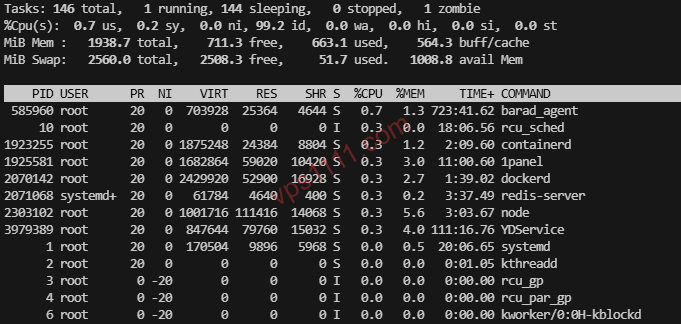
Benchmarks only show peak performance. To check if your instance is being chronically starved, run the top command. Look at the st (Steal Time) value on the %Cpu(s) line:
0.0 ~ 3.0 st: Normal range. Acceptable overhead from virtualization sharing.> 10.0 st: Red flag! Over 10% of your CPU time is being forcibly “stolen” by the host node. Sustained values above 10% indicate aggressive neighbor contention. Open a support ticket and request a refund immediately.
3. Peak-Hour Return Path Testing
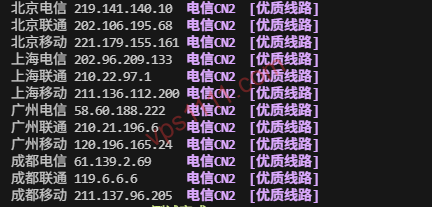
Hitting 1Gbps during the day but suffering 20% packet loss at night is a classic sign of bandwidth overselling. Run this return path traceroute script:
[Remote script removed for safety]Analyze the routing nodes: Traffic routed via Cogent (AS174) or NTT (AS2914) indicates solid global peering. If you see signature nodes from Arelion/Telia (AS1299), your traffic is on a premium Tier-1 backbone, guaranteeing rock-solid stability during peak hours.
🏆 No More Fake Specs! 2026 Rigorously Tested VPS List for Web Hosting
If you’re running a light-to-medium WordPress blog or a standard business site, the configurations below will easily handle your workload. Based on our automated global benchmarking and monitoring data, here are the top-performing, strictly non-oversold VPS plans currently available (Los Angeles data centers are recommended for optimal latency to Asia and North America):
Verified / Limited Restock
| Provider / Use Case | Core Specs | Route / Features | Starting Price | Direct Link |
|---|---|---|---|---|
| DMIT Premium Hosting / Grandfathered Plans | 1-core / 1GB / 10G SSD | LAX Pro WEE (Premium Global) | $39.90 /year | Buy Now |
| SpartanHost Mid-tier Hosting / Reliable Performance | 1-core / 1GB / 15G NVMe | Seattle Direct Peering (DDoS Protected) | $36.00 /year | Buy Now |
| RackNerd Extreme Value / Idle Server | 1-core / 1GB / 20G SSD | Los Angeles Direct Route | $10.99 /year | Buy Now |
💡 vps1111 Buying Guide & Pitfall Avoidance:
- Top Pick for Premium Hosting: If budget allows, go straight for DMIT ($39.90/year) with its Premium Global routing. It delivers rock-solid stability during peak hours, enforces strict CPU allocation, and completely avoids overselling.
- Route Breakdown & Smart Buying: Return paths optimized via NTT (AS2914) prevent peak-hour congestion, making it ideal for cost-conscious webmasters. SpartanHost includes baseline DDoS protection and delivers exceptional single-core performance. For advanced edge security, check out our Cloudflare CDN Ultimate Configuration Guide.
- Recommendation Rating: ⭐⭐⭐⭐ (For web hosting, DMIT and SpartanHost at this price point are virtually unmatched). If you only have a ~$15 budget for running test scripts, RackNerd is a no-brainer—massive value for the price.
❓ Frequently Asked Questions (FAQ)
Why did my VPS benchmark perfectly at first, but become extremely sluggish after a week?
This is a common “honeymoon period” tactic used by budget providers. Newly provisioned instances are placed on lightly loaded dedicated nodes, yielding excellent initial scores. As the host packs more users onto that same node, CPU contention spikes, Steal Time rises, and your performance plummets. The fix is to consistently monitor with the top command or switch to a reputable, transparent provider.
When benchmarking a VPS, should I prioritize single-core or multi-core performance?
Most web architectures (like WordPress, which relies on PHP-FPM and MySQL) are highly sensitive to single-threaded performance. Consequently, a 1-core instance scoring 1000 will vastly outperform a 4-core instance where each core only scores 400 (often referred to as “e-waste” in the hosting community).