


Core Summary: For startups and cross-border e-commerce sellers, tight budgets are standard. Many assume WooCommerce is inherently bloated and will inevitably lag or crash on a low-spec 2C2G (2-core, 2GB RAM) VPS. In reality, by understanding the underlying architecture and implementing aggressive server tuning alongside multi-tier caching, this hardware can easily handle thousands of concurrent visitors. This guide will help you avoid the classic ripping off customers trap of blindly upgrading to expensive plans. We’ll take an architect’s approach to squeeze every last drop of performance from your server, enabling a high-converting DTC e-commerce site at minimal cost.
Why Does WooCommerce Default to “Crash on Launch” on a 2C2G VPS?
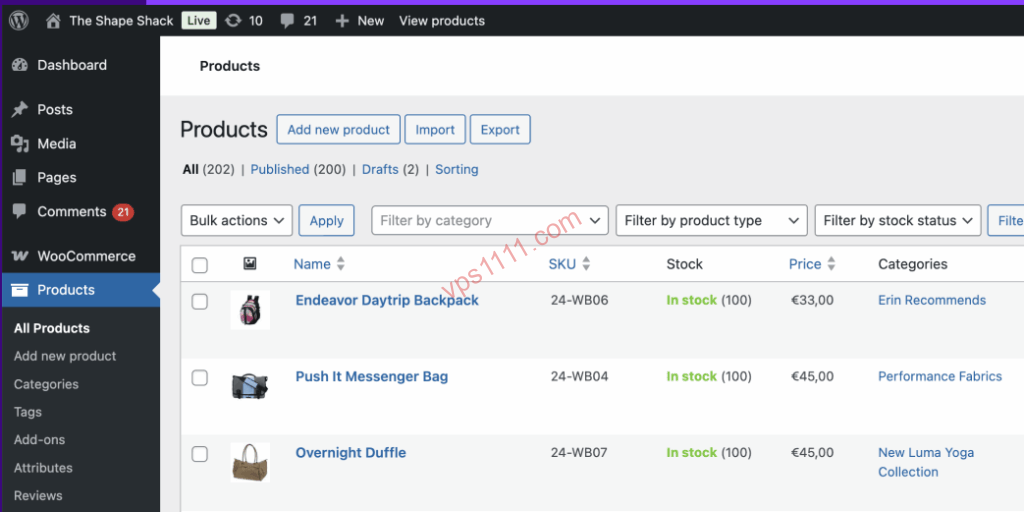
In the DTC e-commerce space, the WordPress + WooCommerce stack dominates due to its open-source nature and extensibility. However, after deploying a one-click stack on a standard 2C2G cloud server (like DigitalOcean, Linode, or a generic budget provider), importing just a few dozen products will make the site crawl.
This is dictated by WooCommerce’s underlying data structure. It heavily relies on the wp_postmeta and wp_options tables. Every page load triggers dozens, sometimes hundreds, of complex SQL queries in the background.
When external traffic hits an unoptimized system, every request becomes a Dynamic Request. PHP-FPM spawns a separate process for each visitor to execute code, while MySQL frantically performs full table scans. On a server with only 2GB of physical RAM, MySQL can easily consume 1GB. Once the remaining memory is exhausted by PHP processes, the Linux OOM-Killer steps in mercilessly, crashing and restarting the database. This is a classic OOM (out of memory) incident.
To break this deadlock, we must fundamentally restructure the request lifecycle from the ground up.
Architect’s Deep Dive: Scaling from 10 to 1,000 Concurrent Users
Under the 2C2G hardware ceiling, our core strategy is singular: “Never let unnecessary requests touch PHP or MySQL“.
Ditch the Bloat: Embrace Static/Dynamic Separation
While default Apache installations are easy to configure, their synchronous, process-based blocking model is extremely memory-intensive on low-spec hardware. As an architect, your first step must be a full migration to Nginx.
Nginx uses an asynchronous, non-blocking, event-driven architecture, handling tens of thousands of concurrent static files (images, CSS, JS) with minimal memory overhead. By configuring Static/Dynamic Separation, Nginx serves static assets directly from RAM or SSD without ever waking up backend PHP. You can refer to our guide Site Too Slow? Step-by-Step Nginx Static/Dynamic Separation & Cache Optimization for basic traffic routing. Additionally, as a public-facing commercial site, foundational security is critical. Before deployment, review Ultimate VPS Hardening Guide: Change Default Port 22 & Disable Root Password Login to secure your baseline.
Database Overwhelming Advantage: Slimming Down MySQL
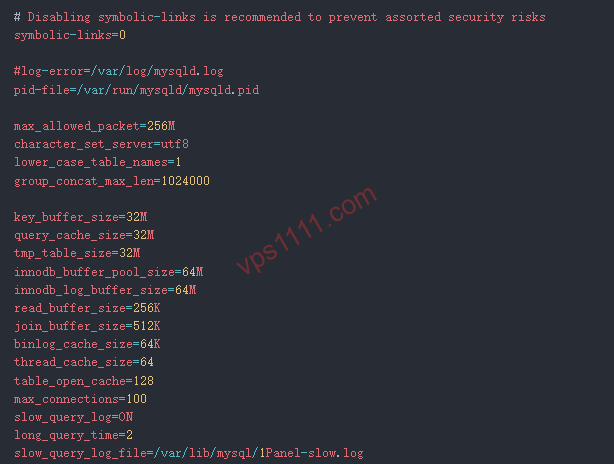
With only 2GB of RAM, you cannot let MySQL run unchecked. You must edit /etc/my.cnf or /etc/mysql/my.cnf to strictly cap core parameters:
innodb_buffer_pool_size: On a 2GB RAM machine, this value must never exceed512M, or it will easily trigger an OOM crash.max_connections: E-commerce databases do not need excessive connections. Setting this between100and150is sufficient. Higher limits only increase CPU context-switching overhead.
Enable Object Cache: Breaking the CPU Bottleneck
As mentioned, WooCommerce’s biggest performance killer is the sheer volume of repetitive SQL queries (e.g., fetching product prices and attributes for category pages). To avoid hitting MySQL on every request, you must install Redis on the server.
Once Redis is configured alongside a WordPress plugin (like Redis Object Cache), the system caches query results in memory. When the next user visits the same category page, PHP fetches data directly from high-speed Redis RAM, reducing a 2-second database query to 0.05 seconds. This is the critical tipping point for performance on low-spec hardware.
Cache Hit Ratio: The Ultimate Secret to Handling 1,000 Concurrent Users
The optimizations above only improve dynamic request handling. To genuinely handle 1,000 concurrent users on a 2C2G machine, the only path is maximizing the Cache Hit Ratio by serving pre-generated static HTML pages to the vast majority of visitors.
Nginx FastCGI Cache & Bypass Rules
Compared to bloated PHP plugins (like WP Super Cache), a more robust and lower-overhead approach is enabling FastCGI caching at the Nginx level. When a guest visits a product page, Nginx saves the PHP-generated HTML to disk. When the next visitor arrives, Nginx serves that HTML directly, completely bypassing PHP.
However, in a WooCommerce DTC environment, you must configure Bypass Rules with extreme caution. Your Nginx config must explicitly state: when users access /cart, /checkout, or /my-account, or when their cookies contain woocommerce_items_in_cart, caching must be strictly disabled. Misconfiguring this means User A will see User B’s shopping cart, causing severe privacy breaches and order corruption.
Once your site-wide cache hit ratio exceeds 95%, out of 1,000 concurrent browsing users, fewer than 50 requests will actually hit the CPU and MySQL. This is the fundamental logic behind handling heavy traffic on a 2C2G VPS.
Advanced Pitfall Guide: Don’t Let Poor Hardware Ruin Your Optimization
Even with flawless software tuning, terrible underlying VPS hardware will render your efforts useless. Especially those suspiciously cheap “special offer” machines often hide critical flaws.
💡 vps1111 Pitfall & Field Guide:
- Route Analysis: DTC e-commerce sites target global audiences. For the North American market, choose Los Angeles; for Europe, choose Frankfurt. Avoid cheap routes with severe suboptimal routing. Network latency impacts user experience far more than server processing time.
- Pitfall Warning: Beware of fly-by-night host providers practicing extreme overselling. Many providers throttle host IOPS, turning your VPS into a severe I/O Bottleneck with spinning rust. For WooCommerce, which relies heavily on frequent DB reads/writes, abysmal disk I/O will nullify any RAM or CPU tuning. You get what you pay for; don’t risk high-value orders to save a few dollars.
- Recommendation: ⭐⭐⭐⭐ (Requires basic Linux skills, but saves hundreds annually in server costs, offering exceptional ROI).
FAQ: Common Questions
After Optimization, Can a 2C2G VPS Really Handle 1,000 Users Checking Out Simultaneously?
Absolutely not. We must clarify the difference between “concurrent browsing” and “concurrent checkout”.
Under our optimized architecture, a 2C2G VPS handles 1,000 concurrent browsers thanks to a high page cache hit ratio, with Nginx blocking traffic at the edge. However, the “checkout” action is strictly uncachable. It’s a heavy dynamic request requiring PHP logic, MySQL order writes, and external payment gateway calls. On a 2C2G machine, you can realistically handle 10 to 20 concurrent checkout requests. This is entirely sufficient, as even with 1,000 active users, they won’t all hit the “Pay Now” button in the exact same millisecond.
Why Is the WooCommerce Admin Still Sluggish After Enabling Redis Object Cache?
This is a common scenario. Page caching (like FastCGI Cache or WP Rocket) is intentionally disabled for admin (/wp-admin) operations to prevent data corruption. Managing orders or products in the backend still heavily relies on CPU cycles and DB I/O. If your admin panel remains sluggish, it’s usually due to two factors: first, too many low-quality analytics plugins bogging down queries; second, the wp_options table is bloated with expired Transients. Regularly clean database bloat and keep only essential shipping and payment plugins.
For a DTC Site, Is Upgrading CPU or RAM More Cost-Effective?
For WooCommerce, prioritize upgrading RAM over CPU.
WordPress is inherently memory-hungry, especially with Redis Object Cache and a large MySQL buffer pool. RAM will always be the first bottleneck. Upgrading from 2C2G to 2C4G allows you to allocate more memory to the DB and cache, yielding a noticeable site-wide performance leap. Conversely, upgrading to 4C2G leaves RAM constrained; before the extra CPU cores can even flex, the system will start thrashing on slow Swap memory, causing overall lag.