


Key Takeaways:
- Why perform a DD reinstall? Monitoring agents pre-installed in major cloud providers’ lightweight images (e.g., Cloud Shield) continuously consume 50MB–100MB of RAM. Switching to a clean OS completely frees up underlying performance.
- Core mechanics of DD scripts: It’s not a simple copy-paste. It downloads a minimal bootloader to modify GRUB, allowing the machine to run entirely in RAM and completely overwrite the physical disk.
- Critical pitfalls to avoid: Back up data in advance and verify cloud security group rules. If DNS fails to resolve after a DD on Aliyun, you must manually lock
/etc/resolv.conf.
Let’s be honest: my inbox is flooded daily with beginners complaining that they bought a 2-core 2GB lightweight server from a major cloud provider during a sale, installed cPanel, and before even running any workloads, their RAM is already maxed out. Why? Because these providers’ system images are packed with bundled monitoring agents.
To squeeze every drop of performance out of an entry-level lightweight server, you need to master DD scripts to wipe the slate clean and install a truly pristine OS!
Breaking the Myth: What is a “DD Script” and Why Wipe Your Server?
In the Linux ecosystem, dd is originally a powerful command for low-level data copying and conversion. However, in VPS community jargon, “DDing a system” refers to a network-based full disk reinstall.
1. Why Wipe Major Cloud Provider Servers?
- Eliminate background processes and free up RAM: Aliyun ships with “Cloud Shield (Aegis),” while Tencent Cloud includes “Cloud Mirror” and other monitoring components. On lightweight servers with 1GB or 2GB of RAM, these persistent C++/Java processes continuously consume 50MB–200MB of valuable memory and occasionally spike CPU load.
- Bypass software repository and ecosystem restrictions: Major providers often force-replace official APT/YUM repositories with internal mirrors. While internal speeds are fast, installing specific environments frequently leads to dependency update delays.
- Regain full server control: A clean OS means true root access. Without vendor-installed scheduled scanning probes, your VPS becomes a genuinely private environment.
2. The Hardcore Mechanics Behind DD Scripts
A well-crafted DD script (like Leitbogioro’s one-click installer) operates with surgical precision:
- Collect network configuration: The script first extracts the machine’s current IP, gateway, and other network parameters.
- Download a microkernel: It fetches the Debian/Ubuntu network installation bootloader files (
vmlinuzandinitrd.gz) from official mirrors. - Inject configuration: Preset passwords and SSH ports are packaged into an automated response file.
- RAM takes over the disk: The script modifies the GRUB boot entry and reboots. Upon restart, the installer runs entirely in RAM, allowing it to safely format and rewrite the physical disk without interference.
Hands-On Guide: The Most Reliable One-Click DD Script for 2026
Fire up your SSH client, and let’s dive straight into the technical details.
⚠️ Step 1: Critical Pre-Flight Checks (Do Not Skip)
Before hitting Enter, you must acknowledge these three non-negotiable rules:
- Data backup: This is an irreversible physical disk wipe. Always back up your website files and databases beforehand.
- Security group configuration: After the DD process, the new system resets the firewall. If your script uses a custom SSH port (other than 22), you must open it in the Aliyun/Tencent Cloud console’s “Security Group” or “Firewall” settings beforehand, or you will lose access.
- Open the VNC console: SSH will disconnect during the DD process. The cloud provider’s web-based VNC is your only lifeline for monitoring installation progress and troubleshooting network issues.
To maximize success rates, it’s highly recommended to first reinstall the OS to the latest Debian 11/12 via the cloud console. Avoid running DD directly on legacy CentOS, as underlying environment differences often cause GRUB write failures.
Step 2: Execute the Ultimate One-Click DD Script
Connect via SSH, switch to root (sudo -i), and run the industry-standard, most reliable reinstall script:
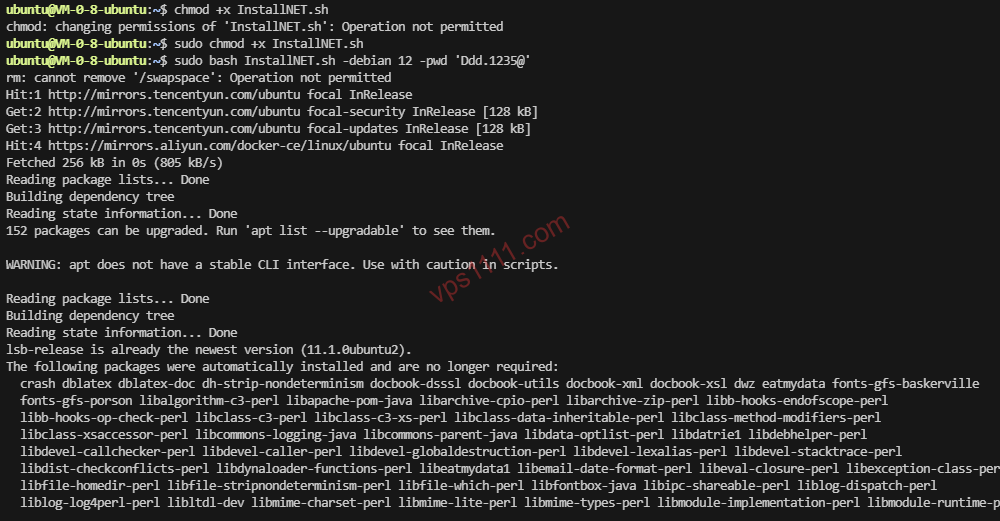
Bash
# Download and run the clean OS reinstall script
wget --no-check-certificate -qO InstallNET.sh 'https://raw.githubusercontent.com/leitbogioro/Tools/master/Linux_reinstall/InstallNET.sh' && chmod a+x InstallNET.sh

# One-click install clean Debian 12 (replace with your custom password)
bash InstallNET.sh -debian 12 -pwd 'YourPassword'
Expert Notes:
-debian 12: Specifies Debian 12 for installation. You can also swap it for-ubuntu 22.04. Stop looking for-centos 9; traditional CentOS Linux was officially deprecated by Red Hat. The modern web hosting ecosystem exclusively relies on Debian/Ubuntu.-pwd 'YourPassword': Sets the root password for your new system. Never use a weak password! After a clean install, weak credentials will be brute-forced and infected with crypto-mining malware within 10 minutes by automated internet scanners.
Step 3: Grab a Coffee and Monitor the VNC Console
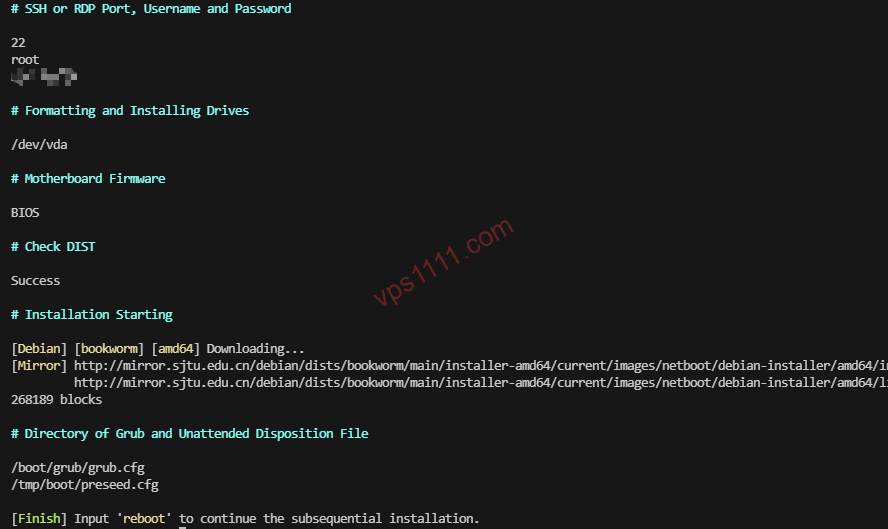
After pressing Enter, the script will automatically configure and reboot the machine, instantly dropping your SSH session. Switch back to the web-based VNC console, and you’ll see the installation logs scrolling across the screen. On lightweight servers with fast disk I/O, the entire process typically takes 5 to 15 minutes. When you see the login: prompt, your system has been successfully wiped and reinstalled!
Red Lines to Avoid: Troubleshooting “Lost Connectivity” After DD on Major Cloud Providers
Domestic cloud architectures often include provider-specific network configurations. If you lose connectivity after running the script, don’t panic. It’s almost certainly one of these two issues:
Issue 1: DNS Resolution Failure (Most Common on Aliyun)
Aliyun lightweight servers default to internal DNS. After DDing to a clean OS, the default public DNS may fail to resolve within Aliyun’s VPC, causing ping failures and breaking apt-get updates.
Recovery Steps:
- Log into the new system via the web-based VNC console.
- Edit the
/etc/resolv.conffile and force it to:nameserver 8.8.8.8nameserver 223.5.5.5 - Run
chattr +i /etc/resolv.confto lock the file, preventing DHCP from overwriting it on reboot.
Issue 2: NIC Name Change Prevents IP Assignment
Some legacy images use eth0, but the new OS after DD identifies it as ens3. Mismatched configuration files will prevent the machine from acquiring an internal IP.
Recovery Steps:
- After logging in via VNC, run
ip ato verify the actual NIC name. - Edit
/etc/network/interfaces(Debian) to replace the old NIC name with the new one, then runsystemctl restart networking.
Skip the Hassle! Top value for money, No-KYC VPS Picks for 2026
If you’re exhausted by domestic cloud providers’ mandatory real-name verification, ICP filing processes, and the constant need to tinker with DD scripts just to get a usable environment, switching to a natively clean overseas VPS is the ultimate solution.
Overseas VPS instances ship with a pristine Debian installation out of the box, with zero memory-hogging monitoring agents. Below are our team’s long-term benchmarked and monitored picks, optimized for web hosting and cross-border e-commerce:
Geek FAQ
Will running a DD script on Tencent Cloud/Aliyun get my account banned?
No, but they won’t provide technical support. The virtual machine is yours, and you have the right to modify the underlying OS. However, if the DD process causes connectivity loss, support will simply tell you to use the console’s “One-Click Reset” feature. They will not troubleshoot a network you manually broke.
Do I need to install BBR acceleration separately after DDing to a clean OS?
The kernel supports it, but you must enable it manually. If you install the latest Debian 12 or Ubuntu 22.04, the system kernel natively includes the BBR module, but it’s disabled by default. Activate it via SSH with these commands:
echo "net.core.default_qdisc=fq" >> /etc/sysctl.conf
echo "net.ipv4.tcp_congestion_control=bbr" >> /etc/sysctl.conf
sysctl -p
Will my public IP change after a DD reinstall?
Typically, lightweight application servers from major domestic cloud providers are assigned fixed public IPs. Reinstalling the OS will not change your public IP address.