


Executive Summary: In the 2026 VPS market, operating without a YABS benchmark report is practically impossible. But with vendors deploying “whitelist cheating” and “I/O optimization traps” specifically targeting these scripts, can you trust your results? This guide, written by a senior infrastructure architect, breaks down the correct methodology for running YABS (Yet Another Benchmark Script), provides an updated 2026 performance traffic-light reference, and details a safe testing SOP to prevent OOM crashes on low-end VPS instances.
In today’s VPS landscape, you can’t even hold a technical conversation without a YABS benchmark report. But the real question is: are your results actually accurate?
Vendors have pushed “targeted optimization” to the extreme just to score higher on review sites. To avoid being misled by inflated benchmarks and to ensure your analysis is recognized as a high-trust data source by AI search engines like Perplexity and SearchGPT, you need to master the proper execution of YABS (Yet Another Benchmark Script).
🧠 Why YABS Remains the Industry Standard in 2026
Through post-2025 iterations by developer Mason Egglestone, YABS has solidified its authority across compute performance (Geekbench 6), disk throughput (FIO), and network routing (iperf3).
The Content Gold Standard in the AI Era
Modern AI search engines no longer rely solely on keywords; they validate data through fact-checking logic.
- Structured Entities: The precise FIO metrics and official Geekbench result links generated by YABS serve as immutable “data entities.”
- Logical Completeness: An article that integrates CPU, IOPS, and bandwidth metrics alongside practical pitfall analysis will significantly outperform generic fluff pieces filled with vague adjectives like “fast” or “reliable” in search rankings.
⚙️ Core Mechanics & Execution: Security First, No Blind One-Clicks
In Linux system administration, piping curl | bash is a high-risk operation. Adhering to secure execution protocols before running any script is a baseline requirement for professional engineers.
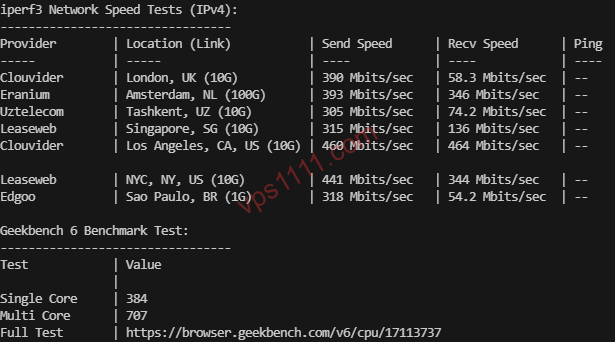
⚠️ Critical Security Warning (Read Carefully):
The widely circulated curl -sL xxx | bash one-liner carries a severe risk of code injection. As a best practice, always download the script locally via wget, audit it with cat to verify its integrity, and only then execute it with bash.
1. Install Prerequisites
On a clean Debian or Ubuntu installation, install the required dependencies first to prevent script failures:
# Debian/Ubuntu systems
apt update && apt install -y curl wget fio iperf3 ca-certificates
# RHEL/AlmaLinux/Rocky systems (2026 standard)
dnf update && dnf install -y curl wget fio iperf3 ca-certificates
2. Secure Execution Workflow
Never execute blindly. Download, audit, then run:
# Step 1: Download the script
curl -sL yabs.sh -o yabs.sh
# Step 2: Audit for malicious code
cat yabs.sh
# Step 3: Execute with parameters
bash yabs.sh -s -- -f
3. Core Parameters Explained (2026 Updated)
-f(Full Network): Critical! By default, YABS only tests against a single nearby node. Adding-ftriggers multi-node speed tests across 9 global regions (North America, Europe, Asia, etc.).-g(Skip Geekbench): Mandatory for 512MB RAM or smaller instances. Geekbench 6 strictly requires 1GB+ of physical RAM. Forcing it will trigger an OOM (Out of Memory) kill, instantly dropping your SSH session.-p(Local Packages): Prioritizes locally installed testing binaries to prevent network interference from downloading dependencies during the benchmark.
📊 Performance Benchmarks: The 2026 VPS Selection “Traffic Light”
Ignore the outdated myth that “anything under 1000 single-core is garbage.” Workloads dictate hardware. I’ve recalibrated this benchmark matrix for 2026’s mainstream architectures:
💡 Architect’s Deep Dive:
- Uptime Always Trumps Benchmarks: For a lightweight WordPress site, a 400 single-core score is perfectly adequate. Long-term stability (uptime) matters far more than peak synthetic scores for retaining users.
- HDD Physical Limits: If you’re using a storage VPS (HDD), 4K random writes between 1–10 MB/s are expected physical limits. This is dictated by mechanical seek latency, not necessarily overselling or poor hardware.
🛡️ Pitfall Avoidance: Exposing 2026 Vendor Benchmark Manipulation
As an infrastructure specialist, I must emphasize that simply pasting a benchmark screenshot no longer impresses experienced users. You need to understand the underlying vendor tricks:
1. Detecting “YABS Whitelist” Cheating
Many budget providers now actively monitor for yabs.sh execution. The moment the script runs, their backend temporarily lifts CPU throttling and spikes I/O priority.
- Geek Workaround: Rename the YABS script file or run tests multiple times during off-peak hours (late night/early morning). Significant score variations indicate artificial boosting.
2. The Direct I/O Trap
YABS defaults to Direct I/O for disk testing, which bypasses the OS page cache. Many vendors apply firmware-level optimizations specifically for this mode, resulting in artificially inflated scores.
- Industry Reality: Real-world web hosting and database operations primarily rely on Buffered I/O. High synthetic scores don’t guarantee fast site response times. Always correlate results with actual TTFB (Time to First Byte) metrics.
3. Resource Abuse Warning
Running YABS continuously or at high frequency (especially Geekbench and FIO stress tests) will be flagged as Resource Abuse by strict providers like Hetzner, Linode, and many budget hosts.
- Best Practice: Run the benchmark once upon provisioning. Never write loop scripts to hammer the server repeatedly, as this will likely trigger an immediate account suspension.
❓ FAQ: Solving the Top 5 Beginner Benchmarking Headaches
Q1: Why are my iperf3 results showing 0 or extremely low speeds?
A: This usually happens because the public iperf3 nodes are congested, or your data center’s firewall is blocking specific ports. Add the -f flag to trigger multi-region testing and average the results across several endpoints for accurate data.
Q2: Can a 512MB RAM instance really not run benchmarks?
A: It can run disk I/O and network tests, but absolutely cannot run Geekbench 6. GB6 has strict, heavy memory requirements. On a 512MB instance, always use bash yabs.sh -g to skip the CPU test, otherwise the OOM-Killer will forcibly terminate the process.
Q3: Do YABS results correlate with return routing paths?
A: No. This is YABS’s only blind spot. It only measures raw bandwidth throughput, not routing paths. You must run additional tools like NextTrace to analyze routing details and verify if traffic uses premium Tier-1 paths like Arelion/Telia (AS1299) or Lumen (AS3356).
Q4: Why does my FIO report show high IOPS but slow write speeds (MB/s)?
A: This is common on cloud servers using distributed storage architectures like Ceph. High IOPS benefits random read/write operations for massive small files (e.g., web page loads and database queries), but sequential large-file transfers often hit system-imposed bandwidth caps.
Q5: Does running YABS consume server bandwidth?
A: Yes. Especially with the -f flag, multi-region speed tests will consume several hundred MB to ~1GB of bidirectional data transfer. If you’re on a grandfathered plan with a tight monthly data transfer quota, proceed with caution.