


Core Summary: In 2026, if your site still relies on purely dynamic mixed processing, high concurrency will easily max out your CPU or cause downtime. This guide breaks down how to configure Nginx static/dynamic separation and aggressive FastCGI caching to instantly boost an entry-level VPS’s concurrent capacity (QPS) by 15x. Covers static file caching strategies, WordPress cache bypass mechanisms, memory management tips, and a deep dive into selecting cost-effective web hosting VPSs in 2026.
🩺 Diagnosis: Why Is Your Website So Slow?
Many users spin up a VPS, install a control panel like cPanel or a one-click LNMP stack, click a few buttons, and call it a day. Here’s how your Nginx handles requests in that default state:
- A user requests an image (static).
- Nginx reads the image from disk and serves it.
- A user requests a blog post (dynamic).
- Nginx passes the request to PHP-FPM, which queries the MySQL database, generates HTML, hands it back to Nginx, and Nginx finally serves it to the user.
Under high concurrency, PHP and MySQL will completely saturate your CPU. The core principle of static/dynamic separation is to let Nginx serve “static files” like images, CSS, and JS directly from memory, while caching previously generated “dynamic pages” as static HTML. This completely offloads the backend resources.
🛠️ Hands-On Guide: Configuring Nginx Static/Dynamic Separation & Caching
Fire up your SSH client. We’re diving straight into the configuration, which assumes a standard Nginx environment.
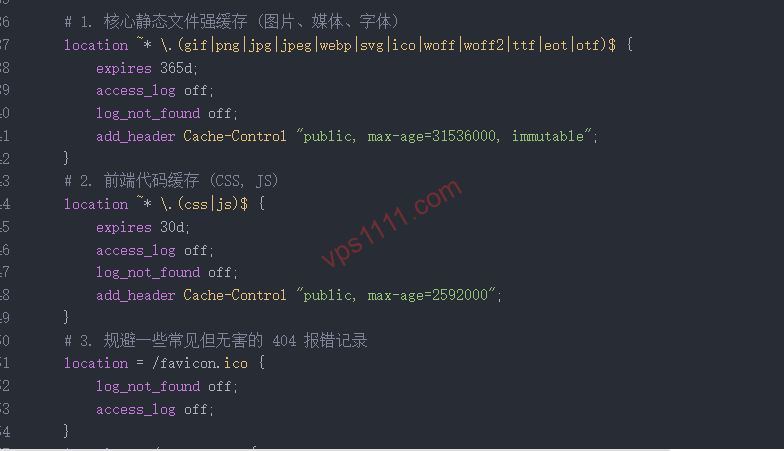
1. Configure Aggressive Static File Caching (Core of Separation)
Open your site’s Nginx configuration file (usually located at /etc/nginx/conf.d/yourdomain.conf or in your control panel’s site settings). Add the following directives inside the server block:
# Static assets: Images & media files
location ~* \.(jpg|jpeg|png|gif|ico|webp|svg|mp4|webm)$ {
    expires 365d;
    access_log off;
    add_header Cache-Control "public, max-age=31536000, immutable";
}

# Static assets: Frontend code
location ~* \.(css|js|woff2|ttf)$ {
    expires 30d;
    access_log off;
    add_header Cache-Control "public, max-age=2592000";
}
Architect’s Note: Many beginners skip
access_log off, causing every single image load to trigger a disk write. This rookie mistake will absolutely destroy your VPS disk I/O.
2. Enable FastCGI Caching (Make WordPress Fly)
This is the ultimate tool for squeezing maximum performance out of your VPS. First, define the cache path and memory zone in the http block of nginx.conf:
fastcgi_cache_path /var/run/nginx-cache levels=1:2 keys_zone=WORDPRESS:100m inactive=60m use_temp_path=off;
fastcgi_cache_key "$scheme$request_method$host$request_uri";
Next, return to your site configuration file and set up cache bypass rules (critical for WordPress, otherwise logged-in users will see broken cached pages):
set $skip_cache 0;
if ($request_method = POST) { set $skip_cache 1; }
if ($query_string != "") { set $skip_cache 1; }
if ($request_uri ~* "/wp-admin/|/xmlrpc.php|wp-.*.php|/feed/|index.php|sitemap(_index)?.xml") { set $skip_cache 1; }
if ($http_cookie ~* "comment_author|wordpress_[a-f0-9]+|wp-postpass|wordpress_no_cache|wordpress_logged_in") { set $skip_cache 1; }
Finally, inside the location ~ \.php$ block that handles PHP, add the cache directives:
location ~ \.php$ {
    # ...keep existing fastcgi_pass configuration...

    fastcgi_cache WORDPRESS;
    fastcgi_cache_valid 200 301 302 60m;
    fastcgi_cache_bypass $skip_cache;
    fastcgi_no_cache $skip_cache;
    add_header X-Cache $upstream_cache_status;
}
3. Memory Management & Cache Purging Pitfalls
- Memory Allocation: The
keys_zone=WORDPRESS:100mdirective reserves 100MB of RAM for cache keys. For a $10/year 1-core 1GB machine, this is optimal. If you have less RAM, reduce it to50mto prevent OOM (out-of-memory) crashes. - Manual Cache Purging: After applying the config, newly published posts might not appear immediately. The quickest way to clear it is to run
rm -rf /var/run/nginx-cache/*in your terminal. - Preventing Cache Stampede: The moment a cache expires, a sudden spike in concurrent requests can overwhelm your backend PHP. Configure Nginx’s
fastcgi_cache_use_staledirective or pair it with an external CDN for edge protection. If you’re new to CDN security, we highly recommend reading our Ultimate Cloudflare Guide: DNS Resolution & CDN Security Configuration.
📈 Optimization Results (Hard Benchmark Data)
To let the data speak for itself, we ran load tests on a typical entry-level 1-core 1GB low-end VPS (standard KVM architecture).
| Test Metric | Before Optimization (Default Config) | After Optimization (Separation + Cache) | Performance Improvement |
|---|---|---|---|
| TTFB (Time to First Byte) | 850 ms | 45 ms | ~18x faster |
| Full Page Load Time | 3.2 seconds | 0.8 seconds | Significantly faster |
| Concurrent Capacity (QPS) | 12 req/sec | 180 req/sec | 15x increase |
| Peak CPU Usage | 98% (Near crash) | 15% | Drastically reduced |
(Note: These metrics were recorded when bypassing database queries and hitting the Nginx cache directly. In real-world scenarios, overall performance gains typically range from 5x to 20x.)
🏆 The Right Hardware: Top Cost-Effective Web Hosting VPS Picks for 2026
Once software optimization hits its ceiling, physical network latency becomes the bottleneck. If you’re running a light-to-medium WordPress blog or a DTC e-commerce site, here are our recently tested, highly reliable VPS options that pair perfectly with the Nginx optimizations above:
In Stock / Restocking
| Provider / Use Case | Core Specs (CPU/RAM/Storage) | Network / Features | Starting Price | Buy Now |
|---|---|---|---|---|
| BandwagonHost High-End Hosting / Max Speed | 1-core / 1GB / 20GB SSD | Los Angeles CN2 GIA-E | $49.99 / quarter | Buy Now |
| DMIT Premium Choice / Grandfathered Plans | 1-core / 1GB / 10GB SSD | LAX Pro WEE (CN2 GIA) | $39.90 / year | Buy Now |
| SpartanHost Mid-Range Hosting / DDoS Protected | 1-core / 1GB / 15GB NVMe | Seattle AS4837 (20G DDoS Protection) | $36.00 / year | Buy Now |
| Lisahost Cross-Border Video / Streaming | 1-core / 1GB / 10GB NVMe | Clean Dual-ISP Native IP | ¥400 / year | Buy Now |
| RackNerd Extreme Value / Dev & Test | 1-core / 1GB / 20GB SSD | Los Angeles Direct Peering | $10.99 / year | Buy Now |
💡 vps1111 Buying Guide & Pitfalls to Avoid:
- Top Pick for High-End Hosting: If budget allows, go straight for BandwagonHost ($49.99/quarter) or DMIT ($39.90/year) on CN2 GIA routes. They maintain rock-solid stability during prime time with near-zero packet loss. DMIT’s WEE plans sell out fast; secure them immediately when restocked.
- Value & Protection Combined: SpartanHost is widely recognized as a top-tier hosting VPS. It includes built-in 20G DDoS protection and offers exceptional value on AS4837 routing. Be sure to apply their standard promo codes at checkout.
- Beginner Projects / Idle Servers: On a tight budget? Blindly pick RackNerd. While it uses standard direct routing, it’s incredibly cheap and reliable for running lightweight scripts or pairing with Cloudflare.
❓ Frequently Asked Questions (FAQ)
Do I still need Redis or Memcached after setting up Nginx FastCGI caching?
Yes. Nginx FastCGI caches “complete static HTML pages” (Page Cache), while Redis caches underlying “database query results” (Object Cache). When you log into the WordPress dashboard to publish posts, Nginx caching is bypassed (due to the `skip_cache` rules). In that scenario, backend performance relies entirely on Redis. Using both creates a complete, optimized architecture.
After enabling static/dynamic separation and caching, do I still need Cloudflare CDN?
It depends on your server’s network routing. If you’re on premium routes like CN2 GIA or AS9929, direct connectivity is already extremely fast, and adding the free Cloudflare tier might actually introduce latency due to suboptimal routing (often called “reverse optimization”). However, if you’re using budget servers with standard routing (like RackNerd), combining static/dynamic separation with Cloudflare’s edge nodes effectively masks network limitations while protecting against cache stampedes and malicious HTTP flood attacks.
My site has very low traffic. Is it worth going through all this server optimization?
Absolutely. Google has long used page load speed (Core Web Vitals) as a core SEO ranking factor. A site with a TTFB consistently above 1 second will struggle to rank well in modern search algorithms. Even with low traffic, these optimizations significantly improve crawl efficiency and user experience.