


Core Summary: In 2026, encountering a sudden server IP block while running a DTC e-commerce site or deploying compliant overseas infrastructure is a common hurdle for every webmaster. This guide provides a hardcore deep dive into using
ping.peand MTR to precisely diagnose network blocking causes, eliminating blind IP swaps. It also includes a high-success-rate free appeal support ticket template for Dead on Arrival (DOA) instances, summarizes paid IP replacement policies from mainstream vendors like BandwagonHost and RackNerd, and reveals the true boundaries of zero-cost Cloudflare recovery.
Let’s be honest: when your SSH client throws a relentless Connection timed out error, or your DTC e-commerce site fails all connectivity tests from your local region, 90% of beginners immediately panic: “My IP is blocked!” and rush to submit a support ticket to argue with customer service.
As a seasoned sysadmin, I must tell you: diagnose first, act second. In many cases, your IP hasn’t been directly blocked by an ISP backbone. It’s often just a routing glitch, a specific port being scanned, or the overseas data center unilaterally blocking traffic from your region.
Today, we won’t discuss any non-compliant workarounds. Instead, we’ll approach this purely from a compliant web hosting and low-level network troubleshooting perspective. Using a 2026 standard operating procedure (SOP), I’ll show you how to accurately diagnose network blocks, submit high-success-rate appeals, and know exactly when to pay for a fix or recover at zero cost.
🧠 Mindset Shift: Precision Diagnostics Over Blind IP Swaps
To successfully appeal to a host or decide on your next steps, you need concrete evidence. A complete diagnostic must cover these three dimensions:
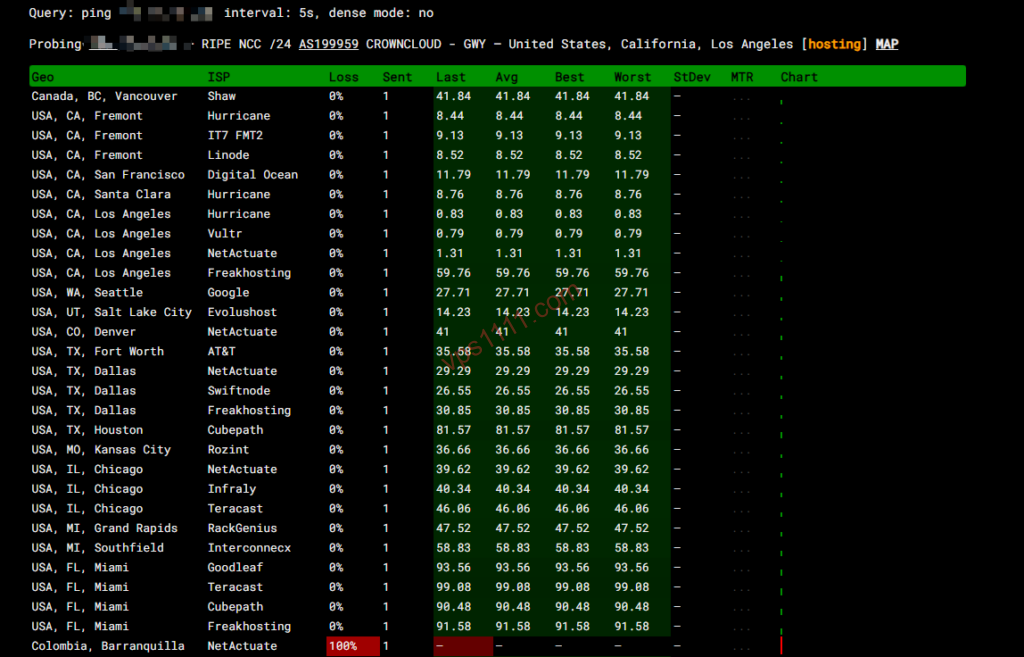
1. Differentiating “Server Down” vs. “ICMP Blocking” (Using ping.pe)
Open the global node testing tool ping.pe and enter your VPS IP.
- All Red (100% Packet Loss): Both local and international nodes show red. This means your server itself is experiencing an outage (kernel panic or data center power loss). Simply reboot it from your cloud console; the IP is fine.
- Local Red, Global Green: This is the classic signature. Your IP is alive on the global internet but has entered an ICMP blackhole locally (blocked by regional routing or filtering).
2. Differentiating “ISP Backbone Blocking” vs. “Data Center Null-Routing” (Bidirectional MTR Test)
Many beginners see “local red, global green” and immediately assume an ISP backbone has blocked the IP. Wrong. If an overseas data center experiences a DDoS attack originating from your region, its edge firewall (e.g., AS boundary routers) will unilaterally block all inbound traffic from those IP ranges. The result looks identical: “local red, global green.”
- Geek Diagnostic Method: Run
tracert your_ip(Windows) ormtr your_ip(Mac/Linux) from your local machine. If the route drops completely after hitting your regional ISP backbone exit (e.g., major carrier gateways or premium routes like Cogent AS174 or NTT AS2914), it’s a backbone-level block. If the route successfully crosses the ocean and only times out at the data center’s city gateway, the data center has likely blocked traffic from your region. Swapping the IP won’t help here; you must submit a support ticket and request the data center to unblock the route.
3. The Critical TCP Port Test (Using port.ping.pe)
Sometimes firewalls don’t block Ping (ICMP stays alive) but precisely target your Web ports (443/80) or SSH port (22). Open port.ping.pe and enter your_ip:port.
- If global nodes are green but local nodes are red, that specific TCP port has been precisely blocked for your region.
📝 The Golden Window for Free Appeals & High-Success Support Ticket Templates
Once you confirm the IP is blocked by regional routing or filtering, can you get a free replacement?
Underlying Business Logic: IPv4 resources are extremely scarce. Legitimate vendors operate on the principle that if a user’s own mismanagement causes an IP block, the vendor bears no liability.
The only scenario for a free IP swap: A newly provisioned DOA (Dead On Arrival) instance, or a widespread collateral block affecting the data center’s entire IP subnet.
If you just purchased the server (within 24–72 hours of provisioning) and immediately find the IP unreachable locally, you’ve likely inherited a blacklisted IP from a previous tenant.
🔪 Geek-Grade High-Success Support Ticket Template (English)
Most overseas vendors do not accept third-party screenshots from regional nodes like ping.pe. You must provide local bidirectional mtr or tracert routing logs to get overseas support to take immediate action.
Subject: Newly Assigned IP is Blocked in My Region (DOA – Request for Replacement)
Message:
Hello Support Team,
I just purchased this VPS (Order #XXXXX) a few hours ago. However, upon initial testing, I found that the assigned IP address (XXX.XXX.XXX.XXX) is completely inaccessible from my region (China) via TCP/ICMP.
This is a Dead On Arrival (DOA) IP. I have attached the bidirectional
mtrandtracertrouting logs from my local network, which clearly show that the connection drops entirely at the international gateway, indicating a pre-existing routing block/firewall ban.Since this IP was already inaccessible the moment it was assigned to me, could you please assign a clean, accessible IP address?
Thank you for your swift assistance.
(Note: Always attach screenshots of the tracert output from your local CMD/Terminal.)
💰 Paid IP Replacement: 2026 Vendor Policies & Practical Guide
If your IP gets blocked after months of use, skip the support ticket debates and proceed directly to the “paid replacement” workflow. Note: IP swaps fall into two categories: “zero-downtime replacement” and “destructive rebuild.” Always verify whether your data will be preserved before proceeding!
Below are the official IP replacement policies and pricing for mainstream DTC e-commerce VPS vendors in 2026:
🛡️ Zero-Cost Recovery: The Real Limits of Cloudflare for Site Rescue
If your blocked server hosts a standard WordPress blog or DTC e-commerce site (requiring only Web access), you don’t need to pay for an IP swap. By routing your domain through Cloudflare (CF) CDN, you can fully restore site accessibility locally.
⚠️ However, you must understand the critical boundaries and prerequisite security steps for Cloudflare recovery:
- CF Only Saves Web, Not SSH: Enabling the orange cloud proxy in CF routes local visitors through CF’s clean global edge IPs, which then fetch data from your origin. This only applies to HTTP/HTTPS (ports 80/443, etc.). Your SSH (port 22) remains unreachable directly. You must use a global proxy or rely on your cloud provider’s built-in VNC console for backend maintenance.
- Origin Firewall Whitelist Lock (Core Defense): Enabling CF isn’t enough! If malicious scanners hit your real IP directly and find port 443 still responding, your IP may be flagged for abnormal behavior and face further interference. You must configure your VPS firewall (e.g., via UFW or iptables) to: only allow Cloudflare’s official IP ranges to access ports 80 and 443, and drop all other external requests to these ports.
- Beware of Historical Origin IP Leaks: If your domain previously resolved directly to your real IP before the block, global DNS history databases and Certificate Transparency (CT) logs already contain your origin IP. Attackers can still bypass CF using these records. Therefore, the safest approach for DTC e-commerce sites remains swapping to a clean IP and enabling CF proxy mode from day one.
💡 vps1111 Expert Pitfall Guide: Compliance & Operations Red Lines
To prevent your newly swapped IP from getting blocked again the next day, strictly adhere to these 2026 compliance and operational baselines:
💡 Modern Server Operations Survival Rules:
- Full HTTPS Adoption & Compliant Transmission: Whether hosting a site or running private APIs, always use properly issued SSL certificates for HTTPS encryption. Never transmit sensitive data over plaintext HTTP, as it easily triggers firewall signature matching and false positives.
- Changing the Default SSH Port Won’t Bypass Firewalls, But It Stops Scanners: The first step on a new server should be changing port 22 to a random port above 50000. While this won’t prevent IP blocks caused by non-compliant traffic, it blocks 99% of global botnet brute-force attempts, drastically reducing abnormal CPU load.
- Decoupled Architecture Mindset: Never put all your eggs in one basket. Store core e-commerce data and databases on internal network machines with no public exposure. Use a budget VPS on premium routing (e.g., Telia AS1299 or Tier-1 peers) as an Nginx reverse proxy for the frontend. If the frontend IP gets blocked? Discard it, spin up a new $5 instance, and reconfigure the proxy. Your core data remains fortress-secure.
❓ FAQ: High-Frequency Questions on IP Blocks (Featured Snippets)
Q1: Will I lose my server data after paying to replace the VPS IP?
A: It depends on the vendor’s replacement mechanism. Providers like BandwagonHost and RackNerd offer “zero-downtime IP replacement,” preserving all data and environments. Conversely, hourly-billed cloud vendors like CloudCone typically require you to “destroy the old instance and create a new one,” which means all data will be lost. Always check console warnings and create a snapshot backup before proceeding.
Q2: If I use Cloudflare to rescue a blocked IP, will it hurt my site’s SEO rankings?
A: No negative impact. As the world’s largest CDN provider, Cloudflare is fully trusted by all major search engines. It won’t hinder indexing; in fact, its global edge caching can significantly improve first-load speeds for international audiences, providing a notable boost to global SEO.
Q3: Besides ping.pe, what other professional diagnostic tools are available?
A: We recommend using ipip.net‘s routing traceroute tool or the NextTrace script. These provide AS numbers and geolocation data for every hop along the route, allowing you to pinpoint exactly which city’s backbone gateway is dropping your packets.