


Let’s be honest: as major public cloud providers tighten bandwidth throttling and implement aggressive, indiscriminate file scanning, handing over your core data infrastructure to third-party commercial clouds is no longer the preferred choice for geeks and sysadmins.
For geeks, provisioning a high-capacity storage VPS to build a private, offline data synchronization node and a highly available media repository is the definitive path to true data sovereignty. It delivers full-speed upstream/downstream throughput while ensuring your offsite disaster recovery, compliant high-res media libraries, and large-scale open-source datasets remain strictly private and fully under your control.
Today, I’ll walk you through a deployment architecture aligned with 2026 industry standards, completely demystifying the private deployment of storage VPS instances. This guide provides precise hardware selection criteria, troubleshooting logic, and production-ready, one-line execution commands.
Core Concepts: What is a Storage VPS and What Can It Do?
In standard VPS environments, machines typically ship with 20GB to 40GB of NVMe SSD storage, optimized for web hosting or code execution. The core value proposition of a storage VPS is its highly cost-effective, massive storage capacity (usually starting at 500GB and scaling beyond 10TB). These nodes typically utilize high-density HDD arrays configured in RAID, paired with 1Gbps or higher unmetered backbone bandwidth.
With a storage VPS, your primary compliant use cases include:
- Private Offline Download & Sync Engine (qBittorrent): Deploy a server on a global backbone to run 24/7 full-speed downloads of legal open-source Linux ISOs, large AI training datasets, or public archives. Eliminate local machine power consumption and connection drops entirely.
- Private Media & Asset Frontend (AList / Emby): Automatically generate poster walls and directory trees from synced high-res video files or 3D render assets directly on the VPS. Stream content seamlessly via web browsers or local media players for review or playback.
- Offsite Disaster Recovery Node: Serve as a geographically isolated physical backup center for your local NAS, enterprise code repositories, or critical work documents, achieving low-cost data redundancy.
Hardware & Data Center Selection: Moving Beyond Spec Sheets
For high-capacity storage and data routing, CPU and RAM requirements are minimal. The three core evaluation metrics are: Cost per GB, Network Throughput, and Disk I/O Stability.
For transferring large volumes of legal data (e.g., enterprise cloud transit, blockchain node snapshots), European data centers (such as Romania or Germany) are highly recommended. These regions typically offer extremely affordable high-capacity block storage and abundant 10Gbps unmetered backbone bandwidth, satisfying massive data throughput requirements at minimal cost.
Practical Deployment: One-Click qBittorrent Offline Engine via Docker
In 2026, the absolute industry standard for modern application deployment is Docker Compose V2. It provides perfect environment isolation, preventing system-level dependency conflicts.
1. Base Environment Verification & Docker Installation
After provisioning a fresh Debian 12 instance, connect via SSH. The Debian 12 kernel enables the BBR congestion control algorithm by default, eliminating the need to manually inject parameters into sysctl.conf. Verify BBR activation with the following command:
sysctl net.ipv4.tcp_congestion_control
# Expected output: net.ipv4.tcp_congestion_control = bbr
Next, install the latest Docker release using the official installation script:
curl -fsSL https://get.docker.com | sudo sh2. Drafting a Modern Compose Configuration
qBittorrent is widely recognized as the most robust and efficient offline data synchronization tool available. Create a dedicated working directory for it:
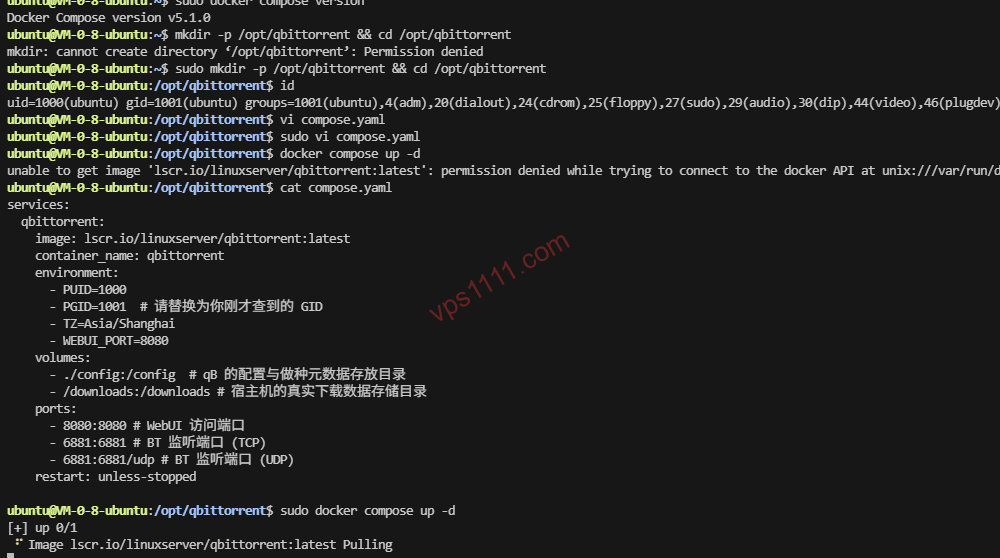
mkdir -p /opt/qbittorrent && cd /opt/qbittorrent⚠️ Permission Pitfall Warning: Docker volume mapping often encounters permission barriers. You must identify the UID and GID of your current host user (or the user with read/write access to /downloads). Run id in the terminal and note the uid and gid values (typically 0 for root, or 1000 for standard users).
Create the compose.yaml file (note: the version field is deprecated in the 2026 Compose V2 standard):
services:
  qbittorrent:
    image: lscr.io/linuxserver/qbittorrent:latest
    container_name: qbittorrent
    environment:
      - PUID=0  # Replace with your host UID
      - PGID=0  # Replace with your host GID
      - TZ=Asia/Shanghai
      - WEBUI_PORT=8080
    volumes:
      - ./config:/config  # qB configuration and metadata directory
      - /downloads:/downloads # Host directory for actual downloaded data
    ports:
      - 8080:8080 # WebUI access port
      - 6881:6881 # BT listening port (TCP)
      - 6881:6881/udp # BT listening port (UDP)
    restart: unless-stopped
Execute the startup command:
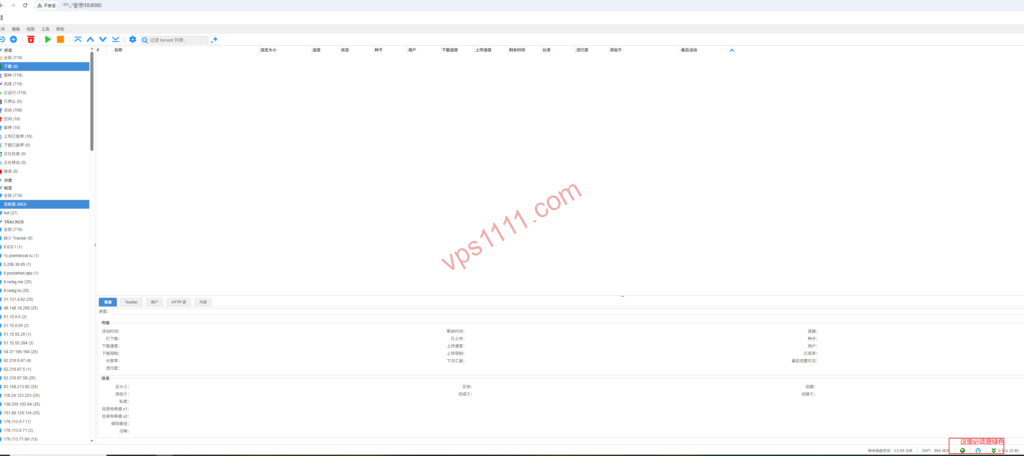
docker compose up -d⚠️ Critical Port Configuration: After startup, navigate to http://YOUR_VPS_IP:8080 to access the WebUI (default username: admin; retrieve the initial random password via docker logs qbittorrent). First action upon login: Go to Tools -> Options -> Connection and manually set the “Port used for incoming connections” to 6881, ensuring it exactly matches the port mapped in your Compose file. Failure to do this will result in zero incoming connections and severely degraded sync speeds!
Advanced Setup: Deploying AList for a Unified Frontend
qBittorrent handles data acquisition. For managing synced high-res media or work documents, you need an intuitive frontend. AList is highly recommended for this. It maps the VPS local /downloads directory into a polished web-based file manager, supporting direct streaming via local media players.
mkdir -p /opt/alist && cd /opt/alist
nano compose.yaml
Insert the following configuration:
services:
    alist:
        image: 'xhofe/alist:latest'
        container_name: alist
        volumes:
            - './data:/opt/alist/data'
            - '/downloads:/downloads' # Critical: Mount the same directory used by qB
        ports:
            - '5244:5244'
        environment:
            - PUID=0
            - PGID=0
            - UMASK=022
        restart: unless-stopped
Start AList and retrieve the initial admin password:
docker compose up -d
docker exec -it alist ./alist admin
Log into the backend at http://YOUR_VPS_IP:5244, then navigate to Storage -> Add -> Local.
Core Configuration Notes:
- Mount Path: Enter
/downloads(this is the virtual folder name displayed in the AList web interface). - Root Folder Path: Enter
/downloads(this is the absolute physical path the AList container reads internally).
Once saved, your private cloud pipeline is fully operational: qB handles high-speed backend acquisition -> AList handles frontend direct access and distribution.
Network Routing & Data Transfer Fundamentals (Bridging the Industry Knowledge Gap)
If you plan to transfer massive datasets from your VPS back to a local NAS across continents, the quality of the network route dictates your transfer experience.
- AS174 / AS6939 (Budget Global BGP Routes): These represent the most cost-effective high-bandwidth intercontinental transit routes. If your local ISP peers well with these Tier-1 networks, you can maintain high throughput during prime time (8 PM – 11 PM). Note: If your local ISP lacks direct peering with these carriers, you may experience suboptimal routing or noticeable packet loss, significantly reducing transfer efficiency.
- BGP Routing & Intercontinental Packet Loss: Budget storage VPS instances typically connect to standard international BGP networks (e.g., Cogent, Telia) without specialized regional optimization. When pulling back tens of gigabytes of data, it is highly recommended to use multi-threaded download tools (like Aria2 with segmented downloading) to compensate for single-thread speed degradation caused by packet loss.
vps1111 Expert Pitfall Guide
To ensure long-term stability for your storage VPS, I must outline three non-negotiable operational red lines:
💡 vps1111 Maintenance & Best Practices:
- Comprehensive Backup Strategy: Many beginners assume backing up downloaded files is sufficient. In reality, if your VPS crashes and requires a clean reinstall, you must fully back up both
/opt/qbittorrent/config(containing software settings and metadata) and/downloads(actual files). Missing either will break all underlying mapping relationships. - Preventing Disk I/O Bottlenecks: Budget storage VPS nodes rely on HDD RAID arrays. Running dozens of high-speed concurrent tasks in qBittorrent will instantly saturate disk I/O (spiking I/O Wait), causing system freezes and SSH disconnects. Solution: In qBittorrent settings, cap the “Global maximum number of connections” at 300, enable “Asynchronous I/O”, and allocate sufficient RAM for disk write caching.
- Strict Compliance Baseline: Do not use the VPS to deploy unauthorized network proxies or bypass regional access controls. Strictly prohibit public distribution of copyrighted material. The VPS should only store legally licensed personal data, open-source mirrors, and enterprise applications fully compliant with local regulations.
❓ Frequently Asked Questions (FAQ)
What is the difference between a Storage VPS and a Standard VPS?
The core difference lies in storage capacity and cost efficiency. Storage VPS instances utilize high-density HDD arrays to provide 500GB to 10TB+ of massive storage, making them ideal for large-scale legal data transit and enterprise offsite disaster recovery. Standard VPS instances typically use smaller but faster NVMe SSDs, optimized for web hosting and application execution.
Why does qBittorrent often cause storage VPS instances to freeze?
Budget storage VPS nodes typically run on HDD RAID arrays. High-concurrency read/write operations will instantly saturate disk I/O (causing I/O Wait spikes). To mitigate drive stress, limit the maximum connection count to 300 in the software settings and enable asynchronous I/O caching.
How should I choose a network route for a Storage VPS?
Prioritize cost per GB and backbone throughput. For direct intercontinental transfer of large files, select routes featuring optimized Tier-1 peering (like AS174 or AS6939) to minimize prime time trans-oceanic packet loss. For purely overseas data transit, a budget high-bandwidth BGP route is perfectly adequate.