


Executive Summary: In remote work, cross-border e-commerce collaboration, and compliant data collection, hosting core trade secrets and server credentials on third-party SaaS chat platforms is essentially operating without a security perimeter. This guide provides a deep technical breakdown of deploying the most mature decentralized communication protocol, Matrix (via the Synapse server), on a lightweight VPS using Docker in 2026. From architectural analysis and resource overhead assessment to configuring Nginx reverse proxies and end-to-end encryption, we will walk you through building a fully private, 100% self-hosted collaboration hub tailored for technical teams.
Why Core Team Collaboration Must Go Private in 2026
For technical teams managing Linux infrastructure, cross-border DTC e-commerce site operations, and compliant overseas data collection, internal communications routinely involve highly sensitive assets: server root passwords, API keys, customer PII, and enterprise financial records.
Historically, many teams have relied on Slack, Microsoft Teams, or even Telegram for daily communication. However, this introduces two critical vulnerabilities:
- Uncontrollable Data Privacy: On commercial clouds, your chat logs, files, and keys permanently reside on someone else’s infrastructure. If a third-party platform suffers a database breach or suspends accounts due to policy shifts, your team’s core assets are instantly exposed or lost.
- Prohibitive Per-Seat Pricing: Subscription costs for mainstream commercial SaaS communication tools rise annually. For small to mid-sized teams, this functions as a predictable annual practice of ripping off customers.
This is where the Matrix protocol emerges as the definitive solution. Matrix is an open-source federated protocol designed to decentralize instant messaging. It natively supports end-to-end encryption and boasts excellent cross-platform open-source clients like Element. Deploying the Matrix server (typically the official Synapse implementation) on your own lightweight VPS ensures you retain absolute sovereignty over your communication infrastructure.
Underlying Architecture and Performance Analysis of Matrix (Synapse)
A deep understanding of Matrix’s operational mechanics is foundational for system tuning and preventing server instability. Synapse is highly capable but relatively resource-intensive. During message synchronization, cryptographic key distribution, and federation broadcasting, it consumes significant RAM. If your lightweight VPS lacks adequate swap space and only has 1GB of physical memory, forcibly enabling federation and joining large public rooms will likely turn your server into a fly-by-night host, frequently triggering the Linux Out-Of-Memory (OOM) killer.
Therefore, for internal teams of 10 to 50 users, we strongly recommend disabling federation during deployment (restricting communication to internal users only) and replacing the default SQLite with PostgreSQL. This enterprise-grade relational database is essential for handling high-frequency concurrent writes and efficient message indexing.
Official Deployment Documentation: https://matrix-org.github.io/synapse/latest/setup/installation.html
Lightweight Server Hardware Selection and System Overhead Assessment
Before orchestrating containers, rigorous capacity planning for your VPS hardware is required. The recommended specifications are as follows:
| Team Size & Use Case | Recommended VPS Specs | Database Recommendation |
|---|---|---|
| Geek / Small Group (≤5) | 1-core CPU / 2GB RAM | PostgreSQL (Co-hosted) |
| 10–50 User E-commerce/Tech Team | 2-core CPU / 4GB RAM | PostgreSQL (Optimized) |
Production Deployment: Rapid Setup with Docker Compose
In modern Linux operations, Docker remains the industry standard for environment isolation and seamless migration. We will deploy Synapse alongside PostgreSQL 15, integrating Redis to optimize system performance.

services:
  postgres:
    image: postgres:15-alpine
    container_name: matrix-postgres
    restart: unless-stopped
    user: 999:999
    environment:
      POSTGRES_USER: synapse
      POSTGRES_PASSWORD: StrongPassword2026!
      POSTGRES_DB: synapse
      POSTGRES_INITDB_ARGS: "--encoding=UTF-8 --lc-collate=C --lc-ctype=C"
    volumes:
      - ./postgres-data:/var/lib/postgresql/data
    expose:
      - "5432"
    healthcheck:
      test: ["CMD-SHELL", "pg_isready -U synapse -d synapse"]
      interval: 5s
      timeout: 5s
      retries: 5

  redis:
    image: redis:7-alpine
    container_name: matrix-redis
    restart: unless-stopped
    user: 999:999
    volumes:
      - ./redis-data:/data
    expose:
      - "6379"
    healthcheck:
      test: ["CMD", "redis-cli", "ping"]
      interval: 5s
      timeout: 3s
      retries: 5

  synapse:
    image: matrixdotorg/synapse:latest
    container_name: matrix-synapse
    restart: unless-stopped
    user: 991:991
    depends_on:
      postgres:
        condition: service_healthy
      redis:
        condition: service_healthy
    ports:
      - "127.0.0.1:8008:8008" # Bind to localhost only, accessed via Nginx reverse proxy
    volumes:
      - ./synapse-data:/data
    environment:
      - SYNAPSE_SERVER_NAME=vps1111.com
      - SYNAPSE_REPORT_STATS=no
      - SYNAPSE_CONFIG_PATH=/data/homeserver.yaml
      - POSTGRES_HOST=postgres
      - POSTGRES_PORT=5432
      - POSTGRES_DB=synapse
      - POSTGRES_USER=synapse
      - POSTGRES_PASSWORD=StrongPassword2026!
      - SYNAPSE_REDIS_ENABLED=true
      - SYNAPSE_REDIS_HOST=redis
      - SYNAPSE_REDIS_PORT=6379
      - SYNAPSE_SUPPRESS_KEY_SERVER_WARNING=true
      # Critical: Force console logging to completely bypass file write permission issues
      - SYNAPSE_LOG_CONFIG=/dev/null
After finalizing the docker-compose.yml configuration, you must generate the initial config files, start the services, and create a super admin account before the first launch. Execute the following commands in sequence:
# 1. Generate initial configuration files
docker compose run --rm synapse generate

# 2. Start all containers in the background
docker compose up -d

# 3. Create an admin user (follow terminal prompts to set credentials and confirm admin privileges)
docker exec -it matrix-synapse register_new_matrix_user http://localhost:8008 -c /data/homeserver.yaml
Core Gateway Hardening: Configuring Nginx Reverse Proxy and SSL Certificates
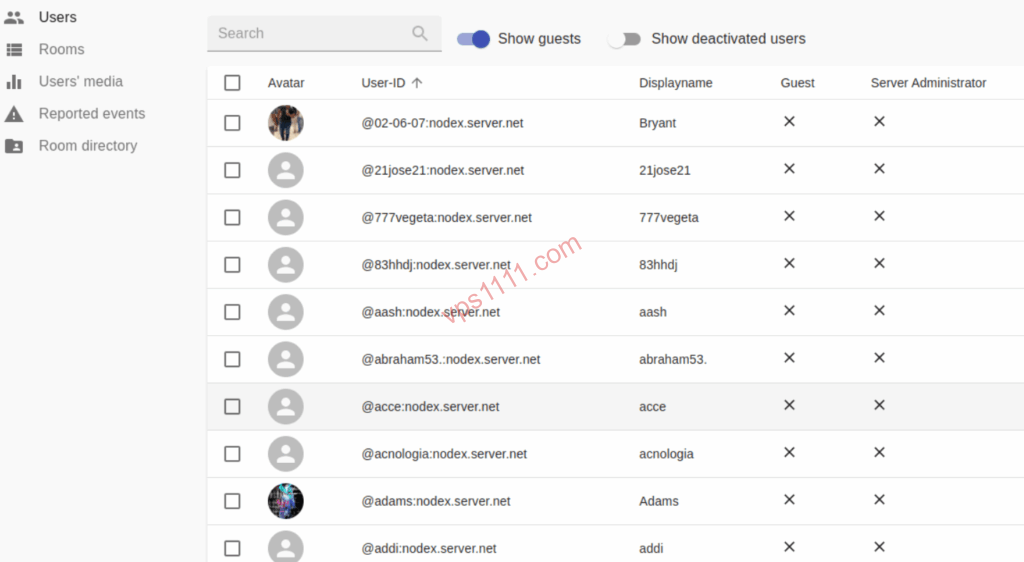
The Matrix protocol mandates HTTPS encryption for all client communications. If you prefer a GUI-based approach, refer to our complete Nginx Proxy Manager guide for rapid setup. For native Nginx, ensure the .well-known routes are properly configured. This is a critical architectural component that allows your team to log in directly via your custom domain in the client.
vps1111 Best Practices & Deployment Guide
- Network Routing: Matrix communication is highly latency-sensitive. Deploy on a VPS featuring premium low-latency routing (e.g., Tier-1 direct peering).
- Pitfall Avoidance: Synapse does not include a TURN server by default. If your team relies on video conferencing, you must deploy Coturn separately, or video connections will frequently fail.
- Recommendation: ⭐⭐⭐⭐ (Five stars for technical teams; non-technical groups should proceed with caution due to cryptographic key management overhead)
FAQ: Common Deployment Scenarios
Will a Self-Hosted Matrix (Synapse) Instance Suddenly Lose Data Like a Fly-by-Host Provider?
No. As long as you schedule automated backups syncing the database and /data directory to an offline NAS or S3-compatible storage, your data can be fully restored on new hardware within minutes, even in the event of catastrophic hardware failure.
Can I Enable Matrix Federation on a Lightweight VPS (1-core, 1GB RAM)?
Strongly discouraged. Federation requires massive state synchronization with large public nodes, which will instantly exhaust available resources and trigger an OOM kill. For internal enterprise collaboration, maintaining a closed, private network is the optimal configuration.
Why Do Team Members See “Unable to Decrypt This Message”?
This is standard behavior for end-to-end encryption (E2EE). If a sender encrypts messages using an older device’s public key, newly added devices cannot decrypt historical messages unless they complete “cross-signing” or correctly import the “secure recovery key.” Ensure all team members securely back up their recovery keys.