


Core Summary: In the VPS industry, if you only evaluate a provider’s outbound ping metrics, you’re only seeing the tip of the iceberg. In 2026, the single most critical metric determining your website’s access speed and stability is the return path. This guide, authored by a senior infrastructure architect, will walk you through using NextTrace to verify actual return routing, provide a hardcore analysis of major Chinese ISPs routes like CN2 GIA, AS4837, and CMIN2, and help you avoid overselling traps where “outbound is blazing fast, but return is painfully slow.”
Let’s be direct: in the VPS space, focusing solely on outbound ping values gives you an incomplete picture. In 2026, the definitive factor for your website’s speed and reliability isn’t the outbound route—it’s the return path.
Beginners often ask: “Why does my local ping show only 150ms, but the webpage just spins endlessly?” This is a classic case of excellent outbound routing paired with a severely degraded return path. To cut costs, providers often purchase premium routes only for outbound traffic to make benchmarks look impressive, while routing your return traffic through congested public internet backbones.
Today, drawing on over a decade of infrastructure architecture experience, I’ll show you how to use tools like NextTrace to cut through marketing claims and identify genuine grandfathered plan.
🧠 Paradigm Shift: Why the “Return Path” Dictates Everything?
In network transmission, data packet paths are rarely perfectly symmetrical.
- Outbound Route (Go Path): You (the user) initiate a request, and the packet travels to the VPS.
- Return Path: The VPS processes the request and sends the web data (images, HTML) back to your browser.
Core Logic: For cross-border e-commerce or personal blogs, slow page loads are almost always caused by a poor server-to-user delivery path (return path suboptimal routing or severe packet loss).
⚠️ Expert Concept Clarification:
When running scripts (like backtrace or NextTrace) inside a VPS to trace your local IP, you are measuring the VPS → Domestic Node path. Technically, this is the VPS’s “outbound” traffic. However, from the end-user’s perspective, this is precisely the return path that dictates your browsing speed.
⚙️ Core Principles Breakdown: 2026 ISP Route “Pros & Cons” List
1. China Telecom
- CN2 GIA (AS4809): The undisputed leader. Both outbound and return traffic traverse the premium AS4809 network across borders. While expensive, it reliably maintains packet loss below 1% during prime time.
- 163 Backbone (AS4134): Standard routing. The default choice for most budget VPS providers, suffering from severe congestion during prime time.
- ⚠️ Note: CN2 GT routing was largely decommissioned by 2025. Providers still advertising GT routes are likely using outdated or misleading marketing.
2. China Unicom
- Unicom 9929 (AS9929): Unicom’s premium network (Network A). Low load, exceptional return path performance, and in some regions, it even outperforms Telecom’s CN2 GIA.
- Unicom 4837 (AS4837): The value champion. Specifically refers to the Unicom Cross-Border Backbone (CUII). It offers massive international bandwidth redundancy, making it the most stable and cost-effective direct return path for cross-border web hosting in 2026.
3. China Mobile
- CMIN2 (AS58807): Mobile’s premium cross-border network. This is China Mobile’s direct competitor to Telecom’s GIA. Recommended primarily for users on China Mobile broadband, as optimization for Telecom/Unicom users is limited.
- CMI (AS58453): Standard direct Mobile routing. Performs adequately under normal conditions but is highly prone to fluctuations during prime time.
💻 Practical Guide: How to Properly Test Return Path Routing?
To avoid provider misrepresentation, we strongly recommend conducting bidirectional testing.
1. One-Click VPS Test (VPS → Domestic Nodes)
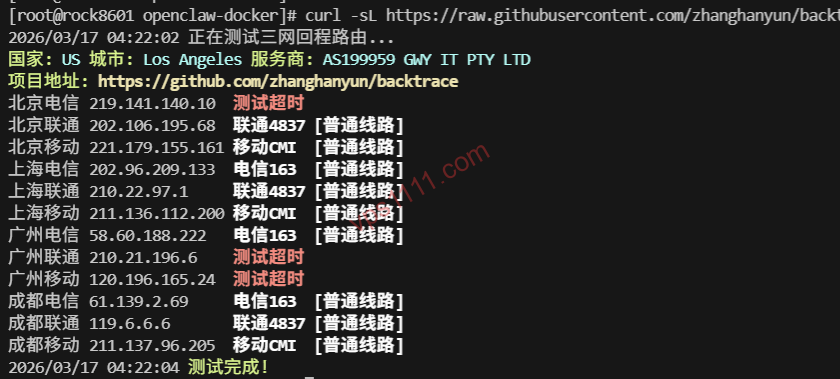
Run the following command on your VPS to trace the routing path back to major Chinese ISPs nodes. This is the fastest way to identify the actual route type.
# Install base dependencies (Debian/Ubuntu)
apt update && apt install -y curl wget

# Run the most comprehensive multi-ISP return path test script (integrates NextTrace)
curl -sL https://raw.githubusercontent.com/zhanghanyun/backtrace/main/install.sh | bash
2. The “Single-Point Perspective” Test That Determines Real-World Speed
Comprehensive scripts provide a major Chinese ISPs reference return path. To accurately gauge your personal management experience, you must specify your local public IP directly from your VPS:
nexttrace <your_local_public_IP>Carefully observe the AS numbers and latency increments at each hop as traffic returns from the VPS to your local IP.
📊 Structured Data: 2026 Route Quality & Positioning Comparison Table
🛡️ vps1111 Pitfall Guide: The “Fake Route” Tricks Providers Won’t Tell You
💡 Route Diagnostics Field Rules:
- “Half-Optimized” Deception: Many providers advertise CN2 GIA, but when you test with NextTrace, you’ll find only the segment from the data center to San Jose uses AS4809. Once it hits domestic borders, it immediately switches to the congested AS4134 (163 network). These “half-optimized” routes will still fail during prime time!
- Beautiful Outbound, Terrible Return: The most insidious tactic for cheap promotional VPS. Your local ping shows 160ms (outbound uses direct routing), but downloading files from the site crawls at 100KB/s (return path uses garbage suboptimal routing nodes). Always remember: for web hosting, only the return path matters!
- AS Number Spoofing (Masked Routes): A few unethical niche providers manipulate underlying routing tables to make scripts display AS4809. In these cases, check the exact IP hop count and latency increments. If latency suddenly jumps by 100ms before reaching the US West Coast, it’s definitely suboptimal routing. No doubt about it.
❓ FAQ: Solving Beginners’ Most Frustrating Routing Issues (Featured Snippets)
Q1: Why does NextTrace show only asterisks (*) for the return path?
A: Intermediate routing nodes or your local ISP have disabled ICMP echo replies (blocked ping, dropping trace response packets). Adding -T (TCP mode) or -U (UDP mode) to the nexttrace command usually bypasses these filters and reveals the actual nodes.
Q2: Is AS4837 an overseas carrier (like Cogent)?
A: No. In the context of VPS reviews and web hosting, AS4837 specifically refers to China Unicom’s direct cross-border backbone (CUII). It is widely recognized as the most cost-effective direct routing benchmark connecting to US West Coast data centers, with highly abundant international bandwidth.
A: Not necessarily. In 2026’s broadband environment, if you run a high-margin premium e-commerce store, buying CN2 GIA buys peace of mind. However, if you’re on a budget or just hosting a standard blog or image server, choosing a machine optimized for Unicom 4837 (AS4837) and enabling the BBR algorithm will deliver prime time page load speeds that satisfy over 90% of standard web hosting requirements.