


Executive Summary: For geeks managing dozens or even hundreds of VPS servers for global e-commerce nodes, data scraping, or distributed web hosting, relying on traditional web-based control panels (like cPanel or aaPanel) introduces severe performance overhead and security risks. This guide will help you move beyond the limitations of “beginner-friendly panels.” Using Ansible, an industrial-grade tool, you can batch update, sync configurations, and uniformly deploy environments across 100 idle VPS servers without installing any client software. While the learning curve is slightly steep, this workflow is an essential path for evolving from a beginner to a senior Linux operations architect in 2026.
Moving Beyond Beginner Panels: From Manual Workflows to Industrialized Operations
When your server inventory consists of just 1 to 3 machines, installing a GUI-based “beginner panel” certainly lowers the barrier to entry. However, when you manage 100 VPS instances distributed across global data centers, the drawbacks of control panels become exponentially magnified:
- Excessive Resource Overhead: Every panel requires running independent background daemons, databases, and web services. On a low-end server with only 512MB of RAM, the panel itself will consume nearly half of your available memory.
- Exponentially Expanded Attack Surface: Installing panels on 100 machines means exposing 100 web login portals to the public internet. If a 0-day vulnerability is discovered in the panel software, your entire server cluster could be compromised within minutes.
- Unforgivable Time Costs: When a critical system vulnerability (such as an OpenSSH exploit) requires emergency patching, are you really going to log into 100 separate web dashboards and manually click “Update”?
To solve the pain points of managing infrastructure at this scale, we must adopt modern Automated Configuration Management tools, with Ansible standing as the undisputed leader. Before building your automated operations framework, it is highly recommended to review our Ultimate VPS Security Hardening Guide: Changing the Default Port 22 and Disabling Root Password Login, as securing the underlying SSH layer is the absolute foundation for any automation tool.
Architect’s Deep Dive: The Minimalist Philosophy of Ansible
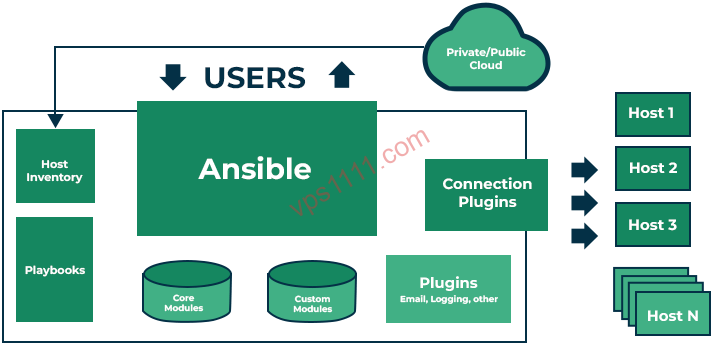
While the market offers numerous operations tools like Puppet, Chef, and SaltStack, why do architects in 2026 still overwhelmingly recommend Ansible? The answer lies in its exceptionally elegant underlying architecture:
Pure Agentless Architecture
Most cluster management tools require you to install client software (an Agent) on every single subordinate machine. Ansible completely overturns this paradigm. It relies purely on the SSH protocol built into the operating system for communication. As long as your machine is accessible via SSH, Ansible can manage it. This is a lifesaver for performance-constrained idle VPS servers—zero additional resource consumption.
Note: While Ansible is agentless, it has one strict requirement: managed nodes must have a Python environment pre-installed (Python 2.7 or 3.5+). Most mainstream Linux distributions include this by default, but if you are running a highly stripped-down OS like Alpine Linux, you may need to manually install this dependency.
Core Operational Logic & Key Terminology
The Ansible architecture revolves around just two core physical concepts:
- Control Node: Your “command center,” typically a local Linux machine or a high-spec VPS with excellent network connectivity. It is responsible for dispatching instructions.
- Managed Node: The 100 machines being managed. They simply wait quietly for incoming instructions.
To enable these nodes to work in unison, Ansible introduces two core logical components:
- Inventory: A plain text file that categorizes and records the IP addresses, ports, and grouping information for those 100 machines (e.g., European nodes, US web hosting nodes).
- Playbook: An automation script written in YAML. Think of it as a detailed “Standard Operating Procedure (SOP) manual.” Ansible will strictly follow this manual to execute operations on the target machines.
Most importantly, Ansible features powerful Idempotency. This means you can execute the same Playbook 100 times, and as long as the target machine’s state already matches the desired configuration, Ansible will not make any redundant changes. It’s like repeatedly pressing a light switch: if the light is already on, pressing it again changes nothing. This completely eliminates the risk of “system crashes caused by repeated execution” during batch deployments. If you plan to run containers across these machines in bulk, it is highly recommended to plan your architecture alongside our Docker Zero-to-Hero Guide: Why Every VPS User Should Master Container Deployment.
Core Practice: How to Elegantly Provision 100 Idle Nodes
Next, we will use a real-world production environment as an example to demonstrate how to batch update and initialize 100 VPS servers using Ansible.
Step 1: Configure the Control Node & Batch Passwordless Login
First, install Ansible on a clean Ubuntu/Debian control machine:
sudo apt update
sudo apt install ansible sshpass -y
Security Recommendation: Using the root user directly is highly discouraged in production environments. It is best practice to create a standard user and configure sudo privileges. To achieve full automation, we need to batch distribute the control node’s SSH public key to all 100 machines. You can save all IP addresses into ips.txt and use sshpass to write a simple loop script for second-level distribution:
# Batch distribute public keys to all nodes
for ip in $(cat ips.txt); do
  sshpass -p "your_initial_password" ssh-copy-id -o StrictHostKeyChecking=no -p 22 ubuntu@$ip
done
Step 2: Build the Inventory
Create a file named hosts.ini to logically group your server assets:
[eu_nodes]
192.168.1.10 ansible_user=ubuntu ansible_port=22
192.168.1.11 ansible_user=ubuntu ansible_port=22

[us_nodes]
10.0.0.50 ansible_user=centos ansible_port=2222
10.0.0.51 ansible_user=centos ansible_port=2222

[all_vps:children]
eu_nodes
us_nodes
Step 3: Execute Ad-Hoc Batch Commands
Ad-Hoc commands are used for executing temporary, simple tasks. For example, if you want to instantly verify whether all 100 machines are online and can successfully escalate privileges, you only need a single command:
ansible all_vps -i hosts.ini -m ping
Your terminal will instantly flood with green SUCCESS messages. This level of centralized control is something beginner panels can never provide.
Step 4: Write a Cross-Distribution Automated Playbook
We will write a playbook named system_update.yml. Considering that your 100 machines might run Debian/Ubuntu or CentOS/AlmaLinux, this playbook perfectly handles the underlying differences in package managers:
---
- name: Batch update system and base environment configuration
  hosts: all_vps
  become: yes # Escalate to sudo root privileges
  tasks:
    - name: Update APT cache and upgrade all packages (Debian/Ubuntu)
      apt:
        update_cache: yes
        upgrade: dist
        autoremove: yes
      when: ansible_os_family == "Debian"

    - name: Update YUM/DNF cache and upgrade all packages (RedHat/CentOS/Alma)
      yum:
        update_cache: yes
        name: '*'
        state: latest
      when: ansible_os_family == "RedHat"

    - name: Install cross-platform basic troubleshooting tools (curl, htop, vim)
      package:
        name:
          - curl
          - htop
          - vim
        state: present
Execute ansible-playbook -i hosts.ini system_update.yml to run it concurrently.
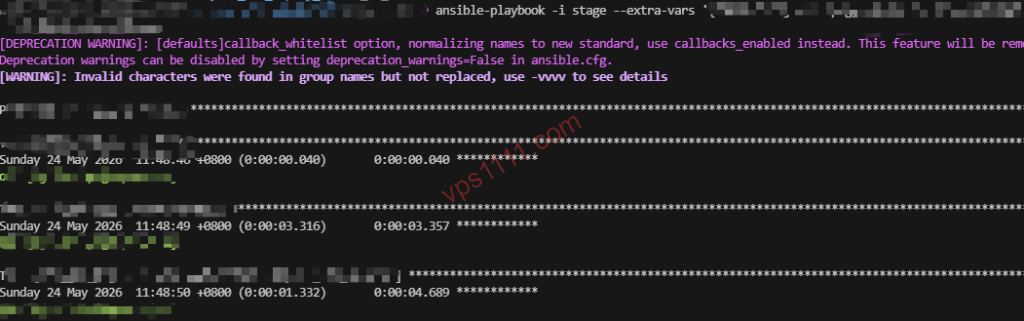
Advanced Troubleshooting: If execution stalls with red error messages, you can add the -vvv parameter to enable Debug mode and inspect the underlying SSH handshake and execution logs: ansible-playbook -i hosts.ini system_update.yml -vvv.
Advanced Optimization & Pitfall Avoidance Guide
Don’t assume that mastering basic commands means you’re set. In real-world public network environments managing 100 intercontinental VPS servers, network instability and concurrency limits are hard realities you must address.
💡 vps1111 Pitfall Avoidance & Practical Guide:
- SSH Denial of Service from High Concurrency (Pitfall): Ansible’s default concurrency is 5. Never greedily increase
forksto 100 to save time. A sudden surge of TCP handshakes will be flagged as a DDoS attack by the data center firewall, resulting in an immediate IP ban. Keep it between 20-30, and use rolling batch updates (theserialparameter). - SSH Connection Keep-Alive Optimization: Intercontinental networks are highly prone to drops. Always enable
pipelining = Trueinansible.cfgand configuressh_args = -o ControlMaster=auto -o ControlPersist=60s. This alone can boost execution speed by at least 3x. - Sensitive Data Encryption: Never hardcode database passwords directly in plaintext playbooks! Make it a habit to encrypt sensitive variables using
ansible-vault encrypt secrets.yml. - Recommendation Rating: ⭐⭐⭐⭐⭐ (An essential path to leaving manual workflows behind).
FAQ: Frequently Asked Questions
Is Ansible suitable for managing low-end VPS servers with only 512MB of RAM?
Absolutely. This is Ansible’s greatest advantage over various web panels. Thanks to its pure Agentless Architecture, managed nodes do not need to run any memory-consuming background daemons. Ansible only pushes temporary Python scripts to the managed node via SSH during task execution, and destroys them immediately afterward. The resource footprint on low-end machines approaches zero.
What should I do if a few overseas machines time out due to poor network quality during batch updates?
Task timeouts are extremely common for intercontinental nodes with inconsistent network quality. You can add retries (number of attempts) and delay (wait time between attempts) parameters to specific tasks in your Playbook. If a machine completely loses connectivity, Ansible will default to marking it as UNREACHABLE and automatically skip it, ensuring the execution flow for the other 99 machines is not blocked. You can troubleshoot and handle the failed nodes individually later by reviewing the logs.
Does Ansible have a built-in rollback mechanism if a large-scale operation fails?
Ansible does not have a built-in “one-click undo” rollback mechanism. This requires us to design Playbooks to be strictly idempotent. For highly critical core configuration deployments, it is recommended to append the --check parameter to your execution command to perform a Dry Run first. If conditions allow, using your cloud provider’s API to batch create snapshots before executing updates serves as the final safety net in a production environment.
Can Ansible completely replace Docker and Kubernetes?
No, their purposes are entirely different and they should be used complementarily. Ansible excels at “configuration management” for the underlying operating system (e.g., modifying kernel parameters, hardening SSH, installing base software). Docker and Kubernetes excel at “container orchestration” at the application layer. The most authentic architectural approach is: use Ansible to batch initialize the underlying server environment and deploy the Docker engine, then hand over to Docker/K8s to handle the startup, shutdown, and scaling of specific business containers.