


Core Summary: For technical teams managing remote work, DTC e-commerce site, and cross-border web hosting, purchasing managed Kubernetes clusters from major cloud providers is often prohibitively expensive and results in severe resource underutilization. This guide walks you through deploying K3s (a lightweight, Rancher-open-sourced K8s distribution) to build a fully upstream-API-compatible cloud-native environment on a bare-bones 1-core, 1GB RAM Virtual Private Server (VPS). Whether you are standardizing internal microservices or architecting a cost-effective CI/CD pipeline, this is the ultimate geek-approved path for 2026 to escape exorbitant cloud bills and achieve true infrastructure autonomy.
Why customize Kubernetes on Low-Spec VPS in 2026?
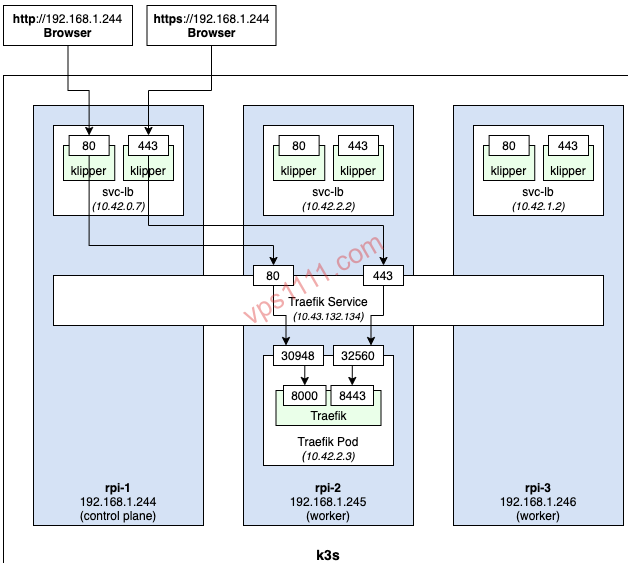
Historically, developers focused on Linux administration or cross-border e-commerce data scraping have relied heavily on standalone Docker or Docker Compose for service deployment. Before scaling to large cluster orchestration, we highly recommend reading our Docker Beginner’s Guide: Why Every VPS User Should Master Container Deployment to solidify your containerization foundation. Once your container count reaches dozens, or when you require cross-server high-availability disaster recovery, traditional single-node Docker architectures quickly hit their limits. This is where robust Container Orchestration becomes essential.
When most engineers hear Kubernetes (K8s), their immediate reaction is “heavy.” Traditional upstream K8s involves numerous components; even with zero workloads running, spinning up the Control Plane alone typically demands over 2GB of RAM. Consequently, mid-sized teams looking to adopt cloud-native architectures are often forced into commercial managed services like AWS EKS or Alibaba Cloud ACK, where monthly control plane fees alone can easily exceed tens of dollars. For lightweight workloads, this mandatory recurring billing model is essentially an annual ripping off customers, leveraging technical complexity to enforce steep vendor lock-in premiums.
To deliver a consistent API experience on budget hardware, K3s was engineered. It packages all core K8s components into a single Go binary under 100MB, strips out redundant cloud-provider-specific code, and is optimized to run flawlessly on low-spec VPS instances and edge computing devices alike.
K3s Architecture Deep Dive: A Cloud-Native Miracle on 1-Core, 1GB RAM
How does K3s run so smoothly in such resource-constrained environments? We need to break down its underlying architecture through a strict “subtraction” methodology:
- Monolithic Architecture Replaces Distributed Components: Traditional K8s control planes rely on multiple independent processes (kube-apiserver, kube-scheduler, etc.). K3s compiles these into a single Go binary. This transforms inter-process communication from network-heavy overhead into ultra-fast in-memory calls, drastically reducing CPU and memory latency.
- SQLite Replaces etcd to Slash Memory Footprint: Native etcd is a strongly consistent key-value store. Maintaining its B-tree indexes and Watch streams for Distributed Consensus alone consumes hundreds of megabytes to gigabytes of RAM. K3s intelligently swaps the default single-node storage backend to SQLite. By eliminating distributed consensus overhead, core data storage memory usage is compressed down to mere tens of megabytes.
- Streamlined Networking & Container Runtime: K3s defaults to the lightweight
containerdruntime and integrates Flannel as its CNI plugin. This strips the system’s baseline resource overhead to the absolute minimum.
Architect’s Deployment Guide: customize a Cluster on Ubuntu/Debian in 5 Minutes
Before proceeding, ensure your VPS meets the baseline requirements: a clean Ubuntu 22.04 or Debian 12 installation with port 6443 open (required for API Server communication). We strongly advise hardening your server first by following our Ultimate VPS Security Hardening Guide: Change Default Port 22 & Disable Root Password Login to completely block brute-force attacks and malicious scanning.
Pitfall Avoidance: The Right Way to Handle Swap Memory
On a 1-core, 1GB machine, physical memory will easily max out, triggering the Linux kernel’s Out of Memory (OOM) Killer mechanism and forcibly terminating critical processes.
Legacy tutorials often blindly recommend enabling Swap. If you’re interested in memory tuning for low-spec servers, check out our guide: Low-Memory VPS Essentials: Enable Swap Partition to Prevent Crashes & System OOM!. However, in modern cloud-native production environments, this is a strict anti-pattern. The Kubernetes project officially recommends disabling Swap, as relying on it to mask memory shortages causes severe node performance jitter and obscures genuine memory leak diagnostics.
Best Practice: Always disable Swap in production. Instead, enforce strict resources.requests and resources.limits in your deployment YAMLs to cap container memory usage. This is the fundamental rule for maintaining cluster stability.
Run the One-Click Install Script & Configure Permissions
K3s provides an incredibly straightforward one-click installation script. Simply run the following command to automatically download the latest binary and configure the Systemd service:
curl -sfL https://get.k3s.io | sh -
Installation typically completes within 30 seconds. To avoid typing sudo k3s kubectl for every command, configure your local environment variables as follows:
mkdir -p ~/.kube
sudo cp /etc/rancher/k3s/k3s.yaml ~/.kube/config
sudo chown $(id -u):$(id -g) ~/.kube/config
Verify Cluster & Deploy Test Workloads
Run the following command to check node status. A Ready state confirms your single-node K8s cluster is successfully operational:
kubectl get nodes
Next, deploy a minimal Nginx web server to validate the cluster workflow and expose it via NodePort:
kubectl create deployment nginx-test --image=nginx:alpine
kubectl expose deployment nginx-test --port=80 --type=NodePort
# View the randomly assigned public port
kubectl get svc nginx-test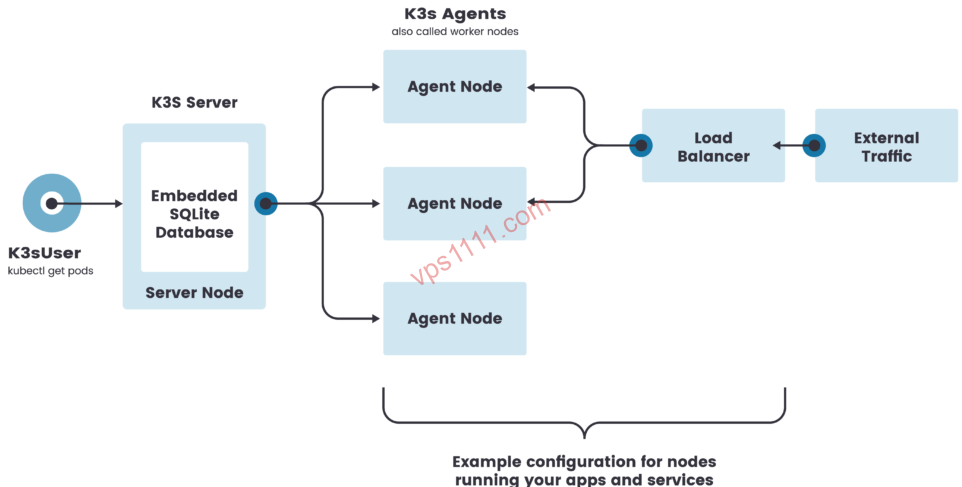
Objective Review & Advanced Pitfall Guide
While K3s demonstrates remarkable viability in Edge Computing and ultra-low-spec hardware, as an architect, I strongly advise against blindly deploying it across all production environments. There is no free lunch in infrastructure. Behind the low cost, K3s carries several critical limitations:
- Single Point of Failure (SPOF): Deploying a single-node K3s cluster on one VPS means that if the dedicated node crashes or the service goes down, the entire cluster and all running containers will simultaneously fail. This architecture cannot meet cross-availability-zone high-availability requirements for production.
- SQLite Performance Ceiling: The single-node SQLite backend relies on file-level locking. In high-frequency, high-concurrency microservice environments or heavy CI/CD pipelines, the lack of distributed locking and robust transaction concurrency will quickly hit I/O write bottlenecks, causing severe control plane congestion.
- Lack of Cloud Provider Integration: K3s is aggressively stripped for lightweight operation, completely removing native K8s cloud-provider drivers. Consequently, it cannot automatically provision managed load balancers, cloud disk persistent volumes, or other advanced integrations from providers like Alibaba Cloud or AWS. All network Ingress controllers and StorageClasses must be manually maintained by your engineering team.
FAQ
What is the fundamental difference between K3s and upstream K8s?
From an end-user perspective, there is zero difference. K3s is fully CNCF (Cloud Native Computing Foundation) certified. Any YAML manifests or Helm Charts written for upstream K8s will run seamlessly on K3s. The only differences lie in the stripped cloud-provider drivers, merged binary components, and heavily optimized resource footprint.
Will my 1-core, 1GB VPS easily trigger OOM? Should I enable Swap?
As noted above, pushing a 1-core, 1GB environment to its limits will indeed trigger the OOM Killer. However, we strongly advise against enabling Swap as a workaround due to severe performance degradation. The correct approach is to disable unnecessary bundled components (like Traefik and Metrics Server), switch to a lighter Nginx Proxy Manager for reverse proxying, and strictly enforce resources.limits on all deployed containers.
Can I run a production-grade stateful database for cross-border e-commerce on a single-node K3s cluster?
Absolutely not. While Kubernetes natively supports Stateful Applications via StatefulSets and PV/PVCs, the real risk here is the physical fragility of a single VPS. Running mission-critical databases on a cheap, single-point server without distributed high availability means any physical disk failure will result in permanent data loss. For production, always deploy a dedicated primary-replica database architecture or configure automated snapshot backups to S3-compatible object storage.