


Core Summary: For cross-border e-commerce operators and international webmasters, VPS route stability directly dictates order conversion rates. Many budget VPS instances deliver blazing speeds during the day but become unusable at night. The root cause is rarely host hardware failure; instead, it triggers the “QoS (Quality of Service)” throttling mechanism on international backbone networks. This article breaks down the congestion control logic behind cross-border data transmission, teaches you how to identify poor routing using MTR tools, and explains how leveraging the BBR algorithm or upgrading to premium routes like CN2 GIA/AS9929 can eliminate prime time connection drops. Remember: extremely cheap fly-by-night hosts typically come with non-existent SLAs and useless customer service.
Phenomenon Analysis: The Illusion of “Lightning Fast by Day” vs. “Prime Time Congestion”
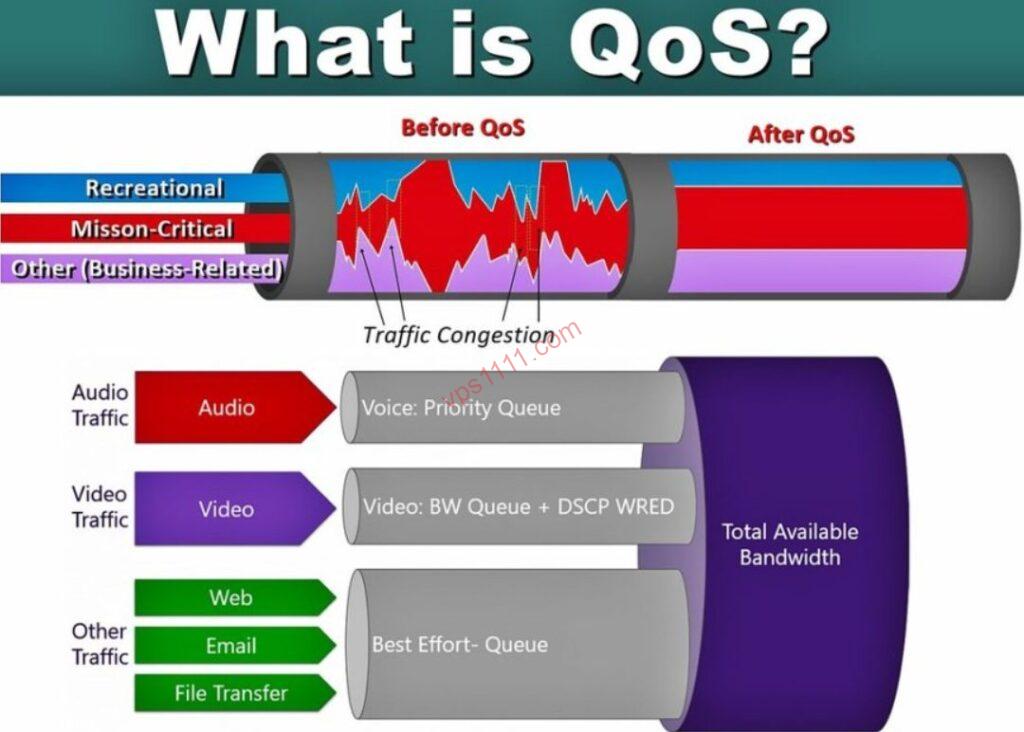
Many Linux administrators experience a “honeymoon phase” when first deploying an overseas VPS: logging in via SSH at 10:00 AM to set up environments, running wget to pull source code, or executing Speedtest benchmarks effortlessly maxing out 500Mbps or even 1Gbps. Pages load instantly, and everything feels incredibly smooth.
However, between 20:00 and 24:00 Beijing time, performance plummets: DTC e-commerce site backends lag so severely that image uploads fail, TTFB (Time to First Byte) spikes from 200ms to over 3000ms, and even typing ls in an SSH terminal takes two to three seconds to return results before ultimately throwing a Connection reset by peer error and dropping the session.
This erratic behavior is widely known in the VPS community as “prime time congestion.” Many immediately suspect misconfigured Nginx or database instances, or even submit a support ticket accusing the provider of overselling and ripping off customers. In reality, the host’s CPU and RAM are often perfectly fine. The actual bottleneck choking your operations is the Quality of Service policy enforced across transoceanic submarine cable endpoints.
Architect’s Deep Dive: How Does QoS Actually Work?
To understand QoS, we must zoom out to the physical topology of the global internet. Cross-border data transmission must pass through international gateway routers. Think of the international backbone network as a toll bridge spanning an ocean, where all network traffic represents vehicles crossing it.
The “Tidal Effect” of Prime Time at International Exits
During daytime hours (e.g., Asian morning and afternoon), total traffic on the bridge remains low, leaving bandwidth highly abundant. At this time, whether you are riding a free shuttle bus (standard China Telecom 163 backbone (AS4134)) or an expensive supercar (CN2 GIA VIP dedicated line), everyone can floor the accelerator and hit 120km/h (resulting in blazing speedtest results). This creates the “lightning fast by day” illusion.
But during prime time, massive volumes of residential broadband users flood the internet simultaneously to stream HD video, download large files, and play cross-border games. The physical lane capacity (total bandwidth) of the transoceanic bridge instantly maxes out, causing severe traffic congestion.
QoS Ruthless Prioritization & Packet Drop Logic
When routers detect insufficient exit bandwidth, they trigger the QoS mechanism. Fundamentally, QoS is “traffic priority discrimination.”
ISPs hardcode the following rules into their routers:
- Highest Priority: Enterprise dedicated lines, IPLC/IEPL circuits. Even during severe congestion, an emergency lane is reserved exclusively for them, guaranteeing zero packet drops.
- High Priority: Traffic routed through expensive commercial paths (e.g., CN2 GIA, China Unicom CU VIP (AS9929), China Mobile CMIN2). These flows utilize independent high-speed channels and remain largely unaffected by general network congestion.
- Lowest Priority: Standard China Telecom 163 backbone (AS4134) and unoptimized budget BGP routes.
Because your budget VPS routes through the lowest priority channel, the router’s response to congestion is brutally simple: it drops your packets outright. This is why your packet loss rate instantly spikes from 0% to 20% or even 50% during prime time.
TCP Protocol: Adding Fuel to the Fire
The TCP protocol features a built-in backoff mechanism: upon detecting packet loss, the TCP algorithm assumes network congestion and aggressively halves its transmission window (sliding window). This creates a vicious cycle: packet loss -> speed reduction -> further packet loss -> further speed reduction. Ultimately, your throughput freefalls from 500Mbps down to a mere 1Mbps.
Pitfall Guide: How to Handle QoS Throttling & Ensure Connectivity?
Understanding QoS mechanics reveals why complaining to customer service is futile. Physical network rules cannot be overridden by support tickets. To permanently resolve prime time paralysis, you must address it across three dimensions:
Understand Route Tiers, Choose “Pay-to-Access” QoS-Free Paths
For high-margin cross-border e-commerce and international web hosting, network quality directly correlates with conversion rates. Do not skimp on network infrastructure. When selecting a VPS, prioritize premium routes identified by these industry-standard tags:
- China Telecom Bidirectional CN2 GIA (AS4809): The undisputed prime time champion. Features independent transoceanic bandwidth and rarely triggers standard network QoS.
- China Unicom CU VIP (AS9929 / AS10099): Known as China Unicom’s “A-Net.” Maintains exceptionally low load and delivers rock-solid stability not just for China Unicom users, but also for cross-ISP access from China Telecom and China Mobile.
- China Mobile CMIN2 (AS58807): China Mobile’s newly deployed premium network. Offers outstanding value and exceptional resistance to QoS throttling.
If you are unsure how to verify these routes or suspect a vendor is masking standard paths as premium networks, master professional diagnostic tools. For a comprehensive walkthrough, refer to: Stop Falling for “Direct Peering” Claims! The Ultimate 2026 Online MTR Testing Guide & Route Pitfall Avoidance.
Enable Congestion Control: BBR to the Rescue
If budget constraints force you to use standard budget VPS instances, you must optimize at the OS kernel level. Default TCP congestion control algorithms (like Cubic) react overly conservatively to QoS-induced packet loss, causing severe throughput drops.
Google’s BBR (Bottleneck Bandwidth and Round-trip propagation time) algorithm dramatically mitigates this issue. Instead of relying solely on packet loss as a congestion signal, BBR actively probes the link’s maximum available bandwidth. Once enabled, even with 5% QoS packet loss during prime time, your server maintains tens of thousands of kbps throughput, transforming your site from “unreachable” to “barely usable.”
For a step-by-step guide on enabling BBR and applying kernel optimizations, bookmark this essential resource: Veteran’s Stash: Essential One-Click Linux Maintenance Scripts (Cache Cleanup, DNS Config, Temp Monitoring).
Accept “Cheap = No SLA” Reality, Implement Frontend Separation
We must acknowledge objectively that the vast majority of sub-$15/year VPS offerings simply sell standard shared bandwidth. These instances inevitably suffer extreme QoS throttling and suboptimal routing during prime time, feature notoriously slow support ticket responses, and absolutely provide zero network connectivity SLA guarantees.
The smartest approach for these machines is to deploy them strictly as “backend processors” or “data storage nodes,” while placing a high-quality commercial CDN (such as Cloudflare’s paid tier) in front as a reverse proxy.
If you are still debating whether to purchase ultra-low monthly VPS plans, read this first: Why You Should Avoid Sub-$1/Month VPS: An Insider’s Look at Overselling & Exit Scams, to understand the underlying cost structure.
💡 vps1111 Pitfall Avoidance & Field Guide:
- Procurement Rule: You get what you pay for. For international web hosting, choose CN2 GIA or China Unicom CU VIP (AS9929) even if it means lower hardware specs. Reserve cheap, high-port-speed China Telecom 163 backbone (AS4134) VPS strictly for development testing and script execution.
- Hidden Pitfalls: Do not blindly trust boutique vendors claiming “optimized routes.” Budget VPS providers typically suffer from extremely slow ticket responses, and when severe QoS packet loss occurs, support will dismiss you with “backbone fluctuations are outside our SLA coverage.”
- Recommendation Rating: ⭐⭐⭐⭐⭐ (This guide applies to diagnosing all cross-border VPS-to-local direct peering performance issues)
FAQ
Q1: I purchased a VPS advertised at 1Gbps bandwidth, but QoS throttles it to 2Mbps during prime time. Can I request a refund?
In the vast majority of cases, no. Standard overseas VPS Terms of Service (ToS) explicitly state that advertised speeds like 1Gbps represent “Best Effort” shared port capacity, and performance degradation due to network congestion is considered force majeure. Unless you purchased an expensive dedicated line product with explicit SLA guarantees and reserved bandwidth, speed reductions caused by prime time QoS are strictly excluded from refund and compensation policies.
Q2: Is there any software or technique to bypass or crack ISP QoS throttling?
At the physical layer, no software or technology can “crack” or bypass hardware-level QoS rules, as these policies are hardcoded into core backbone routing equipment. Your only viable mitigation strategies are upgrading to a higher-priority physical route (e.g., CN2 GIA) or enabling the BBR algorithm on your server to employ a more aggressive packet transmission strategy, allowing you to capture whatever residual bandwidth remains available under poor network conditions.
Q3: Why did my exact same VPS perform fine during prime time yesterday, but completely drop connections today?
International backbone congestion levels are highly dynamic. If a major submarine cable experienced a fault or entered maintenance today, massive traffic volumes would instantly reroute through your VPS’s current path, pushing load far beyond normal levels and drastically lowering the QoS trigger threshold. Additionally, if your IP subnet is flagged for abnormal traffic spikes (e.g., a noisy neighbor experiencing a DDoS attack), the ISP may enforce stricter QoS degradation penalties across the entire /24 block.