


Let’s be honest: in the 2026 VPS market, cloud providers’ marketing claims have reached absurd levels. Whether they promise “premium Tier-1 routing,” “prime time optimized paths,” or “ultra-low latency direct peering,” buying a server based solely on a vendor’s sales deck is a guaranteed way to end up with subpar routing.
In today’s cloud landscape, ignore vendor promises and learn to trace your own routes. Many providers artificially optimize the outbound path to make Ping results look pristine, only for the return path to choke during prime time when your site loads or streams data. A simple Ping test only verifies basic connectivity; it cannot reveal true route quality.
This guide cuts straight to the point. I’m breaking down the most reliable online MTR (My Traceroute) and connectivity testing platforms available in 2026. You’ll learn exactly which tools to use and how to interpret the data like a seasoned sysadmin, helping you avoid costly routing mistakes.
🥇 2026 Top Online Network Testing Platforms Compared
I’ve compiled the most authoritative and node-rich online testing platforms currently available. For a quick comparison, refer to the table below:
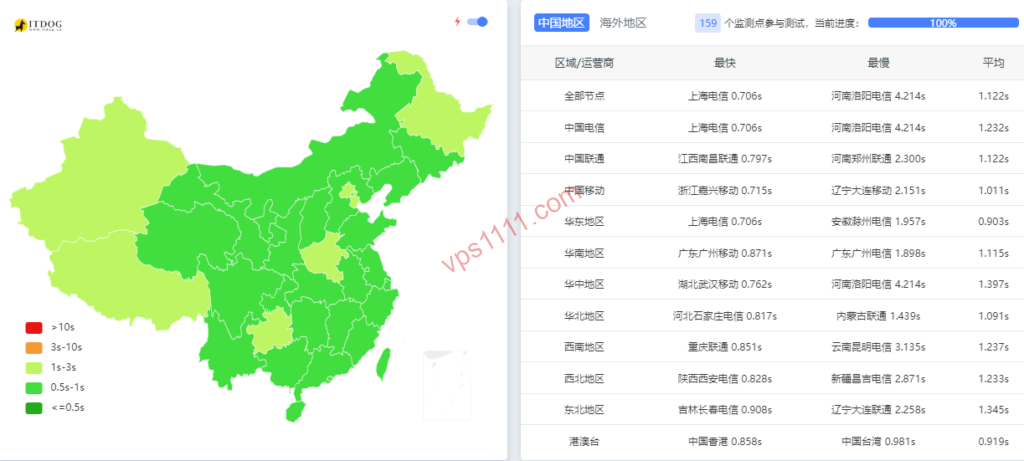
1. ITDog.cn (ITDog) — The Ultimate Outbound Route Analyzer
This is an essential tool for testing regional network environments. Its biggest advantage is a massive pool of real-world nodes across major Chinese ISPs, with MTR functionality that automatically resolves route ASNs (Autonomous System Numbers). If you purchase a VPS advertised as “multi-ISP direct routing,” running an outbound MTR on ITDog and checking the intermediate ASNs will instantly expose any subpar routing.
2. Ping.pe — Global Connectivity & TCP Port Block Detector
As a globally distributed third-party testing platform, Ping.pe is your go-to solution when your VPS “responds to Ping but the website won’t load.” Its TCP Port test sends TCP handshake requests from multiple global locations to your specified ports (like 443 or 22), accurately diagnosing whether a firewall is blocking specific ports.
3. NextTrace Web — Visual Route Mapping to Spot Detours Instantly
NextTrace is a powerful open-source route tracing tool. Beginners often struggle with raw text-based MTR outputs, but the community-driven web visualization solves this by mapping every IP hop to a global map. If your server is in Los Angeles but the route detours through Europe before returning to the US, the visual map exposes the inefficient path instantly. (Note: Always use the official open-source links or nexttrace.fun; avoid unauthorized domains).
🧠 Advanced Guide: How to Read MTR Data Like a Pro
Knowing the tools is just step one. Interpreting the underlying data is what separates beginners from experts. Keep these three critical rules in mind:
💡 vps1111 Exclusive MTR Pitfall Guide:
- False Packet Loss vs. Real Congestion: If intermediate hops show 100% loss but the final destination shows 0% loss, it’s just ICMP rate limiting (false loss) and won’t affect your service. However, if packet loss increases hop-by-hop (e.g., 20% at hop 4, 40% at hop 5, with loss or severe jitter at the endpoint), that’s genuine network congestion!
- Outbound vs. Return Path Reality: Online MTR platforms only test the outbound route (platform node → your VPS). For web hosting, the bottleneck is always the return path (server sending data to users). You must run MTR from your VPS back to a regional IP to accurately judge route quality!
- Decoding ASN Routing: For global transit, look for AS1299 (Telia) or AS174 (Cogent) on the return path. AS2914 (NTT) is a premium low-loss network during prime time, while AS3356 (Lumen) is a standard backbone (expect normal prime time congestion); for regional peering, target AS9002 (RETN).
Common Mistake #1: Assuming NTT / Telia Means a Bad Route
Many beginners see NTT (AS2914) or Telia (AS1299) in an MTR report and immediately assume the route is poor. This is a fundamental misunderstanding. NTT and Telia are top-tier Tier 1 global carriers with massive transoceanic fiber networks.
The issue isn’t NTT itself, but whether the peering bandwidth with regional ISPs is sufficient. If a standard backbone forces traffic through a congested NTT exit, prime time performance will suffer. However, many premium international hosting routes use high-tier BGP peering via NTT, often delivering lower latency than direct paths. Judge routes by actual packet loss and latency jitter at the final hop, not by the carrier names you see.
Common Mistake #2: Unrealistic Latency Expectations
Physics doesn’t lie. The physical latency limit for trans-Pacific fiber is around 120ms. Accounting for backbone routing and exit queuing, normal direct routes from the US West Coast typically sit between 150ms – 190ms.
If you measure 200ms – 250ms, it’s likely normal queuing delay during prime time. However, if latency spikes to 280ms+ or even 300ms+, that indicates genuine route detours (e.g., routing through Europe or South America before returning). Don’t mistake normal prime time queuing around 200ms for inefficient routing.
🛒 Purchasing & Hosting Configuration Advice
No matter how clean the MTR data looks, your choice must align with your actual use case. Before buying, ask yourself what you’ll be running:
- Heavy-Duty Hosting (Dynamic WordPress + MySQL / DTC e-commerce site): Stability is paramount. Always request a Looking Glass to verify the return path uses premium routing like CN2 GIA, AS9929, or CMIN2. For dynamic WP sites, 1-core/1GB RAM will easily OOM (out of memory) during prime time. Start with at least 2-core/2GB RAM.
- Lightweight Distribution or CDN Nodes (High Traffic): Focus on high bandwidth and value. Standard direct routing (AS4837 return path) offers excellent cost efficiency. Expect 5%-10% reasonable congestion during prime time, but the high throughput makes it a highly productive, budget-friendly option.
- Static Hosting or Test Servers: If you’re chasing the lowest price, just use MTR to confirm the route doesn’t severely detour through Europe. 1-core/1GB is perfectly fine for static HTML. Don’t expect 24/7 zero packet loss—you get what you pay for.
Summary: In 2026, don’t buy VPS based on marketing slides—buy based on data. Master platforms like ITDog, Ping.pe, and NextTrace, cross-verify outbound and return paths, decode ASNs, and spot false packet loss. You’ll consistently secure high-quality servers in a crowded cloud market.
❓ FAQ: Online MTR & Network Routing Q&A
Q1: Why does online MTR show low latency, but my website still loads slowly?
A1: This is a classic case of asymmetric routing. Online MTR platforms (like ITDog) test the outbound path from regional nodes to your VPS. A direct outbound route doesn’t guarantee a direct return path. Website load speed is 90% determined by the return path (server to user). You must run a traceroute from inside your VPS back to a regional IP to see the real bottleneck.
Q2: I see 100% packet loss on intermediate nodes in my MTR report. Is the provider’s route bad?
A2: Not necessarily. If intermediate hops show 100% loss but the final destination shows 0% loss and stable latency, it’s due to ICMP rate limiting on backbone routers (often called “Ping blocking” or DDoS mitigation). This “false loss” has zero impact on actual traffic.
Q3: What is the normal latency for a direct US West Coast server?
A3: Due to the physical limits of light traveling through undersea cables, the baseline latency between the US and Asia is 120ms–130ms. Adding router processing time, top-tier optimized routes typically run 130ms–160ms, while standard direct routes sit around 160ms–200ms. Anything above 250ms indicates the traffic is taking a detour.