


Executive Summary: VPS performance depends not only on the advertised specs you purchase, but also on “noisy neighbors” and the dedicated node’s overselling strategy. This article breaks down the underlying mechanics of CPU steal time, disk I/O bottlenecks, and bandwidth contention. Avoid blindly chasing cheap, high-spec plans. Master diagnostic tools like YABS and steer clear of heavily oversold fly-by-night hosts to ensure reliable connectivity and stable SEO rankings.
Breaking the Illusion: Why Does Your VPS Keep Experiencing Intermittent Freezes?
Many sysadmins managing cross-border e-commerce or international web hosting encounter this seemingly “mystical” issue: you purchase a server advertised AS2-core with 4GB RAM, and it runs flawlessly upon deployment. Yet, during specific peak hours, your site’s TTFB (Time to First Byte) suddenly spikes, and even basic SSH commands lag until the connection drops.
You might immediately start troubleshooting your Nginx configuration or hunting for slow MySQL queries. However, in a virtualized environment, this severe performance degradation is rarely caused by your own code. More often, you are experiencing the impact of noisy neighbors.
To understand this, you must first grasp the physical reality of a VPS. You are not renting a standalone physical machine; you are getting a virtual slice carved out of a high-performance physical server—commonly referred to in the industry as a dedicated node. Think of it like renting an apartment: you have your own lock (operating system), but you share the building’s main electrical capacity, water pressure, and elevators. If your neighbor starts running power-hungry mining rigs 24/7 or constantly maxes out the plumbing, your own utilities will inevitably suffer.
For a deeper dive into how virtualization architectures handle resource isolation, we recommend reading: KVM vs OpenVZ vs LXC: Why KVM Is the Top Choice for Modern Web Hosting.
Under the Hood: How Overselling Drains Your VPS Performance
In the hosting industry, providers rarely allocate physical resources at a strict 1:1 ratio. To maximize profits, they bank on the fact that most users only consume a fraction of their allocated resources. Consequently, a dedicated node designed to comfortably run 50 VPS instances might be forced to host 100 or more (a 2:1 overselling ratio or higher). This practice is known as overselling.
Moderate overselling is an industry standard, but aggressive overselling is a disaster. It degrades your service across three critical dimensions:
1. CPU Steal Time and Compute Contention
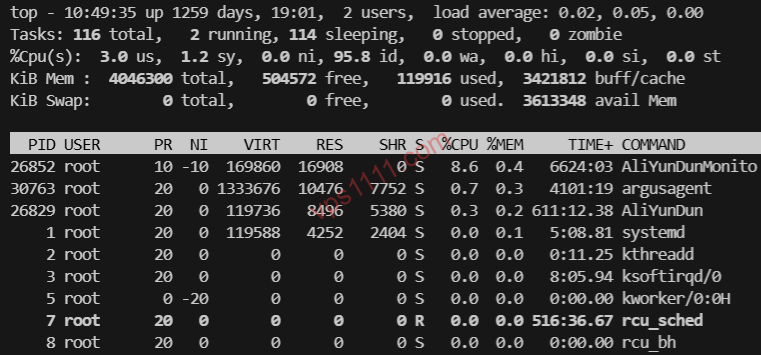
When you run the top or htop command, pay close attention to a key metric: %st (Steal Time). This represents the percentage of time your virtual machine is ready to execute tasks, but the underlying hypervisor cannot allocate CPU cycles because the physical cores are fully occupied by other tenants.
If your %st consistently stays above 10%, it means your neighbors are heavily running data scrapers, torrent seeding, or crypto mining. With the physical cores maxed out, your VPS gets stuck waiting in the scheduler queue, resulting in multi-second response delays for your website.
2. Disk I/O Congestion and the “Spinning Rust” Nightmare
Even more crippling than CPU contention is disk I/O. Even though SSDs are standard in 2026, under extreme overselling or artificially throttled IOPS limits, your VPS can still perform like spinning rust. If a neighbor is running continuous heavy database writes and saturating the storage bus, your %wa (I/O Wait) metric will skyrocket. This is the most common culprit behind 502 Bad Gateway errors on WordPress sites.
To learn how to expose these performance tricks using professional tools, check out our guide: VPS Benchmarking Guide: How to Detect Fake Specs and Overselling.
3. The “Weakest Link” Effect on Network Bandwidth
When providers advertise a “1Gbps port,” they are usually referring to the physical NIC limit of the dedicated node. If that node hosts 100 VPS instances all claiming “1Gbps bandwidth,” but the server’s actual uplink is only 10Gbps, you will face severe contention during prime time. When everyone pushes traffic simultaneously, your real-world throughput could drop to just a few dozen Mbps, far below the advertised specs.
How to Spot Aggressively Oversold, Low-Quality Providers
In today’s hosting market, price and quality are almost always directly correlated. As a senior infrastructure architect, I recommend focusing on these critical details before purchasing:
1. Beware of Unrealistically Low Prices
If a provider advertises “4-core, 8GB RAM, 1Gbps bandwidth for just $12/year,” add them to your blacklist immediately. At that price point, the only way to cover hardware and bandwidth costs is to cram exponentially more virtual machines onto a single dedicated node. This is a textbook example of ripping off customers.
For users prioritizing stability for international web hosting, we highly recommend reading: Why You Should Avoid Sub-$1/Month VPS Plans: The Truth About Overselling and Exit Scams.
2. First Step After Deployment: Run a Hardcore Diagnostic
Once you receive your server, don’t just trust the control panel dashboard. Immediately run a comprehensive benchmark script like YABS, paying close attention to 4K random read/write IOPS and Geekbench single-core scores. If the real-world results drastically differ from the advertised specs, request a refund while you are still within the grace period.
For a detailed walkthrough of the testing process, refer to: The Ultimate VPS Testing Guide: Exposing Provider Tricks with YABS.
3. Accept the Reality of Unmanaged Services
It’s important to acknowledge that most budget-friendly VPS plans are unmanaged. This means when noisy neighbors impact your performance, the provider will typically have a slow support ticket response time, or simply tell you that “the network and hardware are fine; please optimize your application yourself.” These services usually lack advanced hardware DDoS mitigation. If a neighbor gets hit with a DDoS attack, your server may suffer collateral downtime.
Practical Solutions: What to Do When Severely Impacted by Neighbors?
If you are already stuck on a heavily congested dedicated node and cannot migrate immediately, try these mitigation strategies:
- Schedule Off-Peak Tasks: Move high-load operations like data scraping or full backups to off-peak hours (e.g., 03:00–05:00) to avoid competing for I/O during prime time.
- Enable a Swap Partition: When underlying memory is squeezed by neighbors and triggers an OOM (Out of Memory) event, swap space can prevent critical processes like MySQL from crashing. For step-by-step instructions, see: Low-Memory VPS Guide: Enable Swap to Prevent Crashes and System OOM.
- Cut Your Losses and Migrate: If your
%ststays consistently high, stop wasting time tweaking software. Package your data and migrate immediately. Switching to a provider with stricter Terms of Service (ToS) and a proven reputation is the only permanent fix.
💡 vps1111 Practical Guide & Pitfall Avoidance:
- Performance Monitoring: If you experience lag, run
topand check thestvalue. If it consistently exceeds 10%, the dedicated node CPU is severely overloaded. - Common Pitfalls: Many budget VPS providers typically have slow support ticket responses and do not offer free snapshots. You must maintain your own off-site scheduled backups.
- Recommendation Rating: ⭐⭐⭐⭐⭐ (This guide applies to basic troubleshooting for all KVM-based cloud servers)
Frequently Asked Questions
Q1: How can I accurately determine if my VPS is experiencing I/O bottlenecks caused by neighbors?
After logging in via SSH, run the top command and monitor the %wa (I/O Wait) metric. If this value consistently stays above 10% or even 30%, your system is bottlenecked waiting for disk read/write operations. This is typically caused by neighbors heavily saturating the dedicated node’s storage I/O. Running a dd speed test at this point will usually reveal extremely low read/write speeds.
Q2: Does purchasing a Dedicated Instance completely eliminate the noisy neighbor effect?
Not entirely. A dedicated instance (such as a dedicated CPU) only guarantees that your compute cycles won’t be stolen. However, the dedicated node’s RAID I/O, motherboard bus bandwidth, and the rack’s network uplink port are usually still shared resources. In the event of a massive DDoS attack or severe disk abuse by another tenant, your dedicated instance’s network and storage will still experience collateral impact.
Q3: Why is a server from the same provider buttery smooth one day, but extremely laggy the next?
This entirely depends on which physical dedicated node you are assigned to—essentially a “blind box” allocation. If yesterday’s node hosted standard webmasters, performance would be excellent. If today’s node happens to host several tenants running high-concurrency data scrapers or consuming massive bandwidth, your server’s performance will drop sharply.