


Executive Summary: In 2026, instant page load times directly dictate conversion rates for global e-commerce and cross-border web hosting. Traditional TCP protocols struggle under high-latency intercontinental networks, making the UDP-based HTTP/3 and QUIC protocols the \”grandfathered plan\” to overcome these physical bottlenecks. From a systems architect’s perspective, this guide breaks down the core acceleration logic of HTTP/3 and provides a step-by-step walkthrough to enable QUIC support in both native Nginx and cPanel. Note: Some regional ISPs enforce strict QoS throttling on UDP traffic. Enabling it blindly can degrade performance, so thoroughly evaluate your target audience’s actual network conditions before deployment.
1. Protocol Evolution: Why We Need HTTP/3 and QUIC
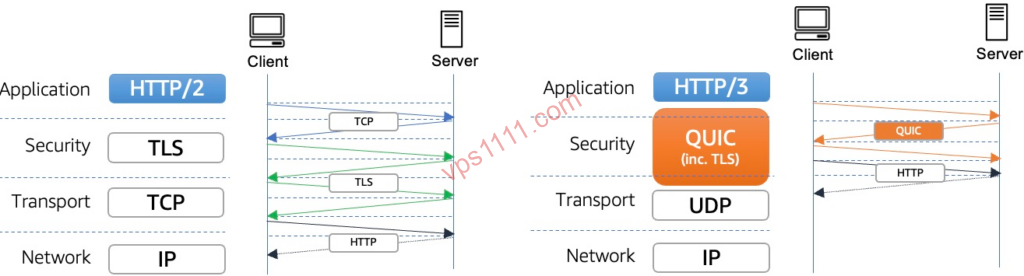
Throughout the evolution of Linux system administration and web architecture, HTTP protocol upgrades have consistently focused on two core objectives: reducing latency and increasing throughput. When deploying DTC e-commerce sites, slow static asset loading remains a common bottleneck. Even with a CDN in place, the physical distance between origin servers and edge nodes makes handshake latency notoriously difficult to eliminate.
While HTTP/2 introduced multiplexing to overcome HTTP/1.1’s concurrent connection limits, it still relies on the legacy TCP protocol. This creates a critical flaw: Head-of-Line (HoL) Blocking. At the TCP layer, if a single packet is lost during transmission, the entire connection stalls until that packet is retransmitted. In high-latency, high-packet-loss intercontinental networks, this behavior is a severe performance bottleneck.
To resolve this, Google pioneered the QUIC protocol, which the IETF officially standardized in 2022 as RFC 9114, cementing it as the underlying transport layer for HTTP/3. HTTP/3 completely abandons TCP in favor of a lighter, more flexible, and secure UDP foundation.
2. Architectural Deep Dive: The Transport Revolution for Intercontinental Networks
For architects managing complex global network environments, what tangible performance gains does HTTP/3 actually deliver for international web properties?
1. Breaking Physical Limits with 1-RTT and 0-RTT Connections
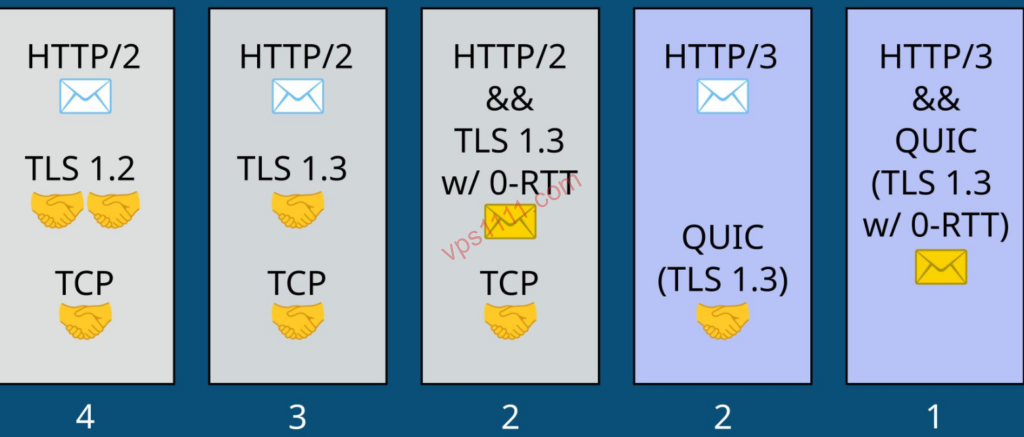
In traditional HTTPS (TCP + TLS 1.2) connections, clients and servers must complete a 3-way TCP handshake followed by multiple TLS handshakes before data transmission begins. If your intercontinental latency sits at 150ms, establishing the connection alone consumes nearly half a second. QUIC merges the transport and encryption handshakes into a single step, requiring just 1-RTT for initial connections. For returning visitors, it supports Zero Round Trip Time (0-RTT) connection resumption, allowing data to be sent in the very first packet upon revisit, delivering true instant-load experiences.
Note: While 0-RTT maximizes reconnection speed, it inherently carries a risk of replay attacks at the application layer. For pages handling sensitive interactions like online payments or user logins, architects should carefully restrict or partially disable 0-RTT handshakes in the configuration.
2. Eliminating Head-of-Line Blocking
Because HTTP/3 operates over UDP, multiplexing is handled directly at the QUIC layer. If a packet is lost in one stream, only that specific stream pauses for retransmission. Other streams (such as concurrently loading images or CSS files) remain completely unaffected and continue transmitting at full speed. In congested, high-packet-loss intercontinental environments, this delivers a massive leap in user experience.
3. Seamless Connection Migration
Modern mobile users frequently switch between Wi-Fi and cellular networks. TCP connections are bound to a four-tuple (source IP, source port, destination IP, destination port), meaning any IP change forces a disconnect and reconnect. QUIC uses a unique Connection ID to maintain sessions. Even if a user’s IP changes mid-session, active downloads or video streams remain uninterrupted—a critical feature for remote work and long-running web applications.
3. Implementation Guide: Enabling HTTP/3 in cPanel and Native Nginx
By 2026, mainstream web servers natively support HTTP/3, though it remains disabled by default. Below is a practical deployment guide for Linux environments. If you are running a heavily oversold fly-by-night host, we strongly recommend reviewing our VPS Nginx Performance Tuning Guide to optimize the underlying system before handling the additional computational overhead.
1. Enabling HTTP/3 in cPanel
cPanel is widely adopted for its intuitive interface, but enabling its Nginx HTTP/3 module typically requires recompilation.
- Upgrade Nginx: Ensure your cPanel installation uses Nginx version 1.25.0 or higher. If not, uninstall the legacy version via the App Store, select version 1.25+, and choose Compile Install.
- Open UDP Ports: Critical! Since QUIC operates over UDP, you must explicitly allow UDP traffic on port 443 in both cPanel’s firewall settings and your cloud provider’s security group rules.
- Modify Site Configuration: Open your site’s configuration file. Directly below the existing
listen 443 ssl http2;directive, add the QUIC listener and Alt-Svc response header:listen 443 quic reuseport;
listen [::]:443 quic reuseport; # If IPv6 is supported
# Enable TLS 1.3, a strict requirement for QUIC
ssl_protocols TLSv1.2 TLSv1.3;
# Inform browsers that this site supports HTTP/3 (Note: Do not use deprecated drafts like h3-29)
add_header Alt-Svc 'h3=\":443\"; ma=86400'; - Save the configuration and restart the Nginx service.
2. Compiling and Configuring Native Nginx
For sysadmins who prefer avoiding control panels, you can compile directly from source.
- Prepare Compilation Flags: When compiling Nginx 1.25+, you must include the
--with-http_v3_moduleflag. - Nginx.conf Configuration:
server {
    listen 80;
    server_name yourdomain.com;
    return 301 https://$host$request_uri;
}

server {
    # Enable HTTP/1.1 and HTTP/2 over TCP
    listen 443 ssl;
    http2 on;

    # Enable HTTP/3 over UDP
    listen 443 quic reuseport;
    server_name yourdomain.com;

    ssl_certificate /path/to/your/fullchain.pem;
    ssl_certificate_key /path/to/your/privkey.pem;
    ssl_protocols TLSv1.2 TLSv1.3;

    # Core header to prompt clients to upgrade to H3
    add_header Alt-Svc 'h3=\":443\"; ma=86400';

    location / {
        root   /var/www/html;
        index  index.html index.htm;
    }
}
3. Verifying HTTP/3 Activation
Once configured, you can verify activation directly using your browser’s developer tools:
- Open your website in Chrome and press
F12to launch Developer Tools. - Navigate to the Network tab, right-click the column headers, and enable the Protocol column.
- Refresh the page and check the Protocol column for static assets (images, JS, etc.). If it displays h3, HTTP/3 and QUIC are successfully active.
4. Advanced Troubleshooting & Deployment Pitfalls
Deploying a new protocol in production can trigger unexpected edge cases. If you encounter intercontinental access anomalies or connection drops post-configuration, we recommend running multi-node MTR tests alongside our Cloud Server Network Troubleshooting SOP.
💡 vps1111 Deployment & Pitfall Guide:
- Network Routing: HTTP/3 relies entirely on UDP paths. Premium backbone networks between North American and European data centers handle UDP exceptionally well. However, in certain Asia-Pacific or direct intercontinental routes, strict Quality of Service (QoS) policies can push UDP packet loss above 50%. In these scenarios, enabling H3 will actively degrade performance.
- CPU Overhead Warning: Do not overlook the CPU load trap. Traditional TCP stacks are baked into the Linux kernel, whereas QUIC currently operates primarily in user space. Its transport logic and intensive packet processing generate heavy context switching and system calls. Under high concurrency, budget-tier servers will quickly hit performance ceilings.
- CDN Offloading Strategy: If you use a major CDN like Cloudflare, strongly consider offloading HTTP/3 computation to the edge. Simply toggle the \”HTTP/3\” switch in the Cloudflare dashboard’s Network tab. This eliminates the need for complex origin VPS recompilation, allowing the CDN to absorb all QUIC processing overhead.
- Recommendation Score: ⭐⭐⭐⭐ (5/5 for architectural innovation, minus 1 star due to unstable intercontinental UDP routing and additional CPU overhead. Evaluate carefully based on your specific deployment scenario.)
5. Frequently Asked Questions
Why isn’t my site noticeably faster after enabling HTTP/3?
This typically stems from three factors. First, the client browser may lack full QUIC support, or cached headers haven’t triggered an Alt-Svc renegotiation. Second, your firewall might only allow TCP port 443 while blocking UDP 443, forcing traffic to fallback to HTTP/2. Finally, intermediate ISPs may throttle or drop UDP packets, making the connection less efficient than a TCP-optimized route.
How do I fix cPanel Nginx compilation failures?
Compilation failures in cPanel usually stem from outdated system dependencies. HTTP/3 strictly requires OpenSSL with TLS 1.3 support. SSH into your server, run yum update or apt upgrade, and manually upgrade OpenSSL to version 3.0+. Review the installation logs for missing components (e.g., pcre, zlib), install them via your package manager, and retry the compilation.
Will HTTP/3 increase VPS CPU load?
Yes, significantly. Traditional TCP stacks are integrated into the Linux kernel for highly efficient processing. QUIC, however, operates primarily in user space. Its transport logic (including complex congestion control) and intensive packet handling generate additional kernel-to-user context switches and CPU overhead. Under identical high-concurrency loads, this results in noticeably higher CPU usage compared to kernel-optimized HTTP/2. If you are using a budget cloud server, we strongly recommend enabling HTTP/3 at the CDN edge rather than forcing the origin VPS to handle the QUIC processing load.