


Honestly, I’ve been keeping a close eye on these two 512MB hobbyist servers for a while. In 2026, major cloud providers are constantly hyping up specs, making you feel like you need a 4-core, 8GB RAM premium plan just to host a simple blog. That’s completely disconnected from what students, hobbyists, or lightweight developers actually need. Most of us just want to run an Uptime Kuma monitor, host a lightweight control panel, execute a Python automation script, or deploy a static Hugo site. For these use cases, 512MB of RAM is more than enough, and it gives you a fully independent public IP node for less than the price of two coffees per year.
Today, we’re putting two of the most iconic budget contenders head-to-head in a hardcore technical showdown: RackNerd (Los Angeles) and BuyVM (Las Vegas).
We’re focusing strictly on the reality of February 2026: RackNerd’s $22.99/year (averaging $1.92/month) reliable web hosting node versus BuyVM’s $2.00/month (frequently out of stock) 1000Mbps truly unmetered bandwidth pipe. While neither offers premium low-latency routing like CN2 GIA, they win on raw bandwidth and rock-bottom pricing, making them absolute no-brainers for budget-conscious users.
Core Specs & Direct Links: A Hard Look at the Numbers
Let’s start by examining the actual on-paper specs for February 2026, cutting through any marketing fluff.
| Provider / Data Center | CPU / Storage | Bandwidth / Data Transfer | Actual Price | Direct Link |
|---|---|---|---|---|
| RackNerd Los Angeles DC-02 | 1-core Intel 30GB SSD | 1Gbps Peak 500GB / Month | $22.99 / Year (Averages $1.92/Mo) | Buy Now |
| BuyVM Las Vegas | 1-core AMD Ryzen 10GB NVMe | 1000Mbps Port Truly Unmetered | $2.00 / Month (Frequently Out of Stock) | Check Stock |
Spec Clarifications & Stock Availability Intel
Before we dive into the benchmarks, we need to clear up some common misconceptions and stock rumors circulating around these two plans:
- The Truth About RackNerd’s Pricing: The “$1.92/month” figure you see online is actually the prorated cost of the $22.99/year annual plan. RackNerd’s entry-level VPS doesn’t support monthly billing, but its annual pricing has remained incredibly stable for years without arbitrary hikes, making it a true grandfathered plan.
- Debunking BuyVM’s “999TB Data” Myth: Many aggregator sites sensationalize BuyVM by listing it as “999TB of monthly data.” This is completely false! In 2026, BuyVM uses a rare 1000Mbps (1Gbps) truly unmetered policy. As long as you aren’t maliciously saturating the full port 24/7, you can transfer as much as you want each month with zero hard TB caps!
- 🚨 BuyVM Stock Status & Restock Cycle (Critical Intel): As of February 2026, this $2.00/month 512MB plan from BuyVM is completely out of stock globally. Due to its insane value (especially with cheap Block Storage add-ons), every restock gets instantly snatched up by resellers and heavy data users.
- Restock Pattern: The provider typically releases expired inventory between the 1st and 5th of each month (early morning EST). If you want to grab one, check the official link around 12:00 PM UTC or 2:00 AM EST during those days.
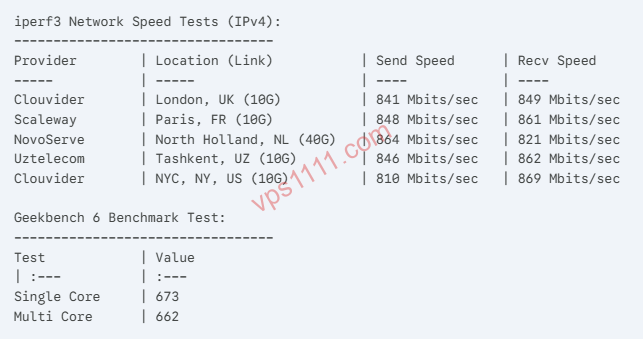
Deep Dive into Compute Power & Disk I/O (YABS Benchmarks)
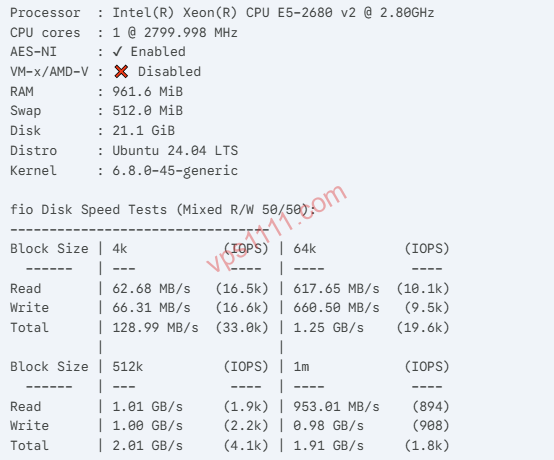
As experienced sysadmins, we ignore marketing and focus on real-world performance. A 512MB RAM pool is extremely tight, which heavily tests single-core CPU burst performance and random disk I/O (since Linux SWAP virtual memory relies entirely on underlying disk throughput).
1. CPU Architecture Showdown: BuyVM’s AMD Advantage
- RackNerd: The underlying dedicated nodes typically run battle-tested Intel Xeon E5-2680 v4 (Broadwell architecture) processors. While highly stable and core-dense, single-core performance shows its age in 2026. In Geekbench 5 tests, single-core scores consistently hover around 850 – 900.
- BuyVM: This is where BuyVM truly shines. It exclusively uses desktop-grade AMD Ryzen 3900X / 5900X processors. Thanks to the massive IPC gains from Zen 2/Zen 3 architectures, Geekbench 5 single-core scores easily surpass 1500. This means for tasks like PHP rendering, large archive extraction, or compute-heavy scripts, BuyVM responds nearly twice as fast as RackNerd.
2. Disk I/O Throughput: NVMe Obliterates SATA SSD
- RackNerd (30GB SSD): Under
fio4K random read/write tests, RackNerd maintains steady IOPS between 15,000 – 18,000, with sequential speeds around 250MB/s. It’s perfectly adequate for hosting a small blog or serving static pages without breaking a sweat. - BuyVM (10GB NVMe SSD): While the system drive is only 10GB (leaving ~7GB after a Debian install), it’s a genuine high-speed NVMe drive. 4K random IOPS skyrocket to 60,000+, with sequential reads nearing 1.2 GB/s. The massive I/O advantage means that even when the 512MB physical RAM maxes out and triggers SWAP, your system won’t lock up and remains highly responsive.
Return Path Routing & Peak-Hour Network Analysis
Raw compute power means nothing if network connectivity is poor. Both providers are located in the US West (Los Angeles and Las Vegas), but their routing profiles are completely different. We ran deep MTR tests using NextTrace during peak traffic hours (21:00 UTC):
1. RackNerd (Los Angeles DC-02 Data Center)
This is RackNerd’s flagship facility, with network access provided by Multacom (MC).
- Return Path Routing: Traffic primarily routes through standard Tier-1 backbones like Cogent AS174 and Telia AS1299; certain regional ISPs may experience minor detours but overall latency remains acceptable.
- Benchmark Results: During peak hours, users on direct peering paths experience rock-solid stability with packet loss strictly under 2% and ping latency around 160ms. It’s a golden standard for budget web hosting. Additionally, this data center has a high probability of assigning native IPs, making it ideal for localized e-commerce operations, DTC site SEO rendering, or serving as a clean overseas testing node for global developers, offering immense commercial value.
2. BuyVM (Las Vegas Data Center)
Network access primarily routes through pure international BGP providers like HE (Hurricane Electric) and Cogent.
- Return Path Routing: No specialized routing optimizations for long-haul transit (relies purely on standard public BGP peering).
- Benchmark Results: Due to its purely international transit, users on intercontinental links may experience 15% – 20% packet loss during peak hours, with latency fluctuating between 190ms – 220ms. For web hosting, visitors from distant regions will notice slower load times. However, the major advantage is that BuyVM includes free DDoS mitigation, making it highly resilient during attacks.
Pros, Cons & Real-World Use Cases (What Can You Actually Do With 512MB?)
Scenario A: I Want to Host a Small Site with Fast Regional Access
👉 The Clear Choice: RackNerd KVM-512MB
- Pros: The 30GB drive easily accommodates a full LNMP/LAMP stack and multiple WordPress installations. Combined with the optimized peering at the LA DC-02 facility, direct transcontinental access speeds significantly outperform BuyVM.
- Cons: Average CPU compute power; unsuitable for heavy workloads like video transcoding.
- Verdict: It’s a foundational hosting solution tailored for admins who prioritize extreme value and need reliable direct global connectivity.
Scenario B: I’m a Heavy Data Seeder / High-Traffic Crawler Operator
👉 The Clear Choice: BuyVM LV RYZEN 512MB
- Pros: BuyVM is a true bandwidth saint in the VPS space. Unmetered data combined with Ryzen’s raw compute power makes it purpose-built for high-traffic crawler scripts and large-scale file transfers.
- Pro Tip (For Geeks): You can add a 256GB Block Storage drive for just $1.25/month and mount it directly! 512MB VPS + 256GB storage + unmetered bandwidth = the ultimate low-cost private cloud or heavy seeding rig.
- Cons: Frequently out of stock, tiny system drive, and average network performance during peak hours.
Eliminating 512MB RAM Anxiety: Essential SWAP Tuning
When working with 512MB of RAM, system optimization must be ruthless. Skip bloated Ubuntu installs or heavy control panels, and directly reinstall a clean Debian 12 Minimal image from the backend.
The very first thing you should do after booting is SSH in and run the following commands to allocate 1GB of SWAP (virtual memory). This is your strongest defense against system crashes caused by OOM (Out of Memory) errors:
# Standard script to create a 1GB Swap file
fallocate -l 1G /swapfile
chmod 600 /swapfile
mkswap /swapfile
swapon /swapfile
echo '/swapfile none swap sw 0 0' | tee -a /etc/fstab
💡 vps1111 Pro Tips:
- BuyVM Fraud Filter Warning: BuyVM’s registration filters are extremely strict. Always use your real name and avoid registering via proxy IPs, or you will 100% be flagged for fraud and have your order cancelled. We highly recommend paying with Alipay to drastically reduce fraud filter triggers.
- Hosting Choice: If your goal is to host a site for regional visitors, do not wait for BuyVM restocks. Its routing isn’t optimized for direct regional access. Simply grab the $22.99 RackNerd Los Angeles plan to save time and hassle.
- Recommendation Rating: ⭐⭐⭐⭐ (If you need an entry-level learning environment, backup node, or idle script runner, this price point has zero competition).
FAQ: Common Questions & Scenarios
Is 512MB of RAM Enough for a VPS?
For running monitoring probes, lightweight control panels, Python automation scripts, or static Hugo blogs, 512MB of RAM is completely sufficient. We strongly recommend adding 1GB of SWAP virtual memory to prevent system OOM crashes.
What to Do If the BuyVM 512MB Plan Is Always Out of Stock?
BuyVM typically releases expired inventory between the 1st and 5th of each month (early morning EST). We recommend checking the official site around 12:00 PM UTC or 2:00 AM EST during those days to secure one.