


Core Summary: In 2026, if you’re still choosing a VPS based solely on ping values and “direct peering” marketing claims, you’re setting yourself up for costly mistakes. This article, compiled by a senior network architect, provides a hardcore breakdown of mainstream global ISP route tracing tools (like NextTrace, MTR, and BestTrace). We deeply analyze the asymmetry between outbound routes and return paths, teach you how to accurately decode routing jargon like AS1299 (Telia) and AS174 (Cogent), and help you move from blind guessing to informed decision-making so you can secure a true web hosting grandfathered plan.
Look, if you’re navigating the VPS market and only know how to check ping values, you haven’t even scratched the surface. Ping only tells you if a packet arrived; route tracing (Traceroute) reveals how it got there.
Many beginners buy a server only to find low latency but high packet loss, or endless loading spinners. The culprit is usually hidden in those suboptimal routing nodes that vendors deliberately obscure. As a veteran with 12 years in Linux operations and network architecture, I’m pulling out my complete arsenal of mainstream global ISP route tracing tools to help you transition from blind guessing to precise diagnostics.
🧠 Paradigm Shift: Why You Must Master Multi-Dimensional Route Testing?
In today’s complex 2026 network landscape, relying on a single ping test is pointless. You need to grasp these three core principles:
- Asymmetry of Outbound vs. Return Paths: The route from your computer to the VPS (outbound) might look pristine, but the return path from the VPS could be routing halfway around the globe. For web hosting, the return path is all that matters!
- Protocol Differences: Traditional ICMP (standard ping) is often rate-limited or dropped at many backbone nodes. Modern tools like NextTrace support TCP/UDP probing, which far more accurately reflects real-world web hosting traffic conditions.
- AS Numbers Are the Real Currency: Ignore vendor marketing fluff. Identifying backbone AS numbers (like AS1299 for premium Telia routing, or AS174 for standard Cogent) is the only concrete metric for evaluating route quality.
🛠️ Hardcore Tool List: Web-Based vs. Client-Based
To help technical readers get started quickly, I’ve categorized the mainstream 2026 tools into two groups based on use cases.
1. Web-Based Tools (Looking Glass): Essential Pre-Purchase Checks for Quick “Outbound” Diagnostics
Web-based route tracing tools are ideal for testing before you spend any money. They primarily verify connectivity from your local network to the data center and confirm whether the vendor’s routing claims hold up.
2. Client-Based Tools: Deep Diagnostics, Essential for Post-Purchase Verification
If you’ve already purchased a server, you must use client-based tools to run deep diagnostics directly inside the VPS to accurately measure the true “return path.”
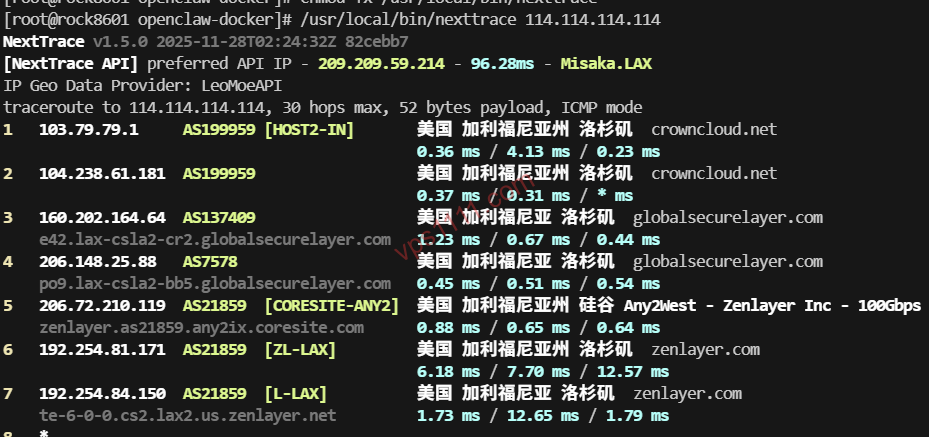
① NextTrace (2026 Industry Standard)
This is currently the most powerful and modern open-source terminal tracing tool. It supports interactive mapping and accurately decodes various ISP routing jargon.
- One-Click Install (Official Stable Release):
curl -sL https://nexttrace.org/script/install.sh | bash
(If this fails, download the binary via wget and apply chmod +x permissions.) - Core Features: Supports advanced TCP/UDP probing. Paired with its built-in precise IP database, it directly highlights the AS number and geolocation for every hop right in your terminal.
② MTR (Continuous Link Quality Monitoring)
MTR is the ultimate hybrid of Traceroute and Ping.
- Expert Positioning: MTR focuses on continuous link quality monitoring (allowing you to observe real-time packet loss and latency fluctuation trends per hop during prime time), whereas NextTrace excels at one-time route visualization and precise protocol probing.
③ BestTrace (Top Choice for Cross-Platform Visualization)
Developed by IPIP, it features an exceptionally user-friendly UI, making it perfect for visualizing the physical path of packets traversing global submarine cables on Windows or Mac clients.
💡 vps1111 Geek Troubleshooting Rules:
- Accurate Return Path Testing is Non-Negotiable: After purchasing, always run NextTrace on the VPS to trace back to your local machine’s public IP. This result determines the actual return path speed for your web hosting.
- Quick Signature Identification: If you see signature nodes from Arelion/Telia (AS1299) or Lumen (AS3356) during testing, your traffic is routed over a premium Tier-1 backbone with minimal congestion.
- Budget-Friendly Route Identification: If you see Cogent (AS174) or HE (AS6939) with stable backbone latency (no erratic city-hopping), this typically represents the best value-for-money balance for web hosting in 2026.
⚙️ Core Principles: How to Read the “Golden Signals” in Trace Results?
When you see a string of hops in your tracing tool, don’t panic. Just remember these three golden signals:
- AS1299 / AS3356 Signatures: The hallmark of premium Tier-1 routing. Seeing these means your packets are traveling on a high-capacity, low-congestion backbone, virtually eliminating packet loss during prime time.
- AS1299 / AS3356 (Premium Low-Latency): If you spot these in your trace, it indicates extremely low backbone load, delivering near-instant page loads for web hosting.
- Node “Timeouts” or Asterisks: If a hop shows only asterisks (* * *), it usually just means that backbone router has ICMP responses disabled (anti-ping). As long as the final destination is reachable and the next hop’s latency doesn’t spike, there’s no cause for alarm.
❓ FAQ: High-Frequency Route Tracing Q&A (Featured Snippets)
Q1: Why does NextTrace prompt for insufficient permissions during testing?
A: Route tracing involves probing low-level network protocols (like TCP/UDP/ICMP), which requires system-level privileges. Prefix your command with sudo, e.g., sudo nexttrace 8.8.8.8, or switch directly to the root user to execute it.
Q2: Why does MTR show a 100% packet loss rate on my first hop (gateway)?
A: This occurs because your local gateway device (like a home router) or the data center’s access-layer switch has disabled ICMP responses (rate-limiting Traceroute). As long as subsequent nodes (Hop 2, Hop 3) show normal packet loss rates and you successfully reach the target IP, it will not impact your actual network communication experience.
A: Not necessarily. In the 2026 network landscape, if your target audience primarily uses standard regional ISPs, opting for routes optimized via Cogent (AS174) or HE (AS6939) will deliver near-instant page loads during prime time, satisfying over 90% of web hosting requirements at a fraction of the cost of premium dedicated backbones.