


⚠️ Core Compliance & Risk Warning:
- Irreversible Data Loss Risk: Network reinstallation (Netboot / direct image write via DD) performs a full-disk wipe installation, permanently erasing all data on the server’s system drive. You must back up all critical databases and website files locally or off-site before proceeding! We assume no liability for data loss resulting from improper operation.
- Software Licensing & Compliance Warning: This article discusses underlying virtualization technologies and system boot principles for educational purposes only. You must possess a valid, official Microsoft license key to activate Windows. We do not provide any download links for third-party modified or pirated Windows images. We strongly recommend using only official Microsoft Evaluation editions or custom images you have legally licensed. Additionally, some cloud providers restrict the installation of third-party OS images. Carefully review your provider’s Terms of Service (TOS) before proceeding to avoid account suspension.
As a cloud infrastructure architect who has benchmarked hundreds of VPS models, I understand a common developer pain point: many providers ship default images bloated with telemetry agents that drain resources and block kernel upgrades. In 2026, mastering clean network reinstallation (Netboot) is a mandatory sysadmin skill. Today, we will break down the underlying mechanics to help you safely cross-convert between Linux and Windows environments.
1. Reality Check: What OS Actually Runs Well on a 2-Core 2GB Low-End VPS?
The bottom line: 2C2G is merely the baseline for running Windows. Below is a realistic resource overhead assessment for mainstream OS versions on low-spec cloud instances in 2026:
| OS Version & Edition | Minimum Stable VPS Specs | Real-World 2C2G Performance |
| Win Server 2019/2022 Core | 1 Core, 1GB RAM | ✅ Effortless: Headless mode, idle usage ~600MB. |
| Win Server 2022 (with GUI) | 2 Cores, 2GB RAM | ✅ Smooth: Idle memory usage ~1.2GB. |
| Win10 LTSC 2021 | 2 Cores, 2GB RAM | ⚠️ Manage workloads carefully: Heavy apps will trigger excessive pagefile I/O. |
| Win11 / Win Server 2025 | 4 Cores, 4GB RAM minimum | ❌ Unusable: Boots into immediate OOM and system freeze. |
2. Four Critical Low-Level Prerequisites for Successful OS Reinstallation
1. Virtualization Architecture: KVM is Non-Negotiable
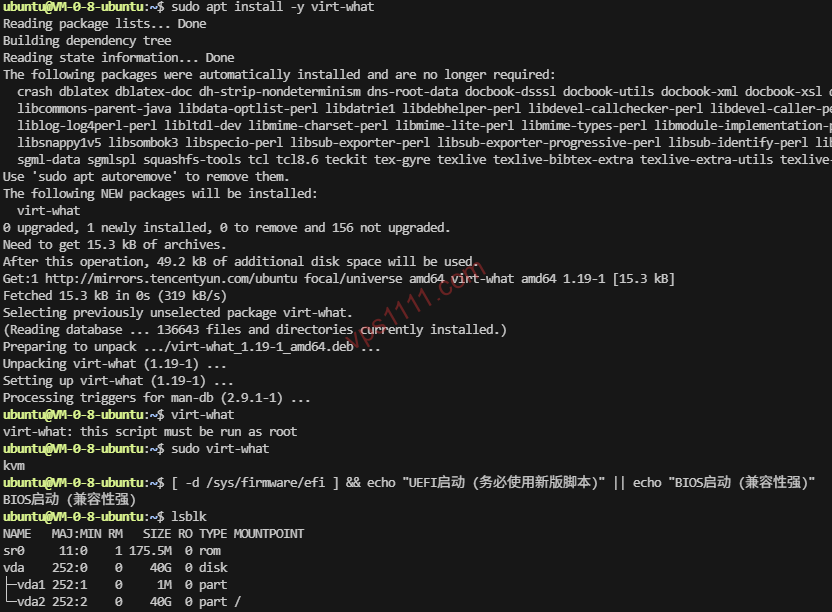
You must use full virtualization architectures like KVM, Xen HVM, or VMware. Containerized environments like LXC, OpenVZ, or Docker share the host kernel and cannot perform low-level disk writes. Attempting this will brick the instance.
2. Boot Mode & NVMe Compatibility
Modern VPS instances default to UEFI boot. Legacy scripts only support legacy BIOS. Running them on new hardware will fail to detect the /dev/nvme0n1 path or missing .efi bootloaders, resulting in a complete loss of connectivity after reboot.
3. VirtIO Driver Integration
Windows images must have VirtIO drivers pre-injected (specifically viostor for storage and NetKVM for networking). Failure to do so will trigger an INACCESSIBLE_BOOT_DEVICE BSOD.
3. 2026 Reinstallation Script Tier List
| Script Name | Compatibility & Low-Level Support | Architect’s Verdict |
| leitbogioro (Beta) | Universal / UEFI / NVMe / ARM64 | ⭐⭐⭐⭐⭐ Top Recommendation: Auto-detects network parameters flawlessly. |
| Bin45678 | Standard Linux / Windows | ⭐⭐⭐⭐ Solid Choice: Classic fork with excellent cloud instance compatibility. |
| MoeClub (Vicer Fork) | Legacy BIOS / SATA only | ⭐⭐ Deprecated: Lacks modern UEFI support. Use with extreme caution. |
4. Step-by-Step Guide: Standard Reinstallation Workflow with leitbogioro
# Download and set executable permissions
wget --no-check-certificate -qO InstallNET.sh 'https://cdn.jsdelivr.net/gh/leitbogioro/Tools@master/Linux_Reinstall/InstallNET.sh' && chmod a+x InstallNET.sh

# Example: Reinstall to clean Debian 12, set root password, and change SSH port to 22345
bash InstallNET.sh -debian 12 -pwd 'SecurePwd_1111' -port '22345'
5. Emergency Recovery & Performance Tuning
💡 Post-Installation Optimization SOP:
- Connectivity Loss Recovery: Immediately access the provider’s VNC console. 90% of failures stem from missing drivers or unopened security group ports (e.g., 3389 or custom SSH).
- Linux Tuning: Enable TCP BBR immediately. For 2C2G instances, allocate at least 1GB of SWAP space to prevent database OOM kills.
- Windows Tuning: Completely disable
SysMainandWindows Searchservices to prevent background I/O spikes from maxing out CPU usage.
6. In-Depth FAQ: Troubleshooting & Best Practices
Can a 2-Core 2GB Low-End VPS Run Windows?
2C2G is the absolute baseline. We recommend installing Win Server 2019/2022 Core (headless) or a legally compliant lightweight edition. It will absolutely not run a full, stock Win11 installation smoothly.
Why Can’t I Connect via SSH or Why Did I Get a BSOD After Reinstall?
This is typically caused by three factors: 1. Unsupported virtualization architecture (LXC/OpenVZ cannot be reinstalled); 2. Boot mode mismatch (UEFI vs. legacy BIOS); 3. Missing VirtIO drivers in the OS image.
What to Do If Network Reinstallation Fails and You Lose Access?
First, use the VNC console for direct troubleshooting. If supported by your provider, boot into Rescue Mode to mount the disk and extract logs. As a last resort, verify that your firewall security groups allow traffic on the new ports.