


Core Summary: In 2026, blindly trusting vendor claims of “gigabit bandwidth” and “optimized routing” makes you a prime target for overselling. This guide provides an in-depth collection of the most essential VPS diagnostic scripts for 2026. From YABS comprehensive benchmarking and NextTrace return path tracing to native IP purity checks, we’ll walk you through how to run a full system diagnostic like a seasoned sysadmin, complete with critical troubleshooting tips to prevent OOM-induced SSH disconnects.
🧠 Why You Must Learn to Benchmark VPS Instances with Scripts
Frankly, I’ve been tracking promotional VPS offerings across the industry for years. By 2026, overselling is an open secret. A server advertised as “1-core, 1GB RAM, 1Gbps bandwidth” might struggle to load a basic static HTML page during prime time.
Never rely solely on marketing slides or vendor emails. Running diagnostic scripts gives you hard data: actual CPU Geekbench scores, real 4K random read/write IOPS for your storage, and whether the return path actually utilizes premium Tier-1 routes like Arelion (AS1299) or Lumen (AS3356).
⚠️ Security Warning for Sysadmins (Mandatory Read):
The widely circulated curl -sL xxx | bash one-liner carries a high risk of executing backdoored or maliciously modified code. Following security best practices, you should always download scripts via wget first, audit them with cat or nano to verify there’s no malicious payload, and only then execute them with bash. (Note: The diagnostic scripts and network testing methods provided here are strictly for educational purposes and verifying baseline server connectivity.)
⚙️ Core Metrics Breakdown: What Are We Actually Testing?
Before hitting Enter, you need to understand the weight and boundaries of three core metrics:
- Baseline Hardware Performance (CPU/RAM/Storage IO): Determines whether your WordPress site or Docker containers will experience lag. Pay attention to storage media differences: NVMe/SSD 4K random write speeds should exceed 50MB/s. However, if you’re using a high-capacity HDD “storage VPS”, 1-10MB/s is its physical limit—do not mistake this for overselling.
- Network Routing & Speed Tests (Outbound vs. Return Path): Dictates how fast visitors load your site. Industry rule of thumb: The return path (data traveling from the VPS back to the user) is always more critical than the outbound route. Direct outbound routing paired with a convoluted return path is a classic vendor trap.
- IP Quality & Regional Connectivity (Purity/Anti-Fraud): A native IP holds significant value when calling cross-border APIs (like OpenAI) and avoiding false-positive blocks from major tech platforms’ risk control systems.
💻 Hands-On Guide: The Four Essential Diagnostic Scripts for 2026
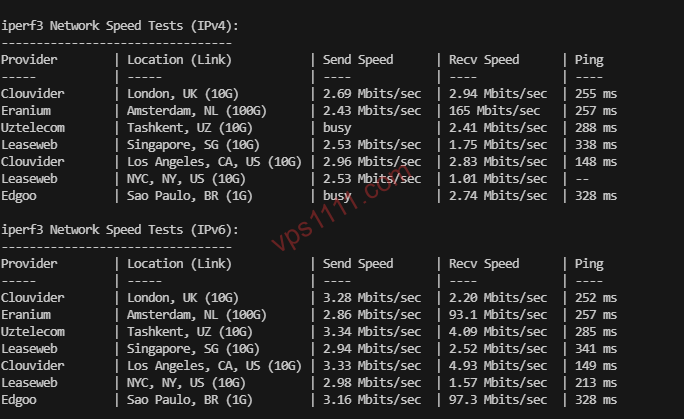
🛠️ Pre-Flight Checklist (Resolves 99% of Errors):
Clean installs of Debian, Ubuntu, or AlmaLinux often lack essential dependencies. You must install them before running any scripts:
apt update && apt install -y curl wget tar awk ping traceroute iproute2 dnsutils fio iperf3
# For CentOS/AlmaLinux, replace apt with dnf1. The Benchmarking Standard: YABS (Yet Another Bench Script)
This is currently the most authoritative benchmarking script globally, featuring built-in fio disk testing and Geekbench 6 CPU evaluation.
- Standard Execution Command:
curl -sL yabs.sh | bash - Lifesaver Command for Low-Spec Machines (Mandatory for RAM < 1GB):
curl -sL yabs.sh | bash -s -- -g
(Adding the-gflag skips Geekbench, preventing 512MB RAM instances from triggering an OOM (Out of Memory) crash that forcibly terminates your SSH session) - Expert Data Interpretation: If you’re hosting a light-to-medium WordPress blog or an e-commerce site on an x86 KVM virtual machine, a Geekbench 6 single-core score of 300 is sufficient for baseline smoothness. Scores exceeding 700 indicate exceptional performance.
2. Route Visualization Tools: NextTrace & AutoTrace
When provisioning international servers, routing quality dictates everything.
- Test Full Return Path (AutoTrace):
wget -qO- https://raw.githubusercontent.com/zhucaidan/mtr_trace/main/mtr_trace.sh | bash - Test Precise Single-Point Return Path (NextTrace): Must be executed on the VPS. Replace the placeholder with your local public IP.
bash <(curl -Ls https://raw.githubusercontent.com/sjlleo/nexttrace/main/nt_install.sh) nexttrace YOUR_LOCAL_PUBLIC_IP - Expert Data Interpretation: If your traffic routes through premium Tier-1 networks like Cogent (AS174) or HE (AS6939) on the return path, with direct peering and acceptable latency, this “budget-friendly premium routing” configuration offers exceptional value for web hosting.
3. IP Purity & Regional Connectivity Test: RegionRestrictionCheck
- Execution Command:
bash <(curl -L -s check.unlock.media) - Expert Data Interpretation: This script evaluates your IP’s connectivity and trust score across regional network nodes. In practice, servers flagged as “Native IP” typically show full accessibility across all tests. This indicates the IP is clean of historical blacklists, significantly reducing the risk of false-positive blocks when running cross-border e-commerce or international API integrations.
💡 vps1111 Pitfall Avoidance & Troubleshooting Guide
💡 Advanced Sysadmin Pitfall Rules:
- Pitfall 1: Beware of “Inflated” Benchmarks. Some vendors temporarily allocate high-priority idle resources during the first few hours after provisioning. Experienced admins run
iperf3tests at 2 AM and again during prime time (9 PM). A server that remains stable and packet-loss-free during peak traffic is genuinely reliable. - Pitfall 2: Respect Virtualization Boundaries. If you purchase ultra-low-cost OpenVZ or LXC instances, never run YABS. These containerized architectures lack full kernel and disk access privileges. Forcing
fioor Geekbench will trigger immediate errors. - Pitfall 3: The CPU Abuse Policy Red Line. Budget providers like RackNerd strictly enforce TOS limits against sustained 100% CPU usage. Running a single YABS test (taking 5-10 minutes) is perfectly safe. However, running continuous stress tests for 24 hours will almost certainly result in an immediate suspension. Run the test, collect your data, and stop.
❓ FAQ: High-Frequency Script Execution Questions (Featured Snippets)
Q1: Why do I keep getting command not found after entering the command?
A: This occurs because you’re using a highly stripped-down OS image (like Debian minimal) that lacks essential system packages. First, ensure you have root privileges, then run apt update && apt install curl wget tar -y to install baseline networking and archiving utilities before executing the diagnostic scripts.
Q2: Why does my SSH client disconnect midway through a YABS run?
A: This is a common issue on instances with less than 1GB of RAM. Geekbench 6 rapidly exhausts available memory, triggering the Linux kernel’s OOM-Killer. To protect system stability, it forcibly terminates your SSH process. Solution: Add the -g flag when running YABS to skip CPU testing, or pre-allocate a 2GB+ Swap partition.
Q3: The IP purity test shows full green, but I still can’t access certain overseas APIs (like ChatGPT)?
A: Major tech platforms maintain dynamically updated risk-control IP databases, and their defenses extend far beyond simple IP checks. The script only verifies baseline network-level connectivity to specific API endpoints. Providers may also analyze browser fingerprints (e.g., WebRTC leaks), DNS poisoning, or deep historical blacklist records. IP purity tests serve as a foundational network reference and do not guarantee bypassing advanced anti-fraud systems.