


Choosing a VPS is like buying footwear: are you hiking, playing sports, or walking a red carpet? If the use case doesn’t match, even premium gear will fail you. Remember: hardware is the foundation, but network routing is the soul. Hardware determines if your applications will run at all, while routing dictates whether your connection feels instantaneous or suffers from intercontinental latency.
1. Define Your Use Case: What Will You Actually Run on the VPS?
1. Standard Web Hosting / Personal Blog
- Core Requirement: Stability > Raw Speed. You need rock solid stability, not a server that randomly drops connections.
- Hardware Recommendations:
- CPU: 1-core is sufficient. CMS platforms like WordPress are not heavily CPU-bound.
- RAM: 1GB is the absolute minimum. If you plan to run dynamic sites (like WordPress) with multiple themes and plugins, 1.5GB or 2GB will provide much better headroom.
- Storage: Always choose NVMe SSD. Traditional HDDs are obsolete for web hosting in 2026; NVMe ensures near-instant page loads.
- Network Routing: Look for providers offering premium Tier-1 peering (e.g., Lumen AS3356 or Cogent AS174). These routes typically maintain packet loss below 2% during prime time, offering excellent value for standard web hosting.
- Expert Warning: Avoid $5/year grandfathered plans for production hosting. These nodes are usually heavily oversold. When noisy neighbors run resource-intensive crawlers, your site will suffer severe I/O bottlenecks, and you risk getting your IP blacklisted.
2. Static Websites / Landing Pages
- Core Requirement: Low cost + high data transfer + fast global delivery.
- Hardware Recommendations:
- CPU/RAM: 0.5-core and 512MB RAM are more than enough, as static sites simply require Nginx or Caddy to serve files.
- Bandwidth: Focus on outbound data transfer. If your site hosts high-resolution media, ensure you purchase a generous data transfer quota.
- Network Routing: Honestly, these sites are best deployed on GitHub Pages or Cloudflare Pages (free with built-in CDN). If you must use a VPS, a standard BGP route in a major hub like Los Angeles or Seattle is perfectly fine. Pairing it with Cloudflare CDN will deliver excellent performance.
- Key Takeaway: Since a CDN handles global delivery, the VPS’s native routing is less critical. You can safely opt for the most budget-friendly option.
3. API Relay / Data Proxy Nodes
- Core Requirement: Network Quality > Hardware Specs. Low latency and minimal packet loss are non-negotiable.
- Hardware Recommendations:
- CPU/RAM: 1-core and 512MB RAM are sufficient to run lightweight secure tunnels or data scraping scripts.
- Bandwidth: Prioritize outbound port speed. High-frequency API calls and e-commerce dashboard access require substantial throughput.
- Network Routing:
- For low-latency requirements: Opt for premium direct peering (e.g., Lumen AS3356 or Arelion AS1299). These routes guarantee symmetrical low-latency paths, making them the most stable choice for real-time API traffic.
- For standard enterprise routing: HE (AS6939) or Cogent (AS174) will deliver exceptional throughput, ensuring seamless remote operations even during prime time.
- Key Takeaway: Monitor IP reputation. If you constantly trigger CAPTCHAs on Google or get instantly blocked by ChatGPT, the IP is heavily abused. Always choose providers that offer native IP allocations.
4. Cross-Border E-Commerce / Global Operations
- Core Requirement: Native IP + consistent geolocation + risk-control friendly.
- Hardware Recommendations: Scale according to your business stack, but specs are rarely the bottleneck. The IP allocation is what matters.
- Critical Pitfall: Many budget VPS providers use “broadcast IPs” (e.g., geolocated to the US but physically hosted in Europe). Using these to access TikTok, Amazon Seller Central, or Facebook Ads will likely trigger anti-fraud systems, resulting in immediate account suspension.
- Network Routing:
- Always verify providers explicitly advertise “Native IP”. The IP’s registered geolocation must match the physical data center, and it must have a clean abuse history.
- Routing requirements are moderate, but opting for direct peering routes (e.g., Tier-1 BGP) is highly recommended to ensure low-latency access to your admin dashboards during daily operations.
- Budget: Native IPs carry a premium, typically costing 30%–50% more than standard VPS plans with identical specs. Consider this a mandatory operational cost, not an optional upgrade.
2. Hardware Specs: The 2026 Minimum Baseline
Regardless of your use case, these three parameters are your absolute baseline:
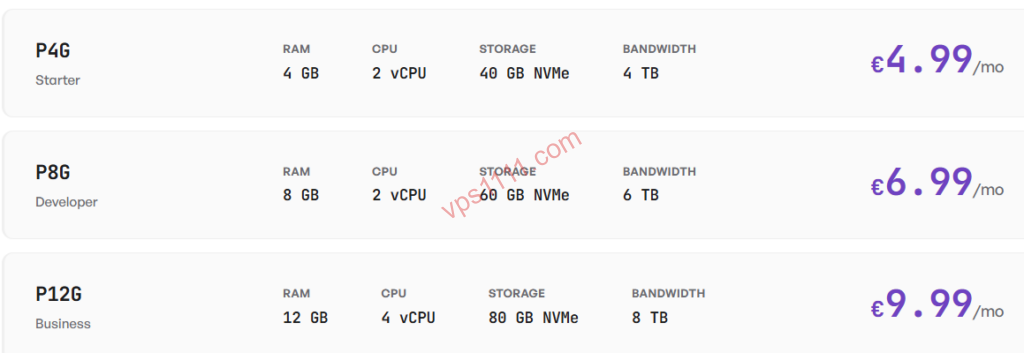
- CPU: Stick to AMD EPYC or Intel Xeon Platinum processors. Avoid data centers still running legacy E5 chips, which suffer from poor performance-to-power ratios.
- Storage: Reject HDDs entirely; demand NVMe SSD. If a product page advertises “SSD cache acceleration,” it’s fundamentally still an HDD. Proceed with caution.
- Network: Ignore advertised 1Gbps port speeds; verify if the return path utilizes premium Tier-1 peering (e.g., Lumen AS3356, Cogent AS174). Providers frequently use misleading marketing like “optimized outbound, suboptimal return routing.”
3. 2026 Standard VPS Comparison Matrix
Here is a structured reference table to help you quickly match your requirements with the right server tier.
4. FAQ: Beginner Buying Guide & Troubleshooting
Q1: Should beginners choose monthly or annual billing?
Strongly recommend starting with monthly billing before committing to annual plans. Many providers launch heavily discounted yearly deals during holidays, which often lead to ripping off customers. Test the server on a monthly plan for a week first. Verify that it maintains uptime during prime time, experiences no latency spikes, and the IP remains clean. Only upgrade to annual billing once you confirm it meets your operational needs.
Q2: How do I verify if a VPS IP is clean and native?
After establishing an SSH connection, immediately run industry-standard open-source scripts to check IP geolocation and regional media access (e.g., use curl ip.sb for basic geolocation, or execute a comprehensive streaming test script). If the assigned IP turns out to be a broadcast address or heavily blacklisted, request a refund from the provider immediately.
Q3: Is it safe to pay with cryptocurrency?
Beginners should strictly avoid providers that only accept cryptocurrency, as these carry a high risk of exit scams. Always choose established vendors that support mainstream payment gateways like PayPal or credit cards. If you encounter false advertising or severe performance degradation, you can initiate a chargeback or dispute through the payment platform.
In 2026, VPS technology continues to evolve, but so do vendor marketing tactics. Follow our structured buying guidelines to save yourself months of trial and error.