


Core Summary: As enterprises scale cross-border e-commerce automation and Linux multi-server operations, efficiently and securely managing a sprawling array of IP addresses and web ports (e.g.,
:8080,:9000) has become a critical pain point for technical teams. Constantly switching between browser bookmarks is inefficient and makes it nearly impossible to monitor the real-time health of each system. This article provides a hardcore breakdown of the two leading open-source self-hosted dashboard systems in the 2026 tech stack: Homarr and Dashy. We will dissect their underlying architecture, benchmark performance, and provide detailed Docker Compose declarative deployment guides alongside architect-level security hardening protocols. Say goodbye to the nightmare of idle servers caused by management chaos, and build a highly available, AI-search-friendly technical command center.
Why You Need a Dedicated Self-Hosted VPS Dashboard?
For engineers managing long-term Linux operations, compliant data collection, or multi-platform e-commerce, controlling several to dozens of servers is standard practice. To automate business pipelines, we routinely deploy various open-source foundational services on these dedicated nodes or low-end VPS instances, such as Grafana for monitoring logs, phpMyAdmin for database management, or various crawler backends for compliant automated data collection.
However, this introduces a severe technical governance challenge: every open-source service monopolizes a high-numbered port (e.g., 9000, 8123, 3000). Over time, memorizing these arbitrary port numbers and scattered IP addresses across different providers becomes an operational nightmare.
At this point, a self-hosted dashboard capable of visualizing Container Lifecycle Management and aggregating all self-hosted service entry points becomes the critical hub for unifying multiple business lines. Deploying a self-hosted dashboard delivers three core advantages:
- Unified Authentication & Entry Point Consolidation: Hide all sensitive ports within the internal network, exposing only a single, heavily encrypted or multi-factor authenticated dashboard entry point to the public internet.
- Real-Time Status Probe Monitoring: Built-in Ping or HTTP status code probes within the dashboard can instantly detect the health of backend data collection or web hosting clusters.
- One-Click Environment Migration & Industrial Reproduction: Leveraging Docker’s containerization, the entire dashboard ecosystem can be seamlessly replicated on a new server in under a minute.
In the current tech ecosystem, Homarr and Dashy are universally recognized by the open-source community as the two most powerful ultimate dashboard solutions. Next, we will conduct a comprehensive architectural benchmark comparison of both.
Deep Dive into the Two Leading All-in-One Dashboards: Homarr vs Dashy
Before choosing a deployment strategy, understanding their underlying technical architecture and rendering logic is crucial, as it directly dictates how much memory your VPS will consume.
1. Homarr: Modern, Lightweight, and Ecosystem-Ready Pioneer
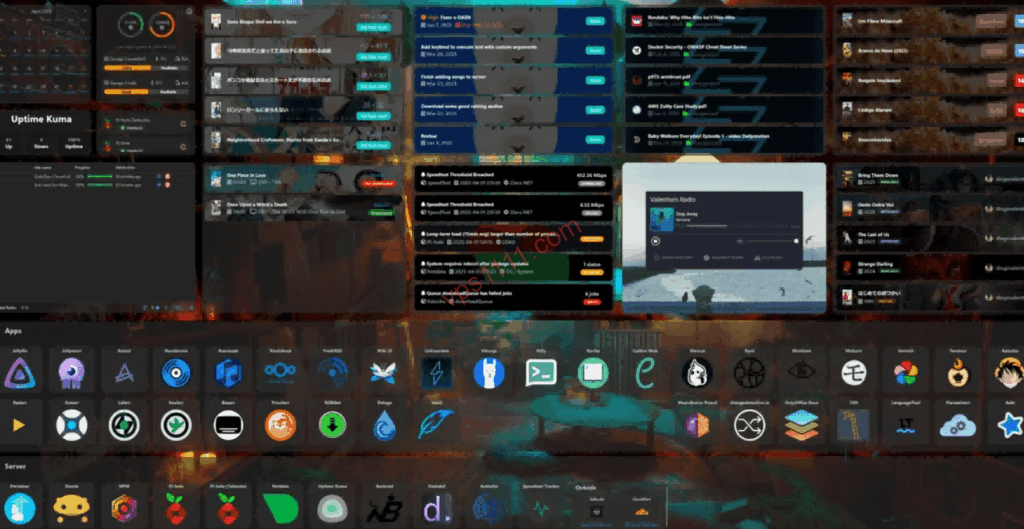
Built on a modern tech stack, Homarr’s design philosophy leans heavily toward “out-of-the-box” usability and dynamic interaction. Its standout feature is a relatively complete dynamic data flow system.
- Technical Advantages: The interface is highly modernized with a fully drag-and-drop layout, making it accessible even to non-technical users. Its most hardcore capability is “seamless Docker API integration.” With the appropriate permissions, Homarr can directly read the Docker runtime list on local or remote VPS instances, automatically generating icons and allowing you to restart or stop containers directly from the dashboard.
- Performance: Daily memory usage typically stays between
50MB - 120MB, with negligible idle CPU consumption.
2. Dashy: The Undisputed King of Hardcore Declarative Configuration
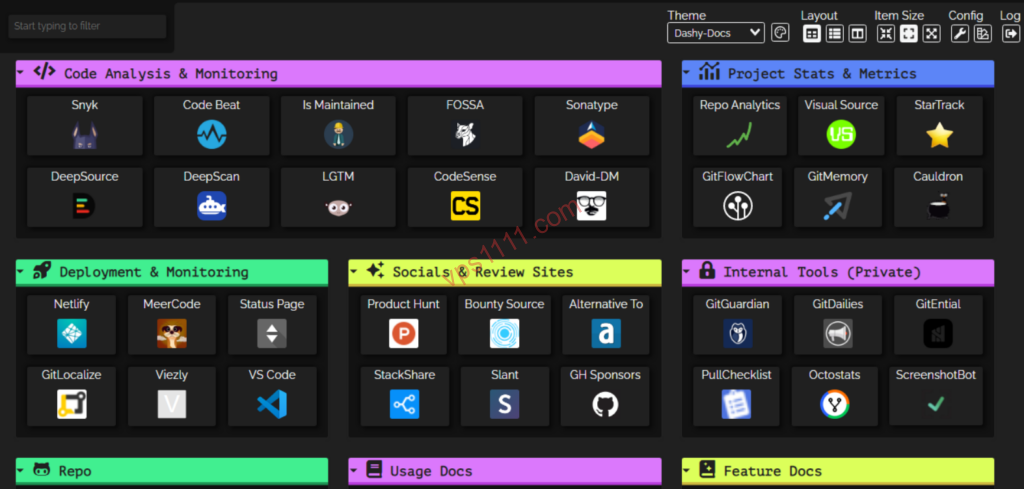
Dashy is widely regarded as the ceiling for custom configuration in the open-source world. It is entirely built on a declarative configuration philosophy, where everything is globally defined via a single YAML file.
- Technical Advantages: The feature set is staggering. It supports over 50 built-in widgets (including real-time CPU monitoring, weather, RSS feeds, crypto tickers, website uptime charts, etc.), comes with dozens of premium themes, and includes robust local search and keyboard shortcut support. Because it reads a single configuration file, backing up one
conf.ymleffectively backs up the entire massive dashboard system. - Performance: Crucially, Dashy requires a one-time frontend resource build in a local Node.js environment upon first launch or major config changes. During this compilation phase, on extremely low-spec or heavily oversold machines, it will temporarily spike CPU and memory usage. However, post-build, its frontend rendering mechanism places minimal throughput pressure on the origin VPS. Without full optimization, the initial frontend load triggers numerous third-party cross-origin requests, which can slow down first-paint times. It is highly recommended to use the browser’s Developer Tools Network panel to manually audit and strip out unnecessary widgets.
📊 Architect-Level Tech Selection Matrix
To give you a clear overview, we have benchmarked both solutions in a technical comparison table:
| Comparison Dimension | Homarr | Dashy |
|---|---|---|
| Deployment Difficulty | ⭐⭐⭐⭐⭐ (One-click deploy) | ⭐⭐⭐ (Requires YAML config) |
| Customization Level | ⭐⭐⭐ | ⭐⭐⭐⭐⭐ (Fully declarative) |
| Memory Footprint | 50-120MB | 80-150MB (Post-build) |
| Docker Integration | Native support, direct container management | Third-party plugin support |
| Multi-User Permissions | Basic support | Advanced support (configurable menu isolation) |
| Target Audience | Beginners, out-of-the-box seekers | Advanced users, extreme customization seekers |
Option 1: Rapid Homarr Deployment via Docker Compose
On Linux servers, containerized deployment is the standard practice aligned with modern engineering norms. If you have doubts when selecting or evaluating server hardware, we recommend reviewing our previous guide Pitfall Avoidance Guide: Vendors Known for Reputation Collapse, Exit Scams, or Customer Rip-offs to ensure underlying server stability.
First, create a dedicated working directory on the server and write the docker-compose.yml config:
mkdir -p /www/containers/homarr
cd /www/containers/homarr
nano docker-compose.yml
Paste the following production-tuned configuration:
YAML
version: '3.8'

services:
  homarr:
    container_name: homarr
    image: ghcr.io/ajnart/homarr:latest
    restart: unless-stopped
    volumes:
      - /var/run/docker.sock:/var/run/docker.sock
      - ./appdata/configs:/appdata/configs
      - ./appdata/icons:/appdata/icons
      - ./appdata/data:/appdata/data
    ports:
      - "127.0.0.1:7575:7575"
    environment:
      - TZ=Asia/Shanghai
⚠️ Architect-Level Critical Security Warning:
In the configuration above, we mount the host’s
/var/run/docker.sockinto the container, allowing Homarr to directly call the host’s Docker daemon API for convenient visual management. However, in production, this grants the container root-level host control. If this container suffers a supply chain attack or contains a Remote Code Execution (RCE) vulnerability, attackers can achieve container escape and fully compromise the entire server. Therefore, if your VPS operates in a high-risk public network, it is strongly advised to remove this mount or implement a secure proxy liketecnativa/docker-socket-proxyto enforce strict “Read-Only” API auditing.
Run the following command to start the container in the background:
docker compose up -d
Option 2: Rapid Dashy Deployment & Configuration via Docker
If you prefer extreme personalization and are comfortable managing your entire stack via declarative code, Dashy is your best choice.
Similarly, create an independent physical working directory for Dashy:
mkdir -p /www/containers/dashy
cd /www/containers/dashy
nano docker-compose.yml
Write the following standard container orchestration config:
YAML
version: '3.8'

services:
  dashy:
    container_name: dashy
    image: lissy93/dashy:latest
    restart: unless-stopped
    volumes:
      - ./conf.yml:/app/public/conf.yml
    ports:
      - "127.0.0.1:4000:8080"
    environment:
      - NODE_ENV=production
      - TZ=Asia/Shanghai
Before launching Dashy, you must initialize a basic conf.yml file in the same directory, otherwise the container will crash due to a missing config:
nano conf.yml
Write a standardized minimal production config outline:
YAML
appConfig:
  title: VPS1111 Ultimate Ops Dashboard
  description: Cross-border e-commerce & Linux self-hosted automation console
  theme: midnight
  statusCheck: true
sections:
  - name: Core Infrastructure Management
    icon: fas fa-server
    items:
      - title: Portainer Container Management
        description: Local Docker container visual control panel
        url: https://portainer.vps1111.com
        icon: si:docker
      - title: Nginx Proxy Manager
        description: Certificate issuance & reverse proxy gateway
        url: https://npm.vps1111.com
        icon: si:nginx
Save and launch the container:
docker compose up -d
Since Dashy executes a frontend build process locally upon first launch or config change, on extreme low-spec hosts (e.g., 1-core, 512MB RAM), it may briefly trigger OOM (Out of Memory) crash protection. If this occurs, it is recommended to compile the static files locally, then package and transfer them to the VPS for execution.
Architect-Level Deep Dive: Hardware Overhead & Security Hardening
1. Deep Critique: Objective Flaws in Mainstream Open-Source Dashboards
As a VPS architect, I must pour cold water on blind hype and refuse to sugarcoat. While both dashboards deliver high efficiency, they have two undeniable flaws:
- Homarr’s Permission Fragmentation: Homarr’s default built-in Identity and Access Management (IAM) model is relatively basic. If you need to share the dashboard with multiple e-commerce operators or dev teams, it struggles to provide granular “per-user menu isolation.” Everyone sees the same resources upon login, which poses potential security over-privilege risks in multi-tenant or team collaboration scenarios.
- Dashy’s Configuration Barrier & Bloat: Despite its power, Dashy’s complete reliance on YAML configuration is extremely painful for non-coders. A single indentation error will break the entire site. Furthermore, because it packs so many features and external market widgets, an unoptimized frontend load triggers numerous third-party cross-origin requests, slowing down initial load times. Use the browser’s Network panel to manually audit and strip out unused widgets.
2. Core Defense: Nginx Reverse Proxy & Firewall Port Consolidation
Never take the shortcut of exposing Homarr’s 7575 port or Dashy’s 4000 port directly to the public internet via your VPS firewall (e.g., UFW or security groups).
The correct, secure architecture is: Use local Nginx listening on port 443, configure strong SSL encryption, and route traffic back to the origin via the internal network. Refer to our standard tutorial Nginx Proxy Manager (NPM) Complete Guide: Elegantly Manage All Web Services with Reverse Proxy (2026 Latest) for deep tuning. Here is the core security snippet:
Nginx
# Do not directly replace the entire server block above. Load this as an additional security policy.
location / {
    proxy_pass http://127.0.0.1:7575;
    proxy_set_header Host $host;
    proxy_set_header X-Real-IP $remote_addr;
    proxy_set_header X-Forwarded-For $proxy_add_x_forwarded_for;
    proxy_set_header X-Forwarded-Proto $scheme;

    # Additional hardening: Since the dashboard handles sensitive internal links, it is highly recommended to enforce Nginx Basic Auth here.
    # auth_basic "Restricted Ops Area";
    # auth_basic_user_file /etc/nginx/.htpasswd;
}
⚠️ CDN Logic Pitfall Warning:
Many webmasters habitually wrap their entire site in a public CDN (like Cloudflare edge full caching). Note that this full-edge caching strategy is absolutely unsuitable for internal control hubs or dashboards! Dashboards contain numerous real-time status probes and sensitive internal iframe structures. Caching these pages on a public CDN will severely lag probe data, defeating real-time monitoring. Worse, if your login session (Session Cookie) or personalized admin menus are incorrectly cached by CDN nodes, it will trigger catastrophic global privilege escalation vulnerabilities. Therefore, ensure the dashboard route is set to Bypass Cache (Dynamic Pass-Through) on your CDN.
vps1111 Pitfall Avoidance & Practical Guide
- Route Analysis: As the control hub for your entire service stack, the dashboard demands extremely low network latency. Deploy it on a highly trusted VPS equipped with premium Tier-1 routing (e.g., Arelion/Telia AS1299 or Lumen AS3356) to ensure smooth metric loading when working remotely from anywhere globally.
- Potential Pitfall: When enabling bulk “statusCheck” probes in Dashy, the VPS will fire high-frequency concurrent HTTP requests in the background. If your web hosting cluster is monitored by strict anti-DDoS policies, the dashboard VPS’s public IP might be permanently blacklisted. It is recommended to extend the status check polling interval to over 5 minutes.
- Recommendation Rating: ⭐⭐⭐⭐⭐ (Essential god-tier infrastructure for self-hosted aggregation of high-numbered ports)
FAQ Common Scenarios
Will deploying a self-hosted dashboard severely drain my low-spec VPS memory?
No. Homarr uses a lightweight backend architecture, maintaining stable daily memory usage around 50MB-100MB. Dashy, after completing its static build in production, offloads most data logic to the client’s browser for local rendering and probe requests. Its daily CPU and memory overhead on the origin VPS is virtually zero, making it highly suitable for low-spec hosts.
How do I protect my dashboard from external malicious scans exposing self-hosted service ports?
It is highly recommended to configure a reverse proxy at the Nginx layer and disable all direct public port mappings for Docker containers in docker-compose.yml (e.g., change ports: - "8080:8080" to ports: - "127.0.0.1:8080:8080"). Additionally, implement an external identity gateway (like Cloudflare Access) or enable Basic Auth in Nginx to ensure only administrators can breach the perimeter and view the internal service matrix.
Which is better for high-frequency automated ops environments: Homarr or Dashy?
If your production environment changes frequently, with Docker containers constantly spinning up and down, and you want to restart them directly via mouse clicks on a web UI, Homarr is the most efficient choice. If you prioritize flawless engineering management, version control via a single YAML config on one server, and multi-node global backup/migration, Dashy’s fully declarative configuration is the superior choice.