


Executive Summary: In the 2026 SEO landscape, real-user rendering metrics (like Core Web Vitals) are critical ranking factors. This guide highlights essential extensions like IPvFoo and ModHeader, using browser-side monitoring probes to infer server caching strategies and hit rates. For cross-border e-commerce operators, these tools effectively identify noisy neighbors and mitigate IP reputation risks. Exercise caution with high-privilege extensions and pair them with native routing to stabilize your traffic pool.
I. Paradigm Shift: Why 2026 SysAdmins Must Arm Their Browsers
Many veterans still consider browser-based debugging unprofessional, but the reality is that Google and Bing algorithms now heavily prioritize end-to-end real-world loading performance.
Latency measured via ping in your terminal only reflects ICMP-layer connectivity. Real users interact over HTTP/HTTPS, involving SSL handshakes, DNS resolution, and TTFB (Time to First Byte). Using the browser’s Network panel alongside specialized extensions allows you to quickly and visually pinpoint these performance bottlenecks.
II. Core Toolkit: Architects’ Secret “Frontend Probes”
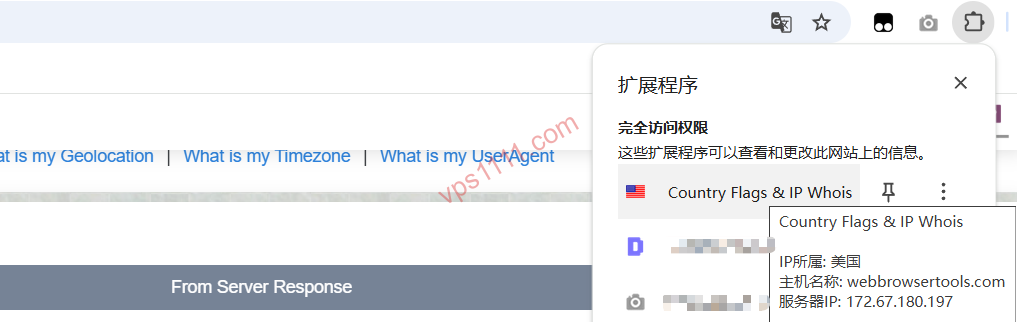
1. IP Geolocation & Reputation: IP Whois & Flags / Chrome & Websites Rating
After purchasing a VPS, your first priority is verifying IP purity.
- Best Practice: Always install the official version from the Chrome Web Store. This extension displays real-time ASN geolocation and IPv4/IPv6 status.
- Pro Tip: The displayed ASN helps determine if your server resides in a high-risk subnet. Sharing a /24 block with malicious actors (noisy neighbors) will severely impact cold email deliverability and, in extreme cases, trigger Google Safe Browsing flags.
2. HTTP Header Modification & Debugging: ModHeader
ModHeader is a powerful tool for validating Nginx caching strategies.
- Technical Correction: Many beginners try to bypass a CDN using
Cache-Control: no-cache, but this only forces the cache server to revalidate with the origin—it doesn’t truly bypass it. To 100% bypass the CDN and test origin response, directly modify your local hosts file to point the domain to the origin IP. - Security Warning: Strict WAFs may flag and block requests with non-standard headers. Only perform HTTP header modification tests on your own servers.
3. Tech Stack Fingerprinting: Wappalyzer
Instantly identify a target site’s Nginx version, PHP framework, and caching layer architecture. This provides direct intelligence for evaluating competitor server infrastructure strength.
III. Page Load Performance Breakdown & SEO Impact
To intuitively understand the VPS’s role in the request chain, refer to the following breakdown:
- TTFB: Primarily driven by VPS compute power and database optimization.
- DNS/SSL: Dictated by your DNS provider and certificate configuration.
- Actionable Advice: If TTFB accounts for a large portion of load time, consider upgrading your plan or auditing your Nginx/Redis caching strategy.
IV. Core Architecture Selection: Reliable Infrastructure for Frontend Automation
Running automated monitoring scripts (like Puppeteer) demands significant memory. A 2-core/2GB setup suits lightweight blogs or monitoring probes, while mid-sized DTC e-commerce sites should upgrade to 4-core/4GB or higher to ensure stability during prime time.
💡 vps1111 Pitfall Avoidance & Field Guide:
- Route Analysis: Direct connection to Los Angeles data centers with balanced latency, ideal for launching cross-border web hosting.
- Pitfall Warning: 2C/2G suits lightweight blogs; mid-sized sites should opt for 4C/4G+. Lacks advanced DDoS mitigation; pairing with Cloudflare is recommended.
- Recommendation: ⭐⭐⭐⭐
V. Pitfall Guide: Extension Risks & Testing Limitations
- Privilege Escalation Risk: Beware of extensions requesting “read all website data” permissions, as they can hijack console cookies.
- Single-Point Limitation: Extensions only measure the local-to-server link. Global route analysis still requires online MTR testing platforms and real routing diagnostic tools.
- Spotting fly-by-night hosts: Low-tier providers engaging in aggressive overselling will cause host node I/O bottlenecks during prime time.
VI. Scenario-Based FAQ
Q1: Why does the IP geolocation shown by the extension differ from my purchased data center location?
A: This is usually due to delayed IP database updates or the provider using Anycast IP deployment. As long as the ASN matches, it won’t impact your web hosting experience.
Q2: Can browser extension speed tests completely replace terminal bench.sh scripts?
A: Absolutely not. Frontend extensions measure HTTP application-layer experience, while terminal scripts benchmark underlying CPU, I/O, and bandwidth. They are complementary.
Q3: Why do I get a direct 403 error when testing with ModHeader?
A: Strict WAFs may flag and block requests with non-standard headers. We recommend only performing these tests on your own servers.