


Core Summary: In 2026, the VPS control panel market has fully shifted toward cloud-native architectures. 1Panel has become the top choice for geeks thanks to its Docker-based design; cPanel (and its overseas twin aaPanel) remains the safest harbor for beginners; while CyberPanel stands out as a high-speed tool for cross-border WordPress optimization. Match your choice to your Linux proficiency and server RAM, and avoid jumping on trends blindly.
In 2026, if you’re still debating “which control panel is best,” you probably haven’t been burned by bloated dashboards yet. With cloud-native and containerization technologies now mainstream, the VPS panel landscape has completely reshuffled. The era of vendors “ripping off customers” with bloated plugins is over. Today, the competition is all about low coupling, high security, and native Docker support.
Today, I’m putting the three most popular panels on the market to the test: 1Panel (the mature cloud-native benchmark), cPanel (the veteran market leader), and CyberPanel (the speed pioneer). Using hard data, I’ll show you exactly which one belongs on your idle server in 2026.
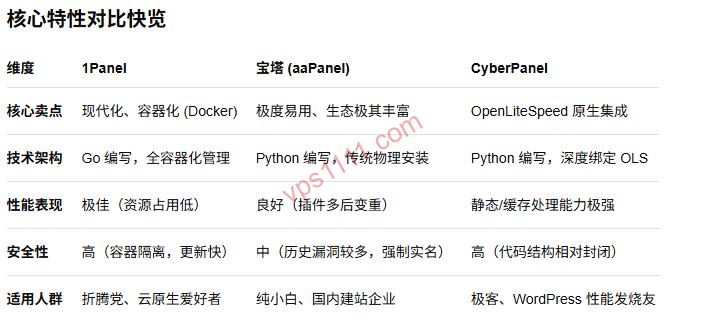
📊 Core Performance & Feature Breakdown
🚀 2026 Mainstream Panel Technical Specs (Updated March 2026)
| Comparison Metric | 1Panel (Go) | cPanel / aaPanel | CyberPanel |
|---|---|---|---|
| Core Architecture | Fully Containerized (Docker) | Traditional Compiled/Binary | Native OpenLiteSpeed |
| Idle Panel Memory Usage | ~150MB (Very Low) | ~300MB (Moderate) | ~300MB (Moderate) |
| Learning Curve | ⭐⭐ (Requires Docker knowledge) | ⭐ (Beginner-friendly) | ⭐⭐⭐ (Advanced/Professional) |
| 2026 Recommendation Score | ⭐⭐⭐⭐⭐ | ⭐⭐⭐⭐ | ⭐⭐⭐ |
Note: 1Panel’s 150MB refers to the idle panel process only, excluding overhead for application containers like Nginx/MySQL; cPanel’s 300MB already includes a basic LNMP environment. Test data is based on a 1-core/2GB RAM VPS on a US West Coast China Unicom 169 backbone (AS4837) optimized route.
1Panel: Five Years of Refinement, The 2026 Cloud-Native “Ultimate Solution”
Many veterans remember 1Panel’s 2021 launch. After five years of rapid iteration, it has fully evolved from a “challenger” into an “industry standard” by 2026.
1. Why is it the Top Choice for Advanced VPS Users?
- Core Advantage: 1Panel’s underlying philosophy is “Everything runs in Docker.” Unlike traditional panels that bundle various services directly into the host OS, 1Panel is built in Go and isolates applications via containers.
- Why It Matters: This architecture guarantees an exceptionally clean host system. Need to switch PHP versions? In 1Panel, it’s just a matter of pulling a new image and rebuilding the container. You’ll never face system crashes caused by conflicting compilation dependencies like with traditional panels.
- Learning Curve Warning: While 1Panel’s UI is clean, configuring reverse proxies can be tricky if you’re completely unfamiliar with Docker concepts like volume mapping. It’s best suited for users with a technical background who prefer a “clean system” approach.
2. Ideal For: Geeks who prioritize production stability, love rapidly deploying open-source images via Docker, and run VPS instances with 1GB+ RAM.
cPanel (aaPanel): The Veteran Leader, A Permanent “Safe Harbor” for Beginners
Even in 2026, cPanel (and its overseas twin aaPanel) still dominates the market with an unmatched ecosystem and massive install base.
- Ecosystem Advantage: cPanel’s biggest moat is its massive library of tutorials. No matter what error you encounter, a quick search yields ready-made solutions. Its graphical interface is highly polished, truly making it “plug-and-play.”
- Resource Usage: Idle memory sits steadily around 300MB (including base services). While heavier than 1Panel, in today’s era of 2GB+ RAM VPS plans, this slight overhead is a highly worthwhile trade-off for usability.
2. Ideal For: Web hosting beginners, enterprise users requiring high operational efficiency, and business-focused users who prefer not to tinker with underlying system logic.
CyberPanel: The “Specialist” for Lightning-Fast WordPress Optimization
If you run WordPress sites or are a staunch OpenLiteSpeed advocate, CyberPanel still holds a strong position in 2026.
- Core Selling Point: Native integration of LSCache, keeping its caching acceleration performance firmly in the top tier of the web hosting community.
- Performance Deep Dive: Full support for HTTP/3 (QUIC). If your VPS is in Los Angeles, cross-border physical latency is unavoidable. However, by pairing a China Unicom 169 backbone (AS4837) optimized route for baseline network stability with CyberPanel’s caching mechanism, you can deliver an exceptionally fast page load experience to end users.
- Note on Localization: CyberPanel includes an official Chinese language pack, but some third-party themes don’t fully support Chinese rendering. Additionally, its active community is primarily overseas.
🛠️ Real-World Performance Tests: The 2026 Panel Competition Report
- 1Panel: Idle memory stays stable at 150MB–180MB, with extremely fast Docker container startup times.
- cPanel: Idle memory ranges from 310MB–350MB. It runs more background processes but operates smoothly on mainstream VPS configurations.
- CyberPanel: Idle memory sits around 290MB, offering the strongest high-concurrency processing capabilities.
💡 vps1111 Pitfall Guide: 2026 Buying Recommendations
💡 vps1111 Control Panel Selection Guide:
- Best for Cross-Border Hosting: Opt for Los Angeles or Seattle data centers, ensuring the return path strictly uses China Unicom 169 backbone (AS4837) or CN2 GIA. Paired with 1Panel’s WAF firewall, it delivers rock solid stability.
- Beginners Should Avoid 1Panel: While visually appealing, finding configuration files will be frustrating if you don’t understand path mapping. Beginners should stick to cPanel/aaPanel.
- RAM Budget Warning: Avoid installing control panels on 512MB low-end VPS instances! If absolutely necessary, only use 1Panel Core + lightweight apps (e.g., Caddy + SQLite). Never install the full cPanel suite.
- Security Strategy: Always change default ports. The real fortress is an IP whitelist + SSH key-only authentication.
Conclusion: Which Should You Choose in 2026?
- If you’re a “tinkerer” who values containerization and cloud-native tech, 1Panel is the undisputed champion.
- If you’re a “pragmatist” who just wants to deploy quickly, cPanel remains a rock-solid backbone.
- If you’re a “WordPress speed enthusiast”, embrace CyberPanel.
Which Saves More Memory: 1Panel or cPanel?
In an idle state, 1Panel Core uses only ~150MB RAM, while cPanel typically sits around 300MB. However, note that 1Panel’s 150MB excludes application containers, whereas cPanel includes a base environment. Overall, 1Panel offers more granular resource control.
Which Panel is Recommended for Absolute Beginners?
For beginners unfamiliar with Docker, cPanel or aaPanel is highly recommended. Its polished GUI and massive tutorial ecosystem drastically lower the learning curve.
Which Panel is Fastest for Cross-Border WordPress E-commerce Sites?
CyberPanel is highly recommended. Its native OpenLiteSpeed and LSCache integration, paired with premium optimized routes, maximizes TTFB and overall page load speeds.