


Core Summary: In 2026, with IPv4 exhaustion and rising server costs, many cross-border webmasters and Linux sysadmins still hold onto a fleet of cheap micro-VPS instances with just 256MB or even 128MB of RAM. While Ubuntu and Debian now routinely consume over 100MB just for base system processes, Alpine Linux has become the ultimate OS for squeezing maximum performance out of these “grandfathered plan” machines. Thanks to an initial system image under 5MB and a minimalist architecture built on musl libc and OpenRC, it’s a sysadmin’s dream. This article takes an architectural deep dive into Alpine’s underlying resource optimization mechanisms, walks you through deploying a full Nginx, PHP, and SQLite stack on a strict 256MB limit, and objectively breaks down its biggest compatibility pitfall.
I. Ditch the Bloat: Why 256MB RAM Can’t Even Breathe on Ubuntu
In the early days of Linux administration, 256MB of RAM was more than enough to host a high-traffic WordPress blog. However, as modern operating systems have evolved, mainstream distributions like Ubuntu and CentOS have grown increasingly “heavy.”
After a fresh install and boot on Ubuntu 24.04, you’ll quickly find that just the systemd daemon, snapd package manager, and various pre-installed logging components silently consume over 150MB of RAM. For a fly-by-night host with severe overselling (a highly unstable, low-quality cheap VPS prone to sudden shutdowns), this leaves virtually no memory for actual business processes like Nginx or databases.
Even a slight spike in concurrent traffic will trigger the OOM (Out of Memory) killer, or force the system into frantic Swap partition thrashing. This paralyzes underlying I/O, causing your site to throw a 502 Bad Gateway or even freeze your SSH session entirely.
In this extreme environment, subtraction is the only viable path forward, and Alpine Linux is the masterpiece of minimalist engineering.
II. Architectural Deep Dive: Alpine Linux’s “God-Tier” Slimming Magic
Alpine Linux isn’t considered “magical” because of some secret black-box technology. It’s revered because it ruthlessly strips away all the historical baggage of traditional Linux distributions. Its extreme efficiency stems from three core architectural decisions:
1. Replacing the Foundation: musl libc vs. glibc
In most mainstream Linux systems, the C Standard Library is GNU C Library (glibc). While glibc is mature and feature-rich, its commitment to backward compatibility has resulted in a massive, bloated codebase.
Alpine Linux made a bold choice: replacing glibc with musl libc. musl is a lightweight, fast, simple, and POSIX-compliant C library. For the same C program, binaries and Dynamic Link Libraries compiled with musl are typically one-tenth the size of their glibc counterparts. This is the core secret behind Alpine’s base image shrinking to under 5MB.
2. Dropping systemd: Returning to Pure OpenRC
Today, systemd dominates nearly every major Linux distribution. It’s no longer just an Init System; it has evolved into a sprawling ecosystem that manages networking, logging, and mounting. While powerful, its background resident processes are highly resource-intensive.
Alpine opts for the lightweight OpenRC. It’s a dependency-based init script management system driven entirely by shell scripts, with zero complex background daemons. Starting a service on Alpine at boot introduces virtually no extra resource overhead.
3. BusyBox Integration & The Lightning-Fast apk Package Manager
Instead of traditional GNU Coreutils (the full versions of ls, grep, tar, etc.), Alpine integrates BusyBox, often called the “Swiss Army knife of embedded Linux.” It bundles hundreds of essential commands into a single executable just a few megabytes in size.
Additionally, Alpine’s custom Package Manager, apk-tools, is written in C. It parses package indexes and installs software at blazing speeds, without leaving behind the massive local cache databases typical of apt or yum.
III. Hands-On Deployment: Running a Full-Stack Service (LNMP) on a 256MB Limit
Next, we’ll practically deploy a lightweight Nginx + PHP 8 + SQLite web stack on a VPS with only 256MB of RAM.
1. Base Environment Initialization & Repository Configuration
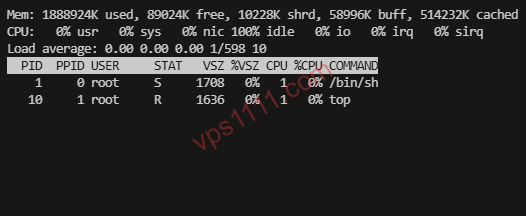
Log into your Alpine VPS via SSH. First, we’ll configure the apk repository to use the fastest mirrors (overseas nodes commonly used for global web hosting can usually stick to the defaults).
# Update local package index
apk update

# Upgrade base system components
apk upgrade
2. Installing Nginx & PHP-FPM
In Alpine, the command to install software is apk add. We’ll install Nginx along with the core runtime environment for PHP 8.2.
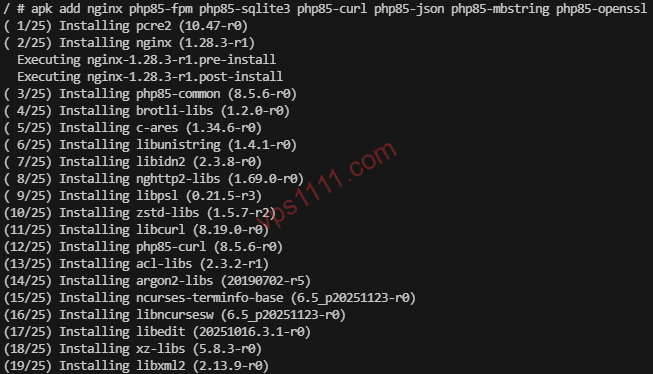
# One-click install for Nginx, PHP-FPM, and core dependencies
apk add nginx php85-fpm php85-sqlite3 php85-curl php85-json php85-mbstring php85-openssl

# Create the web root directory
mkdir -p /var/www/html
chown -R nginx:nginx /var/www/html
3. Configuring OpenRC Services & Starting Them
Since we’re using OpenRC, the commands to start services and enable them at boot differ completely from systemctl:
# Add Nginx and PHP-FPM to the default boot runlevel
rc-update add nginx default
rc-update add php-fpm82 default

# Start the services immediately
rc-service nginx start
rc-service php-fpm82 start
4. Extreme Memory Footprint Results
At this point, run free -m in the terminal to check memory usage:
             total       used       free     shared    buffers     cached
Mem:           245         28        195          0          5         17
-/+ buffers/cache:         22        223
Swap:            0          0          0
You read that correctly! Even while running the system kernel, SSH daemon, Nginx web server, and PHP-FPM process pools simultaneously, total memory usage (including system cache) sits at just ~28MB. Excluding cache, the actual physical memory consumed by system processes is a staggering 22MB! The remaining 200+ MB is completely free for your PHP application code (like a Typecho blog or a lightweight cross-border e-commerce landing page) to utilize.
IV. Advanced Deep Dive: Practical Troubleshooting & Ecosystem Pitfalls
While Alpine’s resource optimization is nothing short of miraculous, it’s not a silver bullet. In real-world web hosting and Linux administration, many beginners quickly fall into traps created by its unique underlying architecture.
💡 vps1111 Pitfall Avoidance & Practical Guide:
- Ideal Use Cases & Advantages: Thanks to its minimal network and memory overhead, Alpine Linux is perfectly suited for deployment on severely resource-constrained cheap VPS instances. It excels as a host for static blogs, a relay node for NAT traversal, or a lightweight API forwarding gateway.
- Critical Pitfall to Avoid: Ecosystem compatibility is its biggest weakness. Because it relies on
musl libcinstead ofglibc, many pre-compiled closed-source commercial binaries or dynamic executables built for standard Linux (like pre-compiled Node.js extensions or Python scientific computing wheels like Pandas) will simply fail to run. When you attempt topip installthese libraries, the system will force a local Cross Compilation because it can’t find a pre-built wheel. The GCC compiler will instantly max out CPU and RAM, causing this 256MB machine to crash from an OOM error. - Recommendation Rating: ⭐⭐⭐⭐ (4/5 stars. It’s the pinnacle of minimalist engineering, but loses one star due to its steep troubleshooting curve and unfriendly C standard library compatibility for beginners.)
If you encounter compilation errors while installing dependencies, or if the system freezes during a build, temporarily expanding your virtual memory can ease the compilation pressure. However, in production environments, if your workload heavily depends on glibc for complex applications, a seasoned architect knows when to cut their losses and switch back to Debian.
V. FAQ: Common Scenarios
Is Alpine Linux suitable as a host for complex production environments?
Not blindly. For stateless microservices (especially those written in statically compiled languages like Go or Rust), lightweight web servers (like Nginx or Caddy), and simple cross-border showcase sites, Alpine is an excellent host. However, if you plan to deploy Java applications, complex Python web scraping scripts, or Node.js projects with heavy native extensions, musl libc compatibility issues will drastically increase your troubleshooting overhead. In those cases, standard Debian is the safer, more reliable choice.
Why does pip constantly throw errors when installing Python libraries on Alpine?
This happens because the official Python repository (PyPI) primarily distributes pre-compiled packages (manylinux wheels) built for glibc environments. Since Alpine lacks glibc, pip cannot download and install these binaries directly. Instead, it downloads the source code and attempts to compile it on your low-memory VPS. Compiling from source consumes massive CPU and RAM, and frequently fails with a flood of red error messages due to missing C compilers (gcc) or required development headers.
Do I still need a Swap partition on a 256MB machine running Alpine?
Even though Alpine’s baseline memory footprint is incredibly low, it is still highly recommended to allocate at least 512MB of Swap space in a 256MB environment. During normal lightweight web operations, the system won’t touch Swap. However, when running system updates (apk upgrade) or occasionally downloading, extracting, and compiling small dependencies, memory usage can easily spike. Swap acts as a “safety net” here, effectively buffering these instantaneous memory peaks. This prevents the OOM Killer from abruptly terminating critical processes, avoiding catastrophic scenarios like dropped SSH connections or paralyzed web services.