


Executive Summary: In cross-border e-commerce and automated web hosting workflows that heavily rely on data processing, continuous reliance on external LLM APIs poses severe data privacy and compliance risks. Deploying a Large Language Model (LLM) privately on a Linux VPS is a critical step toward enterprise data governance and local data residency. From an architect’s perspective, this guide details how to fully utilize the Ollama framework to run the lightweight DeepSeek 1.3B model on a low-spec “grandfathered plan” server with just 2GB of physical RAM. While budget VPS instances suffer from underlying I/O bottlenecks, avoiding memory thrashing traps and implementing strict firewall rules allows you to build a secure, cost-effective private AI assistant.
1. Eliminating Cloud API Privacy Anxiety: The Real-World Value of Private LLMs
In cross-border e-commerce and data scraping operations, AI is widely used to process customer emails, generate product descriptions, and clean structured datasets. However, sending client data containing trade secrets directly to third-party closed-source LLM APIs easily crosses GDPR and other compliance red lines. Furthermore, cloud providers may repurpose this data for secondary model training.
Consequently, leveraging Linux administration skills to host private LLMs on your own infrastructure has become a practical necessity for protecting commercial privacy. Objectively speaking, renting a standard VPS does not equate to absolute physical isolation (since the cloud provider still controls the host hypervisor), but it successfully severs the data pipeline to public AI vendors, striking a highly cost-effective balance between budget constraints and regulatory compliance.
Many mistakenly assume that running large models requires expensive GPU compute servers. Thanks to the modern open-source ecosystem, even standard budget VPS instances can handle lightweight AI inference workloads.
2. Architectural Deep Dive: Hardware Boundaries and Limits for LLMs on Low-Spec VPS
As an architect accustomed to pushing hardware to its absolute limits, we must understand the underlying logic: how can a standard low-spec server with just 2GB of RAM handle large language models with billions of parameters?
1. Breaking the Memory Bottleneck: Model Quantization
Native LLM weights are typically stored in FP16 (16-bit floating-point) format. Loading a 1.3B parameter model requires nearly 3GB of RAM, which standard low-end machines simply cannot handle. The Ollama framework extensively utilizes GGUF-based Model Quantization to compress high-precision floating-point numbers into 4-bit formats. According to official Model Card data, the q4_0 quantized deepseek-coder:1.3b-instruct model shrinks to approximately 776MB, completely removing traditional hardware entry barriers.
2. Compute Shift: The Reality of Pure CPU Inference
The vast majority of budget VPS instances lack dedicated GPU resources. Ollama’s built-in llama.cpp engine features assembly-level optimizations for mainstream CPU instruction sets (e.g., AVX2, AVX-512). This means CPU Inference is fully viable through multi-threaded parallel processing. To manage expectations, pure CPU inference typically yields only 2–5 tokens/s, lacking the seamless typewriter-like experience of a GPU. However, for asynchronous backend scripts (like batch translation or JSON formatting), a few seconds of generation latency is entirely acceptable.
3. Critical Pitfall: Memory Thrashing and the Swap Misconception
Many beginner tutorials suggest “compensating for low RAM with Swap,” allocating 4GB or even 8GB of virtual memory on a 2GB machine. This is a dangerously flawed practice. LLM inference requires extremely high-frequency weight data reads. If physical RAM is insufficient and model weights spill into the Swap partition, the VPS’s weak disk I/O will instantly saturate, triggering severe Memory Thrashing. System load averages will spike into the tens or hundreds, SSH connections will time out, and inference speeds will drop to zero. Therefore, Swap should only act as an “airbag” to prevent an OOM (Out of Memory) system crash, never as a VRAM substitute. Model files and context windows must reside entirely in physical RAM.
3. Practical Deployment: Minimalist Ollama + DeepSeek Workflow
Next, we will deploy a complete private LLM service stack from scratch on a standard Linux VPS running Debian 12 or Ubuntu 24.04, equipped with just 2GB of physical RAM.
1. OOM Prevention: Proper Swap Configuration and Kernel Tuning
We will allocate only 2GB of Swap as a buffer to prevent SSH disconnections caused by sudden memory spikes during service startup. Crucially, adjusting the vm.swappiness value in /etc/sysctl.conf (e.g., setting it to 1 or 10) instructs the kernel to prioritize physical RAM and avoid Swap unless absolutely necessary, effectively eliminating memory thrashing.
# Create a 2GB swap file as a safety buffer
sudo fallocate -l 2G /swapfile
sudo chmod 600 /swapfile
sudo mkswap /swapfile
sudo swapon /swapfile

# Add to fstab for automatic mounting on boot
echo '/swapfile none swap sw 0 0' | sudo tee -a /etc/fstab

# Optimize swappiness parameter to minimize Swap usage
echo 'vm.swappiness=10' | sudo tee -a /etc/sysctl.conf
sudo sysctl -p
2. One-Click Ollama Engine Installation
Ollama is currently the most beginner-friendly LLM daemon manager in the Linux administration ecosystem. It bundles complex environment variables and C++ compilation processes, eliminating the need for manual dependency configuration.
# Run the official installation script for one-click deployment
curl -fsSL https://ollama.com/install.sh | sh

# Verify Ollama service status
systemctl status ollama
3. Pulling and Running the DeepSeek Model
Given the strict physical memory limits of low-spec hardware, we will pull the lightweight instruction-tuned version optimized for logical reasoning and code/structured tasks: deepseek-coder:1.3b-instruct.
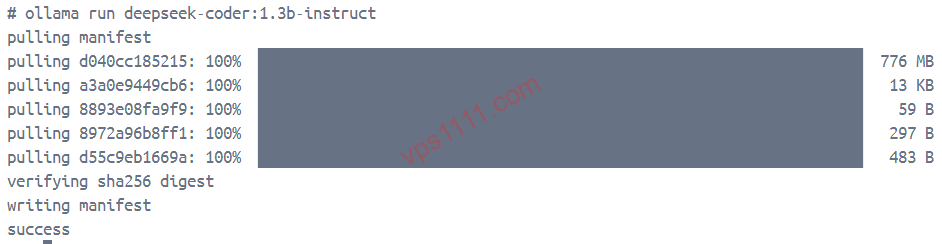
# First run automatically downloads the corresponding GGUF model file (~776MB)
ollama run deepseek-coder:1.3b-instruct
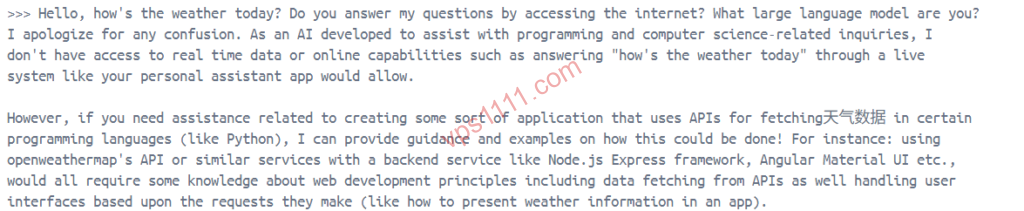
Once inside the terminal-like interactive interface, you can input prompts directly. On a VPS with 2GB RAM and a standard 2-core CPU, stable text generation begins immediately after the model fully loads into memory.
4. Advanced Troubleshooting: Real-World Pitfalls and Optimization
Forcing LLMs to run in severely resource-constrained environments introduces real-world operational challenges. Before exposing any API endpoints, we strongly recommend reviewing our Ultimate VPS Security Hardening Guide to mitigate default port 22 brute-force risks and prevent your backend compute resources from being hijacked by malicious scanners.
💡 vps1111 Practical Guide & Pitfall Avoidance:
- Hardware & Infrastructure Advice: For machines dedicated solely to backend API processing, cross-network latency is negligible. However, model loading (reading nearly 1GB from disk into RAM) heavily depends on disk performance. Avoid legacy instances using spinning rust (HDD) and prioritize NVMe SSD-equipped servers to drastically reduce cold start times.
- Core Risk Warning: The biggest trap with budget low-spec instances is strict CPU throttling (a common restrictive policy among fly-by-night hosts). Ollama will instantly spike CPU usage to 100% during inference. Many heavily oversold budget providers will immediately suspend your instance for “prolonged CPU abuse” and respond slowly to support tickets. We recommend using Linux tools like
cpulimitto throttle the Ollama process (e.g., capping it at 80%), trading raw speed for operational stability. - Recommendation Rating: ⭐⭐⭐⭐ (4/5 Stars. Achieves an excellent balance between data governance and ultra-low costs, but loses one star due to slower pure CPU inference speeds and reliance on the provider’s CPU tolerance policies.)
5. Frequently Asked Questions (FAQ)
1. What is the absolute minimum physical RAM required to deploy an LLM on a low-spec VPS?
The absolute baseline for physical RAM is strictly greater than “quantized model size + context window reservation + base OS overhead”. Taking the 776MB DeepSeek 1.3B 4-bit version as an example, combined with baseline Linux system usage and dynamic memory allocation during inference, 2GB of physical RAM is the absolute minimum for practical usability. On a 1GB machine, the model will be forced to spill into disk Swap, paralyzing system I/O and rendering the server completely unresponsive.
2. How can I optimize pure CPU inference when it runs too slowly?
Without a dedicated GPU for floating-point acceleration, optimization requires a two-pronged approach: First, during inference requests, use systemctl to disable unnecessary persistent background processes (like redundant monitoring probes or bloated logging services) to free up maximum CPU cycles and physical RAM. Second, you can reduce the context window length (num_ctx) via API parameters to lower the computational memory overhead per inference cycle.
3. How do I securely expose the Ollama API for remote public access?
By default, Ollama securely binds only to the local loopback address 127.0.0.1:11434. The most dangerous mistake for external access is forcing Ollama to listen on 0.0.0.0, which exposes your private compute resources directly to the public internet for unauthorized exploitation. The correct architecture adheres to the Principle of Least Privilege: First, use a network-layer firewall (like ufw or iptables) to block all unauthorized IPs. Second, even if requests pass the network layer, enforce application-layer authentication via Nginx (mandatory Basic Auth or API Key validation). This layered defense strategy is a direct implementation of “Zero Trust” architecture for private AI services.